# Cópia Integral


# Documentação Pje-copia-integral

### <span style="color: rgb(0, 0, 0);">**<span class="align-center">1 Introdução</span>**</span>

<span style="color: rgb(0, 0, 0);">Robô destinado para captação de cópias integrais nos Tribunais Pje.</span>

<span style="color: rgb(0, 0, 0);">Este caminho é feito pelo robô dentro do site do Tribunal.</span>

#### <span class="align-center" style="color: rgb(0, 0, 0);">**1.2 Url de acesso**</span>

<span style="color: rgb(0, 0, 0);">**Site que direciona para todos os Pjes: [https://www.pje.jus.br/navegador/](https://www.pje.jus.br/navegador/)** </span>

### <span style="color: rgb(0, 0, 0);">**2 Fluxo de Trabalho**</span>

#### <span class="align-center" style="color: rgb(0, 0, 0);">**2.1 **Login****</span>

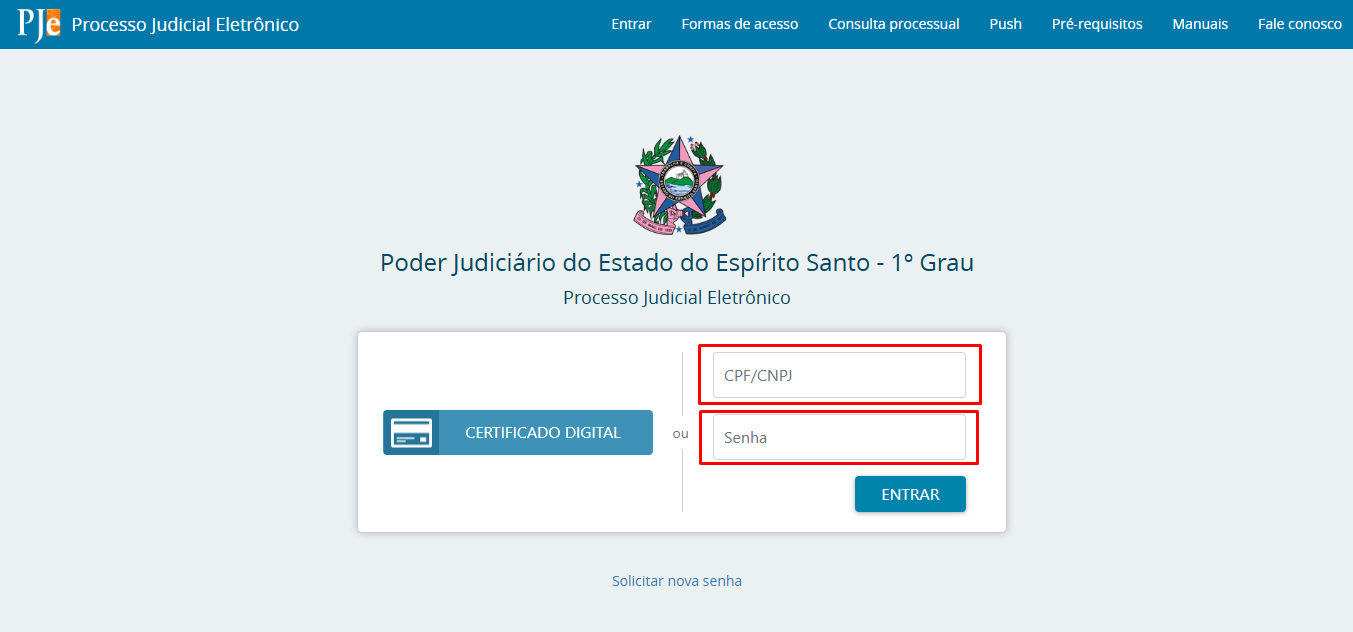
<table border="1" id="bkmrk-1---valide-os-campos" style="border-collapse: collapse; width: 75.5556%; height: 732px;"><colgroup><col style="width: 100%;"></col></colgroup><tbody><tr><td><span style="color: rgb(0, 0, 0);">1 - Valide os campos: "**Usuário**" e "**Senha**".</span>

[![image.png](https://wiki.oystr.com.br/uploads/images/gallery/2025-05/scaled-1680-/gn8image.png)](https://wiki.oystr.com.br/uploads/images/gallery/2025-05/gn8image.png)

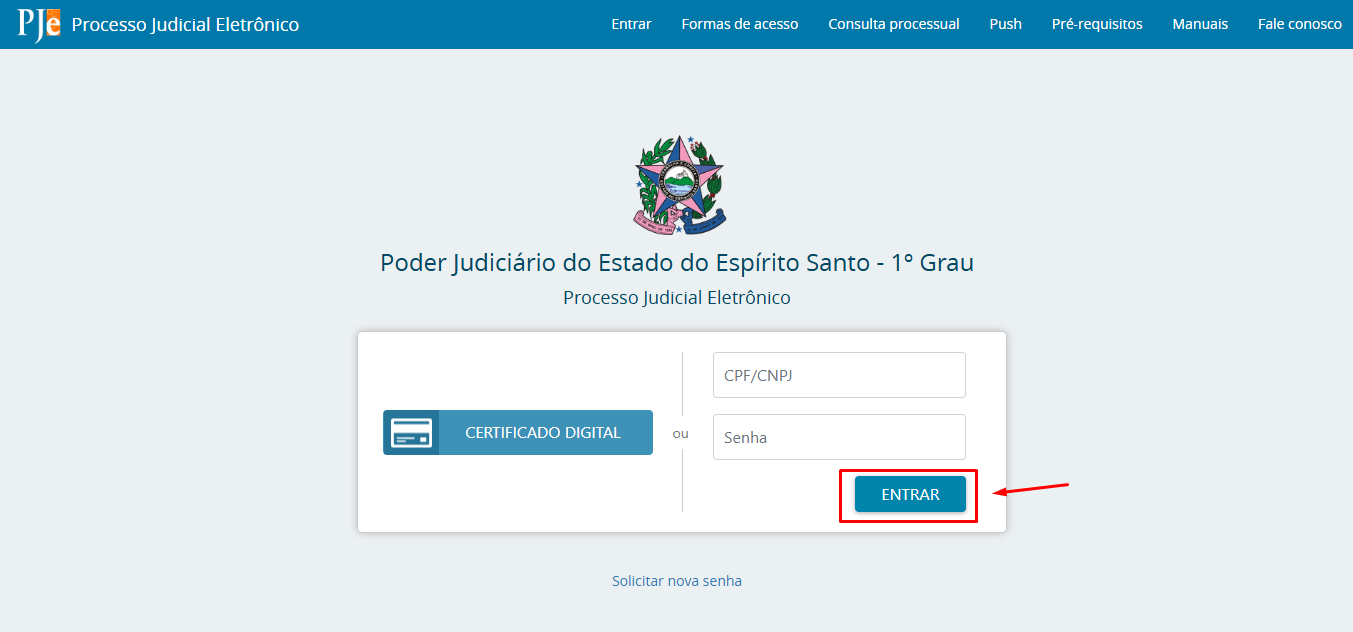
</td></tr><tr><td><span style="color: rgb(0, 0, 0);">2 - Clique em "**Entrar**".</span>

[![image.png](https://wiki.oystr.com.br/uploads/images/gallery/2025-05/scaled-1680-/y3Himage.png)](https://wiki.oystr.com.br/uploads/images/gallery/2025-05/y3Himage.png)

</td></tr></tbody></table>


### <span style="color: rgb(0, 0, 0);">**3 Fluxo no portal**</span>

<span style="color: rgb(0, 0, 0);"><span style="font-size: 11pt; font-family: Arial, sans-serif; background-color: transparent; font-weight: 400; font-style: normal; font-variant: normal; text-decoration: none; vertical-align: baseline; white-space: pre-wrap;">3.1 Após o login é direcionado para a página inicial.</span></span>

[![image.png](https://wiki.oystr.com.br/uploads/images/gallery/2025-05/scaled-1680-/GLMimage.png)](https://wiki.oystr.com.br/uploads/images/gallery/2025-05/GLMimage.png)

<span style="color: rgb(0, 0, 0);"><span style="font-size: 11pt; font-family: Arial, sans-serif; background-color: transparent; font-weight: 400; font-style: normal; font-variant: normal; text-decoration: none; vertical-align: baseline; white-space: pre-wrap;">3.2 O robô seleciona a abertura do “Menu principal” que encontra-se nos “três risquinhos” no canto esquerdo superior.</span></span>

[![image.png](https://wiki.oystr.com.br/uploads/images/gallery/2025-05/scaled-1680-/Ledimage.png)](https://wiki.oystr.com.br/uploads/images/gallery/2025-05/Ledimage.png)

<span style="font-size: 11pt; font-family: Arial,sans-serif; color: #000000; background-color: transparent; font-weight: 400; font-style: normal; font-variant: normal; text-decoration: none; vertical-align: baseline; white-space: pre-wrap;">3.3 Em seguida o campo “Processo” como indica a seta na imagem abaixo.</span>

[![image.png](https://wiki.oystr.com.br/uploads/images/gallery/2025-05/scaled-1680-/XGZimage.png)](https://wiki.oystr.com.br/uploads/images/gallery/2025-05/XGZimage.png)

<span style="font-size: 11pt; font-family: Arial,sans-serif; color: #000000; background-color: transparent; font-weight: 400; font-style: normal; font-variant: normal; text-decoration: none; vertical-align: baseline; white-space: pre-wrap;">3.4 Em seguida a opção “Pesquisar” com indicado.</span>

[![image.png](https://wiki.oystr.com.br/uploads/images/gallery/2025-05/scaled-1680-/AXBimage.png)](https://wiki.oystr.com.br/uploads/images/gallery/2025-05/AXBimage.png)

<span style="font-size: 11pt; font-family: Arial,sans-serif; color: #000000; background-color: transparent; font-weight: 400; font-style: normal; font-variant: normal; text-decoration: none; vertical-align: baseline; white-space: pre-wrap;">3.5 O robô seleciona o campo “Processo”.</span>

[![image.png](https://wiki.oystr.com.br/uploads/images/gallery/2025-05/scaled-1680-/yJoimage.png)](https://wiki.oystr.com.br/uploads/images/gallery/2025-05/yJoimage.png)

<span style="font-size: 11pt; font-family: Arial,sans-serif; color: #000000; background-color: transparent; font-weight: 400; font-style: normal; font-variant: normal; text-decoration: none; vertical-align: baseline; white-space: pre-wrap;">3.6 Nesta etapa é feito o preenchimento do campo “Número do processo” com o número de processo indicado na planilha que foi importada para o robô dentro do painel no momento da criação da execução.</span>

<span style="font-size: 11pt; font-family: Arial,sans-serif; color: #000000; background-color: transparent; font-weight: 400; font-style: normal; font-variant: normal; text-decoration: none; vertical-align: baseline; white-space: pre-wrap;">Planilha contendo o seguinte modelo:</span>

<span style="font-size: 11pt; font-family: Arial,sans-serif; color: #000000; background-color: #ffff00; font-weight: 400; font-style: normal; font-variant: normal; text-decoration: none; vertical-align: baseline; white-space: pre-wrap;">Coluna Integração</span>

<span style="font-size: 11pt; font-family: Arial,sans-serif; color: #000000; background-color: #ffff00; font-weight: 400; font-style: normal; font-variant: normal; text-decoration: none; vertical-align: baseline; white-space: pre-wrap;">Coluna Processo</span>

<span style="color: rgb(0, 0, 0);">  
</span>

[![image.png](https://wiki.oystr.com.br/uploads/images/gallery/2025-05/scaled-1680-/SFyimage.png)](https://wiki.oystr.com.br/uploads/images/gallery/2025-05/SFyimage.png)

<span style="color: rgb(0, 0, 0);"> **<span style="font-size: 11pt; font-family: Arial, sans-serif; background-color: transparent; font-weight: 400; font-style: normal; font-variant: normal; text-decoration: none; vertical-align: baseline; white-space: pre-wrap;">3.7 Com o preenchimento do número do processo a opção “Pesquisar”</span>** </span>

[![image.png](https://wiki.oystr.com.br/uploads/images/gallery/2025-05/scaled-1680-/M72image.png)](https://wiki.oystr.com.br/uploads/images/gallery/2025-05/M72image.png)

[![image.png](https://wiki.oystr.com.br/uploads/images/gallery/2025-05/scaled-1680-/O1mimage.png)](https://wiki.oystr.com.br/uploads/images/gallery/2025-05/O1mimage.png)

<span style="font-size: 11pt; font-family: Arial,sans-serif; color: #000000; background-color: transparent; font-weight: 400; font-style: normal; font-variant: normal; text-decoration: none; vertical-align: baseline; white-space: pre-wrap;">3.8 Ao encontrar o processo pesquisado e selecionar o número do processo em azul como mostra abaixo.</span>

[![image.png](https://wiki.oystr.com.br/uploads/images/gallery/2025-05/scaled-1680-/9l8image.png)](https://wiki.oystr.com.br/uploads/images/gallery/2025-05/9l8image.png)

<span style="color: rgb(0, 0, 0);"><span style="font-size: 11pt; font-family: Arial, sans-serif; background-color: transparent; font-weight: 400; font-style: normal; font-variant: normal; text-decoration: none; vertical-align: baseline; white-space: pre-wrap;">3.9 Sempre “OK”</span></span>

[![image.png](https://wiki.oystr.com.br/uploads/images/gallery/2025-05/scaled-1680-/V7cimage.png)](https://wiki.oystr.com.br/uploads/images/gallery/2025-05/V7cimage.png)

<span style="color: rgb(0, 0, 0);"><span style="font-size: 11pt; font-family: Arial, sans-serif; background-color: transparent; font-weight: 400; font-style: normal; font-variant: normal; text-decoration: none; vertical-align: baseline; white-space: pre-wrap;">3.10 É aberto uma nova guia com o processo onde consta andamento e a opção em destaque para baixar documentos. “Downloads autos do processo”</span></span>

[![image.png](https://wiki.oystr.com.br/uploads/images/gallery/2025-05/scaled-1680-/71Aimage.png)](https://wiki.oystr.com.br/uploads/images/gallery/2025-05/71Aimage.png)

<span style="color: rgb(0, 0, 0);"><span style="font-size: 11pt; font-family: Arial, sans-serif; background-color: transparent; font-weight: 400; font-style: normal; font-variant: normal; text-decoration: none; vertical-align: baseline; white-space: pre-wrap;">3.11 E a opção “Download”</span></span>

[![image.png](https://wiki.oystr.com.br/uploads/images/gallery/2025-05/scaled-1680-/DoMimage.png)](https://wiki.oystr.com.br/uploads/images/gallery/2025-05/DoMimage.png)

<span style="color: rgb(0, 0, 0);"><span style="font-size: 11pt; font-family: Arial, sans-serif; background-color: transparent; font-weight: 400; font-style: normal; font-variant: normal; text-decoration: none; vertical-align: baseline; white-space: pre-wrap;">3.12 Sempre “OK”</span></span>

[![image.png](https://wiki.oystr.com.br/uploads/images/gallery/2025-05/scaled-1680-/ufTimage.png)](https://wiki.oystr.com.br/uploads/images/gallery/2025-05/ufTimage.png)

<span style="color: rgb(0, 0, 0);"><span style="font-size: 11pt; font-family: Arial, sans-serif; background-color: transparent; font-weight: 400; font-style: normal; font-variant: normal; text-decoration: none; vertical-align: baseline; white-space: pre-wrap;">3.13 Selecionado o “OK” , nesse passo o download do processo é iniciado e fica disponível o arquivo em pdf.</span><span style="font-size: 11pt; font-family: Arial, sans-serif; background-color: transparent; font-weight: 400; font-style: normal; font-variant: normal; text-decoration: none; vertical-align: baseline; white-space: pre-wrap;">  
</span><span style="font-size: 11pt; font-family: Arial, sans-serif; background-color: transparent; font-weight: 400; font-style: normal; font-variant: normal; text-decoration: none; vertical-align: baseline; white-space: pre-wrap;">Quando se trata desse caminho dentro do robô, os pdfs de cópia integral ficam disponíveis ao baixar o relatório ao final da execução.</span></span>

# Documentação Pje-trt-copia-integral

### **<span class="align-center">1 Introdução</span>**

<span style="color: rgb(0, 0, 0);">Robô destinado para captação de cópias integrais nos Tribunais TRT Pje.</span>

<span style="color: rgb(0, 0, 0);">Este caminho é feito pelo robô dentro do site do Tribunal.</span>

#### <span class="align-center">**1.1 **Escopo****</span>

<span style="color: rgb(0, 0, 0);">Link do robô: </span>[https://console4.oystr.com.br/bot/pje-trt-copia-integral/v1.0/scheduler/home](https://console4.oystr.com.br/bot/pje-trt-copia-integral/v1.0/scheduler/home)

#### <span class="align-center">**1.2 Url de acesso**</span>

<span style="color: rgb(0, 0, 0);">Tribunais TRT que utilizam o Pje:</span>

[TRT 1ª Região: https://pje.trt1.jus.br/primeirograu/login.seam  
  ](http://www.trt1.jus.br/pje)[TRT 2ª Região: https://www.trt2.jus.br/servicos/pje-menu  
  ](https://www.trt2.jus.br/servicos/pje-menu)[TRT 3ª Região: https://portal.trt3.jus.br/internet/processos/pje  
  ](https://portal.trt3.jus.br/internet/processos/pje)[TRT 4ª Região](https://www.trt4.jus.br/portais/trt4/pje): [https://www.trt4.jus.br/portais/trt4/pje](https://www.trt4.jus.br/portais/trt4/pje)

[TRT 5ª Região: https://portalpje.trt5.jus.br/  
  ](https://portalpje.trt5.jus.br/)[TRT 6ª Região](http://www.trt6.jus.br/portal/pje): [https://pje.trt6.jus.br/primeirograu/login.seam](https://pje.trt6.jus.br/primeirograu/login.seam)

[TRT 7ª Região: http://www.trt7.jus.br/pje/  
  ](http://www.trt7.jus.br/pje/)[TRT 8ª Região: https://www.trt8.jus.br/pje  
  ](https://www.trt8.jus.br/pje)[TRT 9ª Região: https://www.trt9.jus.br/portal/pagina.xhtml?secao=39&amp;pagina=Pje  ](https://www.trt9.jus.br/portal/pagina.xhtml?secao=39&pagina=Pje)[TRT 10ª Região: http://www.trt10.jus.br/?mod=ponte.php&amp;pag=PJE&amp;ori=ini&amp;path=servicos/pje/index.php  
  ](http://www.trt10.jus.br/?mod=ponte.php&pag=PJE&ori=ini&path=servicos/pje/index.php)[TRT 11ª Região: https://portal.trt11.jus.br/index.php/advogados/pagina-pje  ](https://portal.trt11.jus.br/index.php/advogados/pagina-pje)[TRT 12ª Região: http://www.trt12.jus.br/portal/areas/pje/extranet/index.jsp  
  ](http://www.trt12.jus.br/portal/areas/pje/extranet/index.jsp)[TRT 13ª Região: https://www.trt13.jus.br/pje  
  ](https://www.trt13.jus.br/pje)[TRT 14ª Região: http://www.trt14.jus.br/novo-pje  
  ](http://www.trt14.jus.br/novo-pje)[TRT 15ª Região: http://portal.trt15.jus.br/pje-jt  
  ](http://portal.trt15.jus.br/pje-jt)[TRT 16ª Região: https://www.trt16.jus.br/site/index.php?acao=conteudo/pje/index.php  
  ](https://www.trt16.jus.br/site/index.php?acao=conteudo/pje/index.php)[TRT 17ª Região: http://www.trt17.jus.br/principal/atividade-judiciaria/pje  
  ](http://www.trt17.jus.br/principal/atividade-judiciaria/pje)[TRT 18ª Região: http://www.trt18.jus.br/portal/servicos/pje/  
  ](http://www.trt18.jus.br/portal/servicos/pje/)[TRT 19ª Região: http://www.trt19.jus.br/portalTRT19/pje/sobrePje  
  ](http://www.trt19.jus.br/portalTRT19/pje/sobrePje)[TRT 20ª Região: https://www.trt20.jus.br/pje  
  ](https://www.trt20.jus.br/pje)[TRT 21ª Região: http://www.trt21.jus.br/Asp/Pje-JT/Pje\_Home.asp  
  ](http://www.trt21.jus.br/Asp/Pje-JT/Pje_Home.asp)[TRT 22ª Região: http://www.trt22.jus.br/portal/paginas-destaque/pje-processo-judicial-eletronico/  
  ](http://www.trt22.jus.br/portal/paginas-destaque/pje-processo-judicial-eletronico/)[TRT 23ª Região: http://portal.trt23.jus.br/portal/node/295  
  ](http://portal.trt23.jus.br/portal/node/295)[TRT 24ª Região](http://www.trt24.jus.br/www_trtms/pages/pje.jsf): [https://pje.trt24.jus.br/primeirograu/login.seam](https://pje.trt24.jus.br/primeirograu/login.seam)

### **2 Fluxo de Trabalho**

#### <span class="align-center">**2.1 **Login****</span>

<table border="1" id="bkmrk-1---valide-os-campos" style="border-collapse: collapse; width: 73.2099%; height: 746px;"><colgroup><col style="width: 100%;"></col></colgroup><tbody><tr><td><span style="color: rgb(0, 0, 0);">1 - Valide os campos: "**Usuário**" e "**Senha**". Ou acesso por certificado digital.</span>

[![image.png](https://wiki.oystr.com.br/uploads/images/gallery/2025-05/scaled-1680-/zOyimage.png)](https://wiki.oystr.com.br/uploads/images/gallery/2025-05/zOyimage.png)

</td></tr><tr><td><span style="color: rgb(0, 0, 0);">2 - Página inicial de acesso.</span>

[![image.png](https://wiki.oystr.com.br/uploads/images/gallery/2025-05/scaled-1680-/WQkimage.png)](https://wiki.oystr.com.br/uploads/images/gallery/2025-05/WQkimage.png)

</td></tr></tbody></table>

#### <span class="align-center">**3 Fluxo no Portal**</span>

<span style="color: rgb(0, 0, 0);"><span class="align-center">3.1 </span>Na tela inicial como mostra a imagem abaixo “três risquinhos” que direciona para o menu principal.</span>

[![image.png](https://wiki.oystr.com.br/uploads/images/gallery/2025-05/scaled-1680-/PLLimage.png)](https://wiki.oystr.com.br/uploads/images/gallery/2025-05/PLLimage.png)

<span style="font-size: 11pt; font-family: Arial,sans-serif; color: #000000; background-color: transparent; font-weight: 400; font-style: normal; font-variant: normal; text-decoration: none; vertical-align: baseline; white-space: pre-wrap;">3.2 Selecionar a opção “Consulta”</span>

[![image.png](https://wiki.oystr.com.br/uploads/images/gallery/2025-05/scaled-1680-/ztFimage.png)](https://wiki.oystr.com.br/uploads/images/gallery/2025-05/ztFimage.png)

<span style="font-size: 11pt; font-family: Arial,sans-serif; color: #000000; background-color: transparent; font-weight: 400; font-style: normal; font-variant: normal; text-decoration: none; vertical-align: baseline; white-space: pre-wrap;">3.3 Em seguindo a opção “Consulta Processual”.</span>

[![image.png](https://wiki.oystr.com.br/uploads/images/gallery/2025-05/scaled-1680-/ilyimage.png)](https://wiki.oystr.com.br/uploads/images/gallery/2025-05/ilyimage.png)

<span style="font-size: 11pt; font-family: Arial,sans-serif; color: #000000; background-color: transparent; font-weight: 400; font-style: normal; font-variant: normal; text-decoration: none; vertical-align: baseline; white-space: pre-wrap;">3.4 Na tela de consulta processual temos o campo para preenchimento do “Número do processo”.</span>

[![image.png](https://wiki.oystr.com.br/uploads/images/gallery/2025-05/scaled-1680-/xktimage.png)](https://wiki.oystr.com.br/uploads/images/gallery/2025-05/xktimage.png)

<span style="font-size: 11pt; font-family: Arial,sans-serif; color: #000000; background-color: transparent; font-weight: 400; font-style: normal; font-variant: normal; text-decoration: none; vertical-align: baseline; white-space: pre-wrap;">3.5 Após preenchimento do número do processo é necessário a resolução de caracteres para ter acesso ao processo pesquisado.</span>

[![image.png](https://wiki.oystr.com.br/uploads/images/gallery/2025-05/scaled-1680-/Dvuimage.png)](https://wiki.oystr.com.br/uploads/images/gallery/2025-05/Dvuimage.png)

<span style="font-size: 11pt; font-family: Arial,sans-serif; color: #000000; background-color: transparent; font-weight: 400; font-style: normal; font-variant: normal; text-decoration: none; vertical-align: baseline; white-space: pre-wrap;">3.6 Em seguida a tela do processo pesquisado é aberta e no ícone do canto superior direito como indicado na imagem abaixo é dado início a captura da cópia integral do processo.</span>

[![image.png](https://wiki.oystr.com.br/uploads/images/gallery/2025-05/scaled-1680-/zTOimage.png)](https://wiki.oystr.com.br/uploads/images/gallery/2025-05/zTOimage.png)

[![image.png](https://wiki.oystr.com.br/uploads/images/gallery/2025-05/scaled-1680-/iREimage.png) ](https://wiki.oystr.com.br/uploads/images/gallery/2025-05/iREimage.png)<span style="font-size: 11pt; font-family: Arial,sans-serif; color: #000000; background-color: transparent; font-weight: 400; font-style: normal; font-variant: normal; text-decoration: none; vertical-align: baseline; white-space: pre-wrap;">3.7 Ícone de carregamento do arquivo.</span>

<span style="font-size: 11pt; font-family: Arial,sans-serif; color: #000000; background-color: transparent; font-weight: 400; font-style: normal; font-variant: normal; text-decoration: none; vertical-align: baseline; white-space: pre-wrap;">3.8 Após o carregamento é gerado o arquivo é feito automaticamente o download do arquivo.</span>

# eproc-copia-integral

### **<span class="align-center">1 Descrição do processo</span>**

<span style="font-weight: normal;">O robô eproc-copia-integral automatiza o download da cópia integral de processos no sistema eProc. O cliente informa os números dos processos em uma planilha e a envia pelo sistema. Com base nesses dados, o robô acessa o eProc, baixa os arquivos completos de cada processo e, ao final, gera um relatório em Excel com o que foi extraído.</span>

#### <span class="align-center">**1.2 Programas e Aplicações**</span>

#### **Lista de tribunais que o robô acessa:**

<div align="left" dir="ltr" id="bkmrk-tribunal-abrang%C3%AAncia" style="margin-left: 0pt;"><table style="border: none; border-collapse: collapse;"><colgroup><col width="106"></col><col width="190"></col><col width="305"></col></colgroup><tbody><tr style="height: 39.0201416015625pt;"><td style="vertical-align: top; padding: 5pt 5pt 5pt 5pt; overflow: hidden; overflow-wrap: break-word;"><span style="font-size: 10.5pt; font-family: Arial,sans-serif; color: #5f5f5f; background-color: #ffffff; font-weight: bold; font-style: normal; font-variant: normal; text-decoration: none; vertical-align: baseline; white-space: pre-wrap;">Tribunal</span>

</td><td style="vertical-align: top; padding: 5pt 5pt 5pt 5pt; overflow: hidden; overflow-wrap: break-word;"><span style="font-size: 10.5pt; font-family: Arial,sans-serif; color: #5f5f5f; background-color: #ffffff; font-weight: bold; font-style: normal; font-variant: normal; text-decoration: none; vertical-align: baseline; white-space: pre-wrap;">Abrangência / Estado</span>

</td><td style="vertical-align: top; padding: 5pt 5pt 5pt 5pt; overflow: hidden; overflow-wrap: break-word;"><span style="font-size: 10.5pt; font-family: Arial,sans-serif; color: #5f5f5f; background-color: #ffffff; font-weight: bold; font-style: normal; font-variant: normal; text-decoration: none; vertical-align: baseline; white-space: pre-wrap;">Link Geral do Eproc </span>

  
</td></tr><tr style="height: 25pt;"><td style="vertical-align: top; padding: 5pt 5pt 5pt 5pt; overflow: hidden; overflow-wrap: break-word;"><span style="font-size: 10.5pt; font-family: Arial,sans-serif; color: #5f5f5f; background-color: #ffffff; font-weight: bold; font-style: normal; font-variant: normal; text-decoration: none; vertical-align: baseline; white-space: pre-wrap;">TRF4</span>

</td><td style="vertical-align: top; padding: 5pt 5pt 5pt 5pt; overflow: hidden; overflow-wrap: break-word;"><span style="font-size: 10.5pt; font-family: Arial,sans-serif; color: #5f5f5f; background-color: #ffffff; font-weight: 400; font-style: normal; font-variant: normal; text-decoration: none; vertical-align: baseline; white-space: pre-wrap;">RS, SC, PR</span>

</td><td style="vertical-align: top; padding: 5pt 5pt 5pt 5pt; overflow: hidden; overflow-wrap: break-word;">[<span style="font-size: 10.5pt; font-family: Arial,sans-serif; color: #1155cc; background-color: #ffffff; font-weight: 400; font-style: normal; font-variant: normal; text-decoration: underline; -webkit-text-decoration-skip: none; text-decoration-skip-ink: none; vertical-align: baseline; white-space: pre-wrap;">https://eproc.trf4.jus.br/eproc2trf4</span>](https://eproc.trf4.jus.br/eproc2trf4)

</td></tr><tr style="height: 25pt;"><td style="vertical-align: top; padding: 5pt 5pt 5pt 5pt; overflow: hidden; overflow-wrap: break-word;"><span style="font-size: 10.5pt; font-family: Arial,sans-serif; color: #5f5f5f; background-color: #ffffff; font-weight: bold; font-style: normal; font-variant: normal; text-decoration: none; vertical-align: baseline; white-space: pre-wrap;">JFRS </span>

</td><td style="vertical-align: top; padding: 5pt 5pt 5pt 5pt; overflow: hidden; overflow-wrap: break-word;"><span style="font-size: 10.5pt; font-family: Arial,sans-serif; color: #5f5f5f; background-color: #ffffff; font-weight: 400; font-style: normal; font-variant: normal; text-decoration: none; vertical-align: baseline; white-space: pre-wrap;">Justiça Federal do RS</span>

</td><td style="vertical-align: top; padding: 5pt 5pt 5pt 5pt; overflow: hidden; overflow-wrap: break-word;">[<span style="font-size: 10.5pt; font-family: Arial,sans-serif; color: #1155cc; background-color: #ffffff; font-weight: 400; font-style: normal; font-variant: normal; text-decoration: underline; -webkit-text-decoration-skip: none; text-decoration-skip-ink: none; vertical-align: baseline; white-space: pre-wrap;">https://eproc.jfrs.jus.br/eproc2</span>](https://eproc.jfrs.jus.br/eproc2)

</td></tr><tr style="height: 25pt;"><td style="vertical-align: top; padding: 5pt 5pt 5pt 5pt; overflow: hidden; overflow-wrap: break-word;"><span style="font-size: 10.5pt; font-family: Arial,sans-serif; color: #5f5f5f; background-color: #ffffff; font-weight: bold; font-style: normal; font-variant: normal; text-decoration: none; vertical-align: baseline; white-space: pre-wrap;">JFSC </span>

</td><td style="vertical-align: top; padding: 5pt 5pt 5pt 5pt; overflow: hidden; overflow-wrap: break-word;"><span style="font-size: 10.5pt; font-family: Arial,sans-serif; color: #5f5f5f; background-color: #ffffff; font-weight: 400; font-style: normal; font-variant: normal; text-decoration: none; vertical-align: baseline; white-space: pre-wrap;">Justiça Federal de SC</span>

</td><td style="vertical-align: top; padding: 5pt 5pt 5pt 5pt; overflow: hidden; overflow-wrap: break-word;">[<span style="font-size: 10.5pt; font-family: Arial,sans-serif; color: #1155cc; background-color: #ffffff; font-weight: 400; font-style: normal; font-variant: normal; text-decoration: underline; -webkit-text-decoration-skip: none; text-decoration-skip-ink: none; vertical-align: baseline; white-space: pre-wrap;">https://eproc.jfsc.jus.br/eproc2</span>](https://eproc.jfsc.jus.br/eproc2)

</td></tr><tr style="height: 25pt;"><td style="vertical-align: top; padding: 5pt 5pt 5pt 5pt; overflow: hidden; overflow-wrap: break-word;"><span style="font-size: 10.5pt; font-family: Arial,sans-serif; color: #5f5f5f; background-color: #ffffff; font-weight: bold; font-style: normal; font-variant: normal; text-decoration: none; vertical-align: baseline; white-space: pre-wrap;">JFPR </span>

</td><td style="vertical-align: top; padding: 5pt 5pt 5pt 5pt; overflow: hidden; overflow-wrap: break-word;"><span style="font-size: 10.5pt; font-family: Arial,sans-serif; color: #5f5f5f; background-color: #ffffff; font-weight: 400; font-style: normal; font-variant: normal; text-decoration: none; vertical-align: baseline; white-space: pre-wrap;">Justiça Federal do PR</span>

</td><td style="vertical-align: top; padding: 5pt 5pt 5pt 5pt; overflow: hidden; overflow-wrap: break-word;">[<span style="font-size: 10.5pt; font-family: Arial,sans-serif; color: #1155cc; background-color: #ffffff; font-weight: 400; font-style: normal; font-variant: normal; text-decoration: underline; -webkit-text-decoration-skip: none; text-decoration-skip-ink: none; vertical-align: baseline; white-space: pre-wrap;">https://eproc.jfpr.jus.br/eproc2</span>](https://eproc.jfpr.jus.br/eproc2)

</td></tr><tr style="height: 25pt;"><td style="vertical-align: top; padding: 5pt 5pt 5pt 5pt; overflow: hidden; overflow-wrap: break-word;"><span style="font-size: 10.5pt; font-family: Arial,sans-serif; color: #5f5f5f; background-color: #ffffff; font-weight: bold; font-style: normal; font-variant: normal; text-decoration: none; vertical-align: baseline; white-space: pre-wrap;">TRF6</span>

</td><td style="vertical-align: top; padding: 5pt 5pt 5pt 5pt; overflow: hidden; overflow-wrap: break-word;"><span style="font-size: 10.5pt; font-family: Arial,sans-serif; color: #5f5f5f; background-color: #ffffff; font-weight: 400; font-style: normal; font-variant: normal; text-decoration: none; vertical-align: baseline; white-space: pre-wrap;">Minas Gerais</span>

</td><td style="vertical-align: top; padding: 5pt 5pt 5pt 5pt; overflow: hidden; overflow-wrap: break-word;">[<span style="font-size: 10.5pt; font-family: Arial,sans-serif; color: #1155cc; background-color: #ffffff; font-weight: 400; font-style: normal; font-variant: normal; text-decoration: underline; -webkit-text-decoration-skip: none; text-decoration-skip-ink: none; vertical-align: baseline; white-space: pre-wrap;">https://eproc.trf6.jus.br/eproc</span>](https://eproc.trf6.jus.br/eproc)

</td></tr><tr style="height: 25pt;"><td style="vertical-align: top; padding: 5pt 5pt 5pt 5pt; overflow: hidden; overflow-wrap: break-word;"><span style="font-size: 10.5pt; font-family: Arial,sans-serif; color: #5f5f5f; background-color: #ffffff; font-weight: bold; font-style: normal; font-variant: normal; text-decoration: none; vertical-align: baseline; white-space: pre-wrap;">TJRS</span>

</td><td style="vertical-align: top; padding: 5pt 5pt 5pt 5pt; overflow: hidden; overflow-wrap: break-word;"><span style="font-size: 10.5pt; font-family: Arial,sans-serif; color: #5f5f5f; background-color: #ffffff; font-weight: 400; font-style: normal; font-variant: normal; text-decoration: none; vertical-align: baseline; white-space: pre-wrap;">Rio Grande do Sul</span>

</td><td style="vertical-align: top; padding: 5pt 5pt 5pt 5pt; overflow: hidden; overflow-wrap: break-word;">[<span style="font-size: 10.5pt; font-family: Arial,sans-serif; color: #1155cc; background-color: #ffffff; font-weight: 400; font-style: normal; font-variant: normal; text-decoration: underline; -webkit-text-decoration-skip: none; text-decoration-skip-ink: none; vertical-align: baseline; white-space: pre-wrap;">https://eproc1.tjrs.jus.br/eproc</span>](https://eproc1.tjrs.jus.br/eproc)

</td></tr><tr style="height: 25pt;"><td style="vertical-align: top; padding: 5pt 5pt 5pt 5pt; overflow: hidden; overflow-wrap: break-word;"><span style="font-size: 10.5pt; font-family: Arial,sans-serif; color: #5f5f5f; background-color: #ffffff; font-weight: bold; font-style: normal; font-variant: normal; text-decoration: none; vertical-align: baseline; white-space: pre-wrap;">TJSC</span>

</td><td style="vertical-align: top; padding: 5pt 5pt 5pt 5pt; overflow: hidden; overflow-wrap: break-word;"><span style="font-size: 10.5pt; font-family: Arial,sans-serif; color: #5f5f5f; background-color: #ffffff; font-weight: 400; font-style: normal; font-variant: normal; text-decoration: none; vertical-align: baseline; white-space: pre-wrap;">Santa Catarina</span>

</td><td style="vertical-align: top; padding: 5pt 5pt 5pt 5pt; overflow: hidden; overflow-wrap: break-word;">[<span style="font-size: 10.5pt; font-family: Arial,sans-serif; color: #1155cc; background-color: #ffffff; font-weight: 400; font-style: normal; font-variant: normal; text-decoration: underline; -webkit-text-decoration-skip: none; text-decoration-skip-ink: none; vertical-align: baseline; white-space: pre-wrap;">https://eproc.tjsc.jus.br/eproc2</span>](https://eproc.tjsc.jus.br/eproc2)

</td></tr><tr style="height: 19.88507080078125pt;"><td style="vertical-align: top; padding: 5pt 5pt 5pt 5pt; overflow: hidden; overflow-wrap: break-word;"><span style="font-size: 10.5pt; font-family: Arial,sans-serif; color: #5f5f5f; background-color: #ffffff; font-weight: bold; font-style: normal; font-variant: normal; text-decoration: none; vertical-align: baseline; white-space: pre-wrap;">TRF2</span>

</td><td style="vertical-align: top; padding: 5pt 5pt 5pt 5pt; overflow: hidden; overflow-wrap: break-word;"><span style="font-size: 10.5pt; font-family: Arial,sans-serif; color: #5f5f5f; background-color: #ffffff; font-weight: 400; font-style: normal; font-variant: normal; text-decoration: none; vertical-align: baseline; white-space: pre-wrap;">RJ, ES</span>

</td><td style="vertical-align: top; padding: 5pt 5pt 5pt 5pt; overflow: hidden; overflow-wrap: break-word;">[<span style="font-size: 10.5pt; font-family: Arial,sans-serif; color: #1155cc; background-color: #ffffff; font-weight: 400; font-style: normal; font-variant: normal; text-decoration: underline; -webkit-text-decoration-skip: none; text-decoration-skip-ink: none; vertical-align: baseline; white-space: pre-wrap;">https://eproc.trf2.jus.br/eproc/</span>](https://eproc.trf2.jus.br/eproc/)<span style="font-size: 10.5pt; font-family: Arial,sans-serif; color: #5f5f5f; background-color: #ffffff; font-weight: 400; font-style: normal; font-variant: normal; text-decoration: none; vertical-align: baseline; white-space: pre-wrap;"> </span>

</td></tr><tr style="height: 0pt;"><td style="vertical-align: top; padding: 5pt 5pt 5pt 5pt; overflow: hidden; overflow-wrap: break-word;"><span style="font-size: 10.5pt; font-family: Arial,sans-serif; color: #5f5f5f; background-color: #ffffff; font-weight: bold; font-style: normal; font-variant: normal; text-decoration: none; vertical-align: baseline; white-space: pre-wrap;">JFRJ</span>

</td><td style="vertical-align: top; padding: 5pt 5pt 5pt 5pt; overflow: hidden; overflow-wrap: break-word;"><span style="font-size: 10.5pt; font-family: Arial,sans-serif; color: #5f5f5f; background-color: #ffffff; font-weight: 400; font-style: normal; font-variant: normal; text-decoration: none; vertical-align: baseline; white-space: pre-wrap;">RJ</span>

</td><td style="vertical-align: top; padding: 5pt 5pt 5pt 5pt; overflow: hidden; overflow-wrap: break-word;">[<span style="font-size: 10.5pt; font-family: Arial,sans-serif; color: #1155cc; background-color: #ffffff; font-weight: 400; font-style: normal; font-variant: normal; text-decoration: underline; -webkit-text-decoration-skip: none; text-decoration-skip-ink: none; vertical-align: baseline; white-space: pre-wrap;">https://eproc.jfrj.jus.br/eproc/</span>](https://eproc.jfrj.jus.br/eproc/)<span style="font-size: 10.5pt; font-family: Arial,sans-serif; color: #5f5f5f; background-color: #ffffff; font-weight: 400; font-style: normal; font-variant: normal; text-decoration: none; vertical-align: baseline; white-space: pre-wrap;"> </span>

</td></tr><tr style="height: 0pt;"><td style="vertical-align: top; padding: 5pt 5pt 5pt 5pt; overflow: hidden; overflow-wrap: break-word;"><span style="font-size: 10.5pt; font-family: Arial,sans-serif; color: #5f5f5f; background-color: #ffffff; font-weight: bold; font-style: normal; font-variant: normal; text-decoration: none; vertical-align: baseline; white-space: pre-wrap;">JFES</span>

</td><td style="vertical-align: top; padding: 5pt 5pt 5pt 5pt; overflow: hidden; overflow-wrap: break-word;"><span style="font-size: 10.5pt; font-family: Arial,sans-serif; color: #5f5f5f; background-color: #ffffff; font-weight: 400; font-style: normal; font-variant: normal; text-decoration: none; vertical-align: baseline; white-space: pre-wrap;">ES</span>

</td><td style="vertical-align: top; padding: 5pt 5pt 5pt 5pt; overflow: hidden; overflow-wrap: break-word;">[<span style="font-size: 10.5pt; font-family: Arial,sans-serif; color: #1155cc; background-color: #ffffff; font-weight: 400; font-style: normal; font-variant: normal; text-decoration: underline; -webkit-text-decoration-skip: none; text-decoration-skip-ink: none; vertical-align: baseline; white-space: pre-wrap;">https://eproc.jfes.jus.br/eproc/</span>](https://eproc.jfes.jus.br/eproc/)<span style="font-size: 10.5pt; font-family: Arial,sans-serif; color: #5f5f5f; background-color: #ffffff; font-weight: 400; font-style: normal; font-variant: normal; text-decoration: none; vertical-align: baseline; white-space: pre-wrap;"> </span>

</td></tr><tr style="height: 0pt;"><td style="vertical-align: top; padding: 5pt 5pt 5pt 5pt; overflow: hidden; overflow-wrap: break-word;"><span style="font-size: 10.5pt; font-family: Arial,sans-serif; color: #5f5f5f; background-color: #ffffff; font-weight: bold; font-style: normal; font-variant: normal; text-decoration: none; vertical-align: baseline; white-space: pre-wrap;">TNU</span>

</td><td style="vertical-align: top; padding: 5pt 5pt 5pt 5pt; overflow: hidden; overflow-wrap: break-word;"><span style="font-size: 10.5pt; font-family: Arial,sans-serif; color: #5f5f5f; background-color: #ffffff; font-weight: 400; font-style: normal; font-variant: normal; text-decoration: none; vertical-align: baseline; white-space: pre-wrap;">Nacional</span>

</td><td style="vertical-align: top; padding: 5pt 5pt 5pt 5pt; overflow: hidden; overflow-wrap: break-word;">[<span style="font-size: 10.5pt; font-family: Arial,sans-serif; color: #1155cc; background-color: #ffffff; font-weight: 400; font-style: normal; font-variant: normal; text-decoration: underline; -webkit-text-decoration-skip: none; text-decoration-skip-ink: none; vertical-align: baseline; white-space: pre-wrap;">https://eproctnu.cjf.jus.br/eproc/</span>](https://eproctnu.cjf.jus.br/eproc/)<span style="font-size: 10.5pt; font-family: Arial,sans-serif; color: #5f5f5f; background-color: #ffffff; font-weight: 400; font-style: normal; font-variant: normal; text-decoration: none; vertical-align: baseline; white-space: pre-wrap;"> </span>

</td></tr><tr style="height: 0pt;"><td style="vertical-align: top; padding: 5pt 5pt 5pt 5pt; overflow: hidden; overflow-wrap: break-word;"><span style="font-size: 10.5pt; font-family: Arial,sans-serif; color: #5f5f5f; background-color: #ffffff; font-weight: bold; font-style: normal; font-variant: normal; text-decoration: none; vertical-align: baseline; white-space: pre-wrap;">TJRJ</span>

</td><td style="vertical-align: top; padding: 5pt 5pt 5pt 5pt; overflow: hidden; overflow-wrap: break-word;"><span style="font-size: 10.5pt; font-family: Arial,sans-serif; color: #5f5f5f; background-color: #ffffff; font-weight: 400; font-style: normal; font-variant: normal; text-decoration: none; vertical-align: baseline; white-space: pre-wrap;">RJ</span>

</td><td style="vertical-align: top; padding: 5pt 5pt 5pt 5pt; overflow: hidden; overflow-wrap: break-word;">[<span style="font-size: 10.5pt; font-family: Arial,sans-serif; color: #1155cc; background-color: #ffffff; font-weight: 400; font-style: normal; font-variant: normal; text-decoration: underline; -webkit-text-decoration-skip: none; text-decoration-skip-ink: none; vertical-align: baseline; white-space: pre-wrap;">https://eproc1g.tjrj.jus.br/eproc/</span>](https://eproc1g.tjrj.jus.br/eproc/)<span style="font-size: 10.5pt; font-family: Arial,sans-serif; color: #5f5f5f; background-color: #ffffff; font-weight: 400; font-style: normal; font-variant: normal; text-decoration: none; vertical-align: baseline; white-space: pre-wrap;"> </span>

</td></tr><tr style="height: 0pt;"><td style="vertical-align: top; padding: 5pt 5pt 5pt 5pt; overflow: hidden; overflow-wrap: break-word;"><span style="font-size: 10.5pt; font-family: Arial,sans-serif; color: #5f5f5f; background-color: #ffffff; font-weight: bold; font-style: normal; font-variant: normal; text-decoration: none; vertical-align: baseline; white-space: pre-wrap;">TJSP</span>

</td><td style="vertical-align: top; padding: 5pt 5pt 5pt 5pt; overflow: hidden; overflow-wrap: break-word;"><span style="font-size: 10.5pt; font-family: Arial,sans-serif; color: #5f5f5f; background-color: #ffffff; font-weight: 400; font-style: normal; font-variant: normal; text-decoration: none; vertical-align: baseline; white-space: pre-wrap;">SP</span>

</td><td style="vertical-align: top; padding: 5pt 5pt 5pt 5pt; overflow: hidden; overflow-wrap: break-word;">[<span style="font-size: 10.5pt; font-family: Arial,sans-serif; color: #1155cc; background-color: #ffffff; font-weight: 400; font-style: normal; font-variant: normal; text-decoration: underline; -webkit-text-decoration-skip: none; text-decoration-skip-ink: none; vertical-align: baseline; white-space: pre-wrap;">tjsp.jus.br/eproc</span>](http://tjsp.jus.br/eproc)<span style="font-size: 10.5pt; font-family: Arial,sans-serif; color: #5f5f5f; background-color: #ffffff; font-weight: 400; font-style: normal; font-variant: normal; text-decoration: none; vertical-align: baseline; white-space: pre-wrap;"> </span>

</td></tr><tr style="height: 0pt;"><td style="vertical-align: top; padding: 5pt 5pt 5pt 5pt; overflow: hidden; overflow-wrap: break-word;"><span style="font-size: 10.5pt; font-family: Arial,sans-serif; color: #5f5f5f; background-color: #ffffff; font-weight: bold; font-style: normal; font-variant: normal; text-decoration: none; vertical-align: baseline; white-space: pre-wrap;">TJTO</span>

</td><td style="vertical-align: top; padding: 5pt 5pt 5pt 5pt; overflow: hidden; overflow-wrap: break-word;"><span style="font-size: 10.5pt; font-family: Arial,sans-serif; color: #5f5f5f; background-color: #ffffff; font-weight: 400; font-style: normal; font-variant: normal; text-decoration: none; vertical-align: baseline; white-space: pre-wrap;">TO</span>

</td><td style="vertical-align: top; padding: 5pt 5pt 5pt 5pt; overflow: hidden; overflow-wrap: break-word;">[<span style="font-size: 10.5pt; font-family: Arial,sans-serif; color: #1155cc; background-color: #ffffff; font-weight: 400; font-style: normal; font-variant: normal; text-decoration: underline; -webkit-text-decoration-skip: none; text-decoration-skip-ink: none; vertical-align: baseline; white-space: pre-wrap;">eproc1.tjto.jus.br</span>](http://eproc1.tjto.jus.br)<span style="font-size: 10.5pt; font-family: Arial,sans-serif; color: #5f5f5f; background-color: #ffffff; font-weight: 400; font-style: normal; font-variant: normal; text-decoration: none; vertical-align: baseline; white-space: pre-wrap;"> </span>

</td></tr></tbody></table>

</div>### **2 Detalhamento do Processo**

<table border="1" id="bkmrk-para-executar-este-r" style="border-collapse: collapse; width: 100%;"><colgroup><col style="width: 99.8765%;"></col></colgroup><tbody><tr><td>Para executar este robô, é necessário primeiro fazer o upload de uma planilha contendo os seguintes campos:

- **Integração** *(obrigatório)*: utilizado para vincular o processo a um sistema interno, caso aplicável.
- **Processo** *(obrigatório)*: número do processo que será consultado ou tratado pelo robô.

</td></tr><tr><td><span style="font-size: 10.5pt; font-family: Arial,sans-serif; color: #5f5f5f; background-color: #ffffff; font-weight: 400; font-style: normal; font-variant: normal; text-decoration: none; vertical-align: baseline; white-space: pre-wrap;"><span style="font-size: 10.5pt; font-family: Arial,sans-serif; color: #5f5f5f; background-color: #ffffff; font-weight: 400; font-style: normal; font-variant: normal; text-decoration: none; vertical-align: baseline; white-space: pre-wrap;"><span style="border: none; display: inline-block; overflow: hidden; width: 279px; height: 212px;">![](https://lh7-rt.googleusercontent.com/docsz/AD_4nXed9rqoEw9RivuZOHEshWmZ8Far8hz6a8qSnpeuo97d0XjbVCEb3ejGYqrkpUikRqPRBHLZbkLqGJxoQWghSBrKUskX9Zp9eOiEY08XrCmfPlzKyfa-w6Mf9k3OK6E2unWziS5E4g?key=lnMEOn1xjZ269ZVRiTfOmg)</span></span></span></td></tr></tbody></table>

#### **2.1 Robô**

<table border="1" id="bkmrk-acessar-o-sistema-a%C3%A7" style="border-collapse: collapse; width: 100%; height: 89.6355px;"><colgroup><col style="width: 99.8765%;"></col></colgroup><tbody><tr style="height: 29.8785px;"><td style="height: 29.8785px;">**<span style="font-size: 10.5pt; font-family: Arial, sans-serif; color: rgb(95, 95, 95); background-color: rgb(255, 255, 255); font-style: normal; font-variant: normal; text-decoration: none; vertical-align: baseline; white-space: pre-wrap;">Acessar o sistema</span>**</td></tr><tr style="height: 29.8785px;"><td style="height: 29.8785px;"><span style="font-size: 10.5pt; font-family: Arial,sans-serif; color: #5f5f5f; background-color: #ffffff; font-weight: 400; font-style: normal; font-variant: normal; text-decoration: none; vertical-align: baseline; white-space: pre-wrap;"><span style="border: none; display: inline-block; overflow: hidden; width: 602px; height: 244px;">![](https://lh7-rt.googleusercontent.com/docsz/AD_4nXeUGQd_Y-aaQj8vC2pCfOZMhl1tMzFacpWv6uoiDZEXmnMvpqMaCGncu_zMk8ATkDdvGlcClFwxnM6PSo55-wnUlvuFV1K4DoM2WC3tR-mpA6ZccBXn3HUq1HTforMweuXnZcER?key=lnMEOn1xjZ269ZVRiTfOmg)</span></span></td></tr><tr style="height: 29.8785px;"><td style="height: 29.8785px;"><span style="font-size: 10.5pt; font-family: Arial,sans-serif; color: #5f5f5f; background-color: #ffffff; font-weight: 400; font-style: normal; font-variant: normal; text-decoration: none; vertical-align: baseline; white-space: pre-wrap;">Ação 1: utiliza o usuário e senha para entrar no eProc.</span></td></tr></tbody></table>

<table border="1" id="bkmrk-acesso-ao-painel-do-" style="border-collapse: collapse; width: 100%;"><colgroup><col style="width: 99.8765%;"></col></colgroup><tbody><tr><td>**Acesso ao painel do advogado**</td></tr><tr><td><span style="font-size: 10.5pt; font-family: Arial,sans-serif; color: #5f5f5f; background-color: #ffffff; font-weight: 400; font-style: normal; font-variant: normal; text-decoration: none; vertical-align: baseline; white-space: pre-wrap;"><span style="border: none; display: inline-block; overflow: hidden; width: 602px; height: 272px;">![](https://lh7-rt.googleusercontent.com/docsz/AD_4nXdm9VfwJ-_xRoysPh2kVVJgUuXSA_QRlp456Q7Xsid_n9Y8aDh7Tem7YB7QxZceyBMB_Iic95CM47dXGUTXmq-aENbyM9kApmzB75JpCGHuV7RfOAPwB0-0Z_pyIp7rdylVkKD27w?key=lnMEOn1xjZ269ZVRiTfOmg)</span></span></td></tr><tr><td><span style="font-size: 10.5pt; font-family: Arial,sans-serif; color: #5f5f5f; background-color: #ffffff; font-weight: 400; font-style: normal; font-variant: normal; text-decoration: none; vertical-align: baseline; white-space: pre-wrap;"> Ação 2: Seleciona o perfil que está como “advogado”.</span></td></tr></tbody></table>

<table border="1" id="bkmrk-a%C3%A7%C3%A3o-3%3A-%C3%89-aberto-o-p" style="border-collapse: collapse; width: 100%;"><colgroup><col style="width: 99.8765%;"></col></colgroup><tbody><tr><td><span style="font-size: 10.5pt; font-family: Arial,sans-serif; color: #5f5f5f; background-color: #ffffff; font-weight: 400; font-style: normal; font-variant: normal; text-decoration: none; vertical-align: baseline; white-space: pre-wrap;"><span style="border: none; display: inline-block; overflow: hidden; width: 602px; height: 265px;">![](https://lh7-rt.googleusercontent.com/docsz/AD_4nXfMV_d3pw_oj2g_abqcnaHzbtkd6JAVQ88hvA2nsmB3e3fS_au8RLbMgmT5t99l4WYy9WrIX1HolLWl8FqHg8d1TXsucSWNXlnklAajuvNNrD40z2Q1kCgETLo2XbixQo27fQVoVg?key=lnMEOn1xjZ269ZVRiTfOmg)</span></span></td></tr><tr><td><span style="font-size: 10.5pt; font-family: Arial,sans-serif; color: #5f5f5f; background-color: #ffffff; font-weight: 400; font-style: normal; font-variant: normal; text-decoration: none; vertical-align: baseline; white-space: pre-wrap;">Ação 3: É aberto o painel do advogado.</span></td></tr></tbody></table>

<table border="1" id="bkmrk-buscar-processo-a%C3%A7%C3%A3o" style="border-collapse: collapse; width: 100%; height: 198.403px;"><colgroup><col style="width: 99.8765%;"></col></colgroup><tbody><tr style="height: 29.8785px;"><td style="height: 29.8785px;">**Buscar processo**</td></tr><tr style="height: 138.646px;"><td style="height: 138.646px;"><span style="font-size: 10.5pt; font-family: Arial,sans-serif; color: #5f5f5f; background-color: #ffffff; font-weight: 400; font-style: normal; font-variant: normal; text-decoration: none; vertical-align: baseline; white-space: pre-wrap;"><span style="border: none; display: inline-block; overflow: hidden; width: 394px; height: 121px;">![](https://lh7-rt.googleusercontent.com/docsz/AD_4nXdFmWCRpasdVlbcCzsLM69pPgxoFpBmwMWbBNRALAFaXe1S6NqUOy2NNAnrgfC-CAiC08W4hvKJs5C3qNp6PyhFyrwhi-ndZRispAEbc6F7sTcQn6XKE7LgdkFGV63-qVCy9PPggA?key=lnMEOn1xjZ269ZVRiTfOmg)</span></span></td></tr><tr style="height: 29.8785px;"><td style="height: 29.8785px;"><span style="font-size: 10.5pt; font-family: Arial,sans-serif; color: #5f5f5f; background-color: #ffffff; font-weight: 400; font-style: normal; font-variant: normal; text-decoration: none; vertical-align: baseline; white-space: pre-wrap;">Ação 4: No campo de busca é procurado o número do processo que foi inserido na planilha.</span></td></tr></tbody></table>

<table border="1" id="bkmrk-a%C3%A7%C3%A3o-5%3A-seleciona-o-" style="border-collapse: collapse; width: 100%;"><colgroup><col style="width: 99.8765%;"></col></colgroup><tbody><tr><td><span style="font-size: 10.5pt; font-family: Arial,sans-serif; color: #5f5f5f; background-color: #ffffff; font-weight: 400; font-style: normal; font-variant: normal; text-decoration: none; vertical-align: baseline; white-space: pre-wrap;"><span style="border: none; display: inline-block; overflow: hidden; width: 602px; height: 121px;">![](https://lh7-rt.googleusercontent.com/docsz/AD_4nXfBrKBAbu1zGzDWVCi89mm33_klMuUPQq_-TODKQyXDPl4ml29C1L4-2BD5-re9Qdpbmm6VOZ6_R84nes8q2OY98EXl0kET8ZllKlgpL3VytJVNyObnQYa65PQ3YHxojzbEmZLW_g?key=lnMEOn1xjZ269ZVRiTfOmg)</span></span></td></tr><tr><td><span style="font-size: 10.5pt; font-family: Arial,sans-serif; color: #5f5f5f; background-color: #ffffff; font-weight: 400; font-style: normal; font-variant: normal; text-decoration: none; vertical-align: baseline; white-space: pre-wrap;">Ação 5: Seleciona o botão “Acesso íntegra do processo”.</span></td></tr></tbody></table>

<table border="1" id="bkmrk-a%C3%A7%C3%A3o-6%3A-resolve-o-ca" style="border-collapse: collapse; width: 100%; height: 497.743px;"><colgroup><col style="width: 99.8765%;"></col></colgroup><tbody><tr style="height: 465.642px;"><td style="height: 465.642px;"><span style="font-size: 10.5pt; font-family: Arial,sans-serif; color: #5f5f5f; background-color: #ffffff; font-weight: 400; font-style: normal; font-variant: normal; text-decoration: none; vertical-align: baseline; white-space: pre-wrap;"><span style="border: none; display: inline-block; overflow: hidden; width: 602px; height: 448px;">![](https://lh7-rt.googleusercontent.com/docsz/AD_4nXcP5wvi9bIcf2Q1VLt87ttWAJNlWWo0s9FoNK3LTBxywTW1Jg9ErnVUUZB5iTT08sdtkHdSKyVYIExIGdfLz7MN27k_KNyeqCRLi218B8wcVoENX-eHepbrM5lYkHTgL0gwBGft3w?key=lnMEOn1xjZ269ZVRiTfOmg)</span></span>

</td></tr><tr style="height: 32.1007px;"><td style="height: 32.1007px;"><span style="font-size: 10.5pt; font-family: Arial,sans-serif; color: #5f5f5f; background-color: #ffffff; font-weight: 400; font-style: normal; font-variant: normal; text-decoration: none; vertical-align: baseline; white-space: pre-wrap;">Ação 6: Resolve o captcha e seleciona o botão “Confirmar”.</span></td></tr></tbody></table>

<table border="1" id="bkmrk-a%C3%A7%C3%A3o-7%3A-o-sistema-do" style="border-collapse: collapse; width: 100%;"><colgroup><col style="width: 99.8765%;"></col></colgroup><tbody><tr><td><span style="font-size: 10.5pt; font-family: Arial,sans-serif; color: #5f5f5f; background-color: #ffffff; font-weight: 400; font-style: normal; font-variant: normal; text-decoration: none; vertical-align: baseline; white-space: pre-wrap;"><span style="border: none; display: inline-block; overflow: hidden; width: 602px; height: 249px;">![](https://lh7-rt.googleusercontent.com/docsz/AD_4nXf0b7KnqSkoeJv9PV2-j1Ta5rLm6WQRDcZ6O8LRZmy1vsFe5Vp5BQqpnDkAIj3pRSRyiQkWTUDY8TXNWqfPkrLFOwt7MUPpX9KL9dGZfuzo4dnTgFQP58c0aGLZuW57D7qHd7hC?key=lnMEOn1xjZ269ZVRiTfOmg)</span></span></td></tr><tr><td><span style="font-size: 10.5pt; font-family: Arial,sans-serif; color: #5f5f5f; background-color: #ffffff; font-weight: 400; font-style: normal; font-variant: normal; text-decoration: none; vertical-align: baseline; white-space: pre-wrap;">Ação 7: O sistema do Eproc emite um alert, onde é selecionado “ok”.</span></td></tr></tbody></table>

<table border="1" id="bkmrk-download-do-processo" style="border-collapse: collapse; width: 100%; height: 88.6355px;"><colgroup><col style="width: 99.8765%;"></col></colgroup><tbody><tr style="height: 29.8785px;"><td style="height: 29.8785px;">**Download do processo**  
</td></tr><tr style="height: 28.8785px;"><td style="height: 28.8785px;"><span style="font-size: 10.5pt; font-family: Arial,sans-serif; color: #5f5f5f; background-color: #ffffff; font-weight: 400; font-style: normal; font-variant: normal; text-decoration: none; vertical-align: baseline; white-space: pre-wrap;"><span style="border: none; display: inline-block; overflow: hidden; width: 602px; height: 209px;">![](https://lh7-rt.googleusercontent.com/docsz/AD_4nXcLa2FDmzcbXF-kXC6VqZ82GIhV5H64isNczLSSWwYuTua3zc4iIV3hQ-WVGFODolamForYwfBCugRCN7HnSQo6vvIwbu35nr7drVGTOoAUTgstfjpNiXSgZrGvT-kjLhEZn9qsnQ?key=lnMEOn1xjZ269ZVRiTfOmg)</span></span></td></tr><tr style="height: 29.8785px;"><td style="height: 29.8785px;"><span style="font-size: 10.5pt; font-family: Arial,sans-serif; color: #5f5f5f; background-color: #ffffff; font-weight: 400; font-style: normal; font-variant: normal; text-decoration: none; vertical-align: baseline; white-space: pre-wrap;"><span style="font-size: 10.5pt; font-family: Arial,sans-serif; color: #5f5f5f; background-color: #ffffff; font-weight: 400; font-style: normal; font-variant: normal; text-decoration: none; vertical-align: baseline; white-space: pre-wrap;">Ação 8: </span>Ao liberar a página de Consulta Processual, é clicado em “Download Completo”.</span></td></tr></tbody></table>

<table border="1" id="bkmrk-a%C3%A7%C3%A3o-9%3A-seleciona-o-" style="border-collapse: collapse; width: 100%;"><colgroup><col style="width: 99.8765%;"></col></colgroup><tbody><tr><td><span style="font-size: 10.5pt; font-family: Arial,sans-serif; color: #5f5f5f; background-color: #ffffff; font-weight: 400; font-style: normal; font-variant: normal; text-decoration: none; vertical-align: baseline; white-space: pre-wrap;">![](https://lh7-rt.googleusercontent.com/drawingsz/AHiSRb3BZ8xPPz5nDPnP0lGcXMnon8L2rquwX_wMwmgFoRUsKpdimzd18hnxvcyiIg_mg65ru9JYfJbF5WsaKsBHvQs5sVBxb2Y7QukUwXJC190gqNKzC8rhiiePmoAUV6e12QqafYSKPfJ0gqpiNVwoL5S2BzqThN7oNKXDOZ9FILHOA7S5YRtsSoWJTaCz-34ew9cpgDEoFTxi2IO_bdy89EseCoW0qg6qf116IgxI0UyRiw9-YaMT9LQwkLWIziE?key=Ix12vsLdt-Slk9ri82tpLg)</span></td></tr><tr><td><span style="font-size: 10.5pt; font-family: Arial,sans-serif; color: #5f5f5f; background-color: #ffffff; font-weight: 400; font-style: normal; font-variant: normal; text-decoration: none; vertical-align: baseline; white-space: pre-wrap;"><span style="font-size: 10.5pt; font-family: Arial,sans-serif; color: #5f5f5f; background-color: #ffffff; font-weight: 400; font-style: normal; font-variant: normal; text-decoration: none; vertical-align: baseline; white-space: pre-wrap;">Ação 9: </span>Seleciona o botão “Gerar Arquivo Completo”.</span></td></tr></tbody></table>

<table border="1" id="bkmrk-a%C3%A7%C3%A3o-10%3A-por-fim%2C-ao" style="border-collapse: collapse; width: 100%;"><colgroup><col style="width: 99.8765%;"></col></colgroup><tbody><tr><td><span style="font-size: 10.5pt; font-family: Arial,sans-serif; color: #5f5f5f; background-color: #ffffff; font-weight: 400; font-style: normal; font-variant: normal; text-decoration: none; vertical-align: baseline; white-space: pre-wrap;"><span style="border: none; display: inline-block; overflow: hidden; width: 602px; height: 264px;">![](https://lh7-rt.googleusercontent.com/docsz/AD_4nXeu64pIDtNE7meJdXlzny9HdmzOCAKkD9_RQjwWyHXto7ce_zC2XD-Uv8uCsJYhBULl2YwLoEDth45OPOHXwygC2qQYwO2tBa3scBdyKj4FVlPTBWcpgSGOuwigh6gLOlpgsARu?key=lnMEOn1xjZ269ZVRiTfOmg)</span></span></td></tr><tr><td><span style="font-size: 10.5pt; font-family: Arial,sans-serif; color: #5f5f5f; background-color: #ffffff; font-weight: 400; font-style: normal; font-variant: normal; text-decoration: none; vertical-align: baseline; white-space: pre-wrap;"><span style="font-size: 10.5pt; font-family: Arial,sans-serif; color: #5f5f5f; background-color: #ffffff; font-weight: 400; font-style: normal; font-variant: normal; text-decoration: none; vertical-align: baseline; white-space: pre-wrap;"><span style="font-size: 10.5pt; font-family: Arial,sans-serif; color: #5f5f5f; background-color: #ffffff; font-weight: 400; font-style: normal; font-variant: normal; text-decoration: none; vertical-align: baseline; white-space: pre-wrap;">Ação 10: </span></span>Por fim, ao liberar a página com o zip do arquivo, é clicado em “Baixar Todos as Partes (ZIP)”.</span></td></tr></tbody></table>

### **3 **Regras de Negócio****

#### **3.1 **Arquivo de entrada do robô****

##### **3.1.1 XLS**

<table border="1" id="bkmrk-descri%C3%87%C3%83o-propriedad" style="width: 68.7654%; height: 70.9376px;"><colgroup><col style="width: 42.4316%;" width="60"></col><col style="width: 57.6103%;" width="81"></col></colgroup><tbody><tr style="height: 35.4688px;"><td style="height: 35.4688px;">**DESCRIÇÃO**

</td><td style="height: 35.4688px;">**PROPRIEDADE**

</td></tr><tr style="height: 35.4688px;"><td style="height: 35.4688px;">Planilha

</td><td style="height: 35.4688px;">[eproc-copia-integral.xlsx](https://wiki.oystr.com.br/attachments/33)</td></tr></tbody></table>

##### **3.1.2 XML**

<table border="1" id="bkmrk-descri%C3%87%C3%83o-propriedad-1" style="width: 69.7531%;"><colgroup><col style="width: 42.6767%;" width="60"></col><col style="width: 57.3554%;" width="81"></col></colgroup><tbody><tr><td>**DESCRIÇÃO**

</td><td>**PROPRIEDADE**

</td></tr><tr><td></td><td>  
</td></tr></tbody></table>

##### **3.1.3 FILTROS**

<table border="1" id="bkmrk-descri%C3%87%C3%83o-propriedad-2" style="width: 69.1358%;"><colgroup><col style="width: 42.5783%;" width="60"></col><col style="width: 57.444%;" width="81"></col></colgroup><tbody><tr><td>**DESCRIÇÃO**

</td><td>**PROPRIEDADE**

</td></tr><tr><td>Selecionar o grau do tribunal

</td><td>[![image.png](https://wiki.oystr.com.br/uploads/images/gallery/2025-05/scaled-1680-/ALvimage.png)](https://wiki.oystr.com.br/uploads/images/gallery/2025-05/ALvimage.png)

</td></tr></tbody></table>

#### **3.1 **Arquivo de saída****

# tj-rj-copia-integral

### <span style="color: rgb(0, 0, 0);">**<span class="align-center">1 Introdução</span>**</span>

#### <span class="align-center" style="color: rgb(0, 0, 0);">**1.1 **Link do robô****</span>

[https://console4.oystr.com.br/bot/tj-rj-copia-integral/v1.0/scheduler/home](https://console4.oystr.com.br/bot/tj-rj-copia-integral/v1.0/scheduler/home)

#### <span class="align-center" style="color: rgb(0, 0, 0);">**1.2 Url de acesso ao portal**</span>

<span class="align-center" style="color: rgb(0, 0, 0);">[https://www3.tjrj.jus.br/idserverjus-front/#/login?indGet=true&amp;sgSist=PORTALSERVICOS](https://www3.tjrj.jus.br/idserverjus-front/#/login?indGet=true&sgSist=PORTALSERVICOS) </span>

### <span style="color: rgb(0, 0, 0);">**2 Fluxo de Trabalho**</span>

#### <span class="align-center" style="color: rgb(0, 0, 0);">**2.1 **Login****</span>

<span class="align-center" style="color: rgb(0, 0, 0);">****Exemplo:****</span>

<table border="1" id="bkmrk-1---valide-os-campos" style="border-collapse: collapse; width: 100%; height: 815.972px;"><colgroup><col style="width: 99.8765%;"></col></colgroup><tbody><tr style="height: 407.986px;"><td style="height: 407.986px;"><span style="color: rgb(0, 0, 0);">1 - Valide os campos: "**Usuário**" e "**Senha**".</span>

[![image.png](https://wiki.oystr.com.br/uploads/images/gallery/2025-07/scaled-1680-/LZEimage.png)](https://wiki.oystr.com.br/uploads/images/gallery/2025-07/LZEimage.png)

</td></tr><tr style="height: 407.986px;"><td style="height: 407.986px;"><span style="color: rgb(0, 0, 0);">2 - Clique em "**Entrar**".</span>

[![image.png](https://wiki.oystr.com.br/uploads/images/gallery/2025-07/scaled-1680-/LZEimage.png)](https://wiki.oystr.com.br/uploads/images/gallery/2025-07/LZEimage.png)  
</td></tr></tbody></table>

### **3 Fluxo no Portal**

**[![image.png](https://wiki.oystr.com.br/uploads/images/gallery/2025-07/scaled-1680-/x6timage.png)](https://wiki.oystr.com.br/uploads/images/gallery/2025-07/x6timage.png)**

[![image.png](https://wiki.oystr.com.br/uploads/images/gallery/2025-07/scaled-1680-/BITimage.png)](https://wiki.oystr.com.br/uploads/images/gallery/2025-07/BITimage.png)

[![image.png](https://wiki.oystr.com.br/uploads/images/gallery/2025-07/scaled-1680-/4h0image.png)](https://wiki.oystr.com.br/uploads/images/gallery/2025-07/4h0image.png)

[![image.png](https://wiki.oystr.com.br/uploads/images/gallery/2025-07/scaled-1680-/6Jkimage.png)](https://wiki.oystr.com.br/uploads/images/gallery/2025-07/6Jkimage.png)

[![image.png](https://wiki.oystr.com.br/uploads/images/gallery/2025-07/scaled-1680-/ikHimage.png)](https://wiki.oystr.com.br/uploads/images/gallery/2025-07/ikHimage.png)

[![image.png](https://wiki.oystr.com.br/uploads/images/gallery/2025-07/scaled-1680-/YT4image.png)](https://wiki.oystr.com.br/uploads/images/gallery/2025-07/YT4image.png)

[![image.png](https://wiki.oystr.com.br/uploads/images/gallery/2025-07/scaled-1680-/gVWimage.png)](https://wiki.oystr.com.br/uploads/images/gallery/2025-07/gVWimage.png)

[![image.png](https://wiki.oystr.com.br/uploads/images/gallery/2025-07/scaled-1680-/5nTimage.png)](https://wiki.oystr.com.br/uploads/images/gallery/2025-07/5nTimage.png)

<span style="color: rgb(0, 0, 0);">Na opção "Baixar o processo atual em PDF" conforme indicado abaixo.</span>

[![image.png](https://wiki.oystr.com.br/uploads/images/gallery/2025-07/scaled-1680-/bKzimage.png)](https://wiki.oystr.com.br/uploads/images/gallery/2025-07/bKzimage.png)

# tj-se-copia-integral

### **1 Descrição do processo**  


O robô **tj-se-copia-integral**, responsável por automatizar a solicitação e o download de cópias integrais de processos junto ao Tribunal de Justiça de Sergipe (TJSE).

#### 1.1 Programa e aplicações

<table border="1" id="bkmrk-nome-do-sistema-url-" style="width: 95.8025%;"><colgroup><col style="width: 23.563%;"></col><col style="width: 76.3493%;"></col></colgroup><tbody><tr><td>Nome do sistema</td><td>URL</td></tr><tr><td> Copia integral (TJ/SE)</td><td>[https://console4.oystr.com.br/bot/tj-se-copia-integral/v1.0/scheduler/home](https://console4.oystr.com.br/bot/tj-se-copia-integral/v1.0/scheduler/home) </td></tr></tbody></table>

#### 1.2 URL de acesso

<table border="1" id="bkmrk-portal-url-tjma-http" style="width: 95.4321%;"><colgroup><col style="width: 24.0322%;"></col><col style="width: 76.0234%;"></col></colgroup><tbody><tr><td>Portal</td><td>URL</td></tr><tr><td>TJPR</td><td>[https://www.tjse.jus.br/portaldoadvogado/](https://www.tjse.jus.br/portaldoadvogado/) </td></tr></tbody></table>

### **2 Fluxo de Trabalho**

#### <span class="align-center">2.1 Login </span>

<span class="align-center">Para este robô é necessário um usuário com CPF e senha para acessar o portal.</span>

### **3 Detalhamento do Processo**

<table border="1" id="bkmrk-para-executar-este-r" style="border-collapse: collapse; width: 100%; height: 60.25px;"><colgroup><col style="width: 100.041%;"></col></colgroup><tbody><tr style="height: 30.125px;"><td>Para executar este robô, é necessário primeiro fazer o upload de uma planilha contendo os seguintes campos:

- **Integração** *(obrigatório)*: utilizado para vincular o processo a um sistema interno, caso aplicável.
- **Processo** *(obrigatório)*: número do processo que será consultado ou tratado pelo robô.
- **Tramitação** *(não obrigatório)*: Caso tenha o número de tramitação do processo.

</td></tr><tr style="height: 30.125px;"><td style="height: 30.125px;">[![image.png](https://wiki.oystr.com.br/uploads/images/gallery/2025-07/scaled-1680-/VkQimage.png)](https://wiki.oystr.com.br/uploads/images/gallery/2025-07/VkQimage.png)

</td></tr></tbody></table>

#### **2.1 Robô**

<table border="1" id="bkmrk-" style="border-collapse: collapse; width: 100%; height: 418.542px;"><colgroup><col style="width: 99.8765%;"></col></colgroup><tbody><tr style="height: 388.417px;"><td style="height: 388.417px;">[![image.png](https://wiki.oystr.com.br/uploads/images/gallery/2025-07/scaled-1680-/bmiimage.png)](https://wiki.oystr.com.br/uploads/images/gallery/2025-07/bmiimage.png)

</td></tr><tr style="height: 30.125px;"><td style="height: 30.125px;">Primeiro é necessário entrar com o CPF, senha e digitar o captcha. Então clica em logar.</td></tr></tbody></table>

<table border="1" id="bkmrk--1" style="border-collapse: collapse; width: 100%; height: 60.25px;"><colgroup><col style="width: 99.8765%;"></col></colgroup><tbody><tr style="height: 30.125px;"><td style="height: 30.125px;">[![image.png](https://wiki.oystr.com.br/uploads/images/gallery/2025-07/scaled-1680-/9QKimage.png)](https://wiki.oystr.com.br/uploads/images/gallery/2025-07/9QKimage.png)

</td></tr><tr style="height: 30.125px;"><td style="height: 30.125px;">Então entrará no sistema com o login do advogado.</td></tr></tbody></table>

<table border="1" id="bkmrk--2" style="border-collapse: collapse; width: 100%;"><colgroup><col style="width: 99.8765%;"></col></colgroup><tbody><tr><td>[![image.png](https://wiki.oystr.com.br/uploads/images/gallery/2025-07/scaled-1680-/RoRimage.png)](https://wiki.oystr.com.br/uploads/images/gallery/2025-07/RoRimage.png)

</td></tr><tr><td>No menu lateral esquerdo deve procurar a opção Número Único e selecionar ele.</td></tr></tbody></table>

<table border="1" id="bkmrk-na-p%C3%A1gina-de-%22consul" style="border-collapse: collapse; width: 100%; height: 418.708px;"><colgroup><col style="width: 100%;"></col></colgroup><tbody><tr style="height: 388.583px;"><td style="height: 388.583px;">[![image.png](https://wiki.oystr.com.br/uploads/images/gallery/2025-07/scaled-1680-/AmOimage.png)](https://wiki.oystr.com.br/uploads/images/gallery/2025-07/AmOimage.png)

</td></tr><tr style="height: 30.125px;"><td style="height: 30.125px;">Na página de "Consulta por número Único" vai inserir o Número Único e no dropbox selecionar todos.</td></tr></tbody></table>

<table border="1" id="bkmrk-com-os-campos-preenc" style="border-collapse: collapse; width: 100%;"><colgroup><col style="width: 99.8765%;"></col></colgroup><tbody><tr><td>[![image.png](https://wiki.oystr.com.br/uploads/images/gallery/2025-07/scaled-1680-/yenimage.png)](https://wiki.oystr.com.br/uploads/images/gallery/2025-07/yenimage.png)

</td></tr><tr><td>Com os campos preenchidos, basta clicar em "Enviar".</td></tr></tbody></table>

<table border="1" id="bkmrk-ent%C3%A3o-se-abrir%C3%A1-uma-" style="border-collapse: collapse; width: 100%;"><colgroup><col style="width: 99.8765%;"></col></colgroup><tbody><tr><td>[![image.png](https://wiki.oystr.com.br/uploads/images/gallery/2025-07/scaled-1680-/yavimage.png)](https://wiki.oystr.com.br/uploads/images/gallery/2025-07/yavimage.png)

</td></tr><tr><td>Então se abrirá uma página com o número do processo, esse número é um link que ao clicar trará mais dados.</td></tr></tbody></table>

<table border="1" id="bkmrk-nessa-nova-p%C3%A1gina-ap" style="border-collapse: collapse; width: 100%;"><colgroup><col style="width: 99.8765%;"></col></colgroup><tbody><tr><td>[![image.png](https://wiki.oystr.com.br/uploads/images/gallery/2025-07/scaled-1680-/PCgimage.png)](https://wiki.oystr.com.br/uploads/images/gallery/2025-07/PCgimage.png)

</td></tr><tr><td>Nessa nova página aparecerá todos os dados do processo, então o robô seleciona o link "\[Processo Materializado\]".</td></tr></tbody></table>

<table border="1" id="bkmrk-por-%C3%BAltimo-%C3%A9-aberto-" style="border-collapse: collapse; width: 100%;"><colgroup><col style="width: 99.8765%;"></col></colgroup><tbody><tr><td>[![image.png](https://wiki.oystr.com.br/uploads/images/gallery/2025-07/scaled-1680-/c9ximage.png)](https://wiki.oystr.com.br/uploads/images/gallery/2025-07/c9ximage.png)

</td></tr><tr><td>Por último é aberto a opção de impressão e com isso uma opção para baixar também, no canto superior direito.</td></tr></tbody></table>