# Intimação


# cnj-intimacao

### **<span class="align-center" style="color: rgb(0, 0, 0);">1 Descrição do processo</span>**

#### <span class="align-center" style="color: rgb(0, 0, 0);">**1.2 Programas e Aplicações**  
</span>

<table border="1" id="bkmrk-nome-do-sistema-url-" style="width: 100%; border-collapse: collapse; height: 64.125px;"><colgroup><col style="width: 50.0508%;" width="60"></col><col style="width: 49.9492%;" width="81"></col></colgroup><tbody><tr style="height: 37.375px; background-color: rgb(41, 127, 213);"><td style="height: 37.375px;"><span style="color: rgb(255, 255, 255);">**Nome do Sistema**</span>

</td><td style="height: 37.375px;"><span style="color: rgb(255, 255, 255);">**URL**</span>

</td></tr><tr style="height: 26.75px;"><td style="height: 26.75px;">**<span style="color: rgb(0, 0, 0);"> **CNJ**</span>**

</td><td style="height: 26.75px;"><span style="color: rgb(0, 0, 0);">**https://www.cnj.jus.br/pjecnj/login.seam**</span></td></tr></tbody></table>

### <span style="color: rgb(0, 0, 0);">**2 Detalhamento do Processo**</span>

#### <span style="color: rgb(0, 0, 0);">**2.1 Robô**</span>

<table border="1" id="bkmrk-" style="border-collapse: collapse; width: 100%;"><colgroup><col style="width: 99.8765%;"></col></colgroup><tbody><tr><td>**<span style="color: rgb(0, 0, 0);">2.1 - Sistema</span>**  
</td></tr><tr><td>[![image.png](https://wiki.oystr.com.br/uploads/images/gallery/2024-03/scaled-1680-/NyFimage.png)](https://wiki.oystr.com.br/uploads/images/gallery/2024-03/NyFimage.png)

**<span style="color: rgb(0, 0, 0);">  
</span>**

<span style="color: rgb(0, 0, 0);">****Ação: Para início iremos acessar o site do [CNJ](https://www.cnj.jus.br/pjecnj/login.seam).****</span>

</td></tr><tr><td>**<span style="color: rgb(0, 0, 0);">2.2 - Login</span>**</td></tr><tr><td>[![image.png](https://wiki.oystr.com.br/uploads/images/gallery/2024-03/scaled-1680-/ndQimage.png)](https://wiki.oystr.com.br/uploads/images/gallery/2024-03/ndQimage.png)

**<span style="color: rgb(0, 0, 0);">**Ação: Ao acessar o portal, clique em “Certificado Digital” para entrar no sistema.**</span>**

</td></tr><tr><td>[![image.png](https://wiki.oystr.com.br/uploads/images/gallery/2024-03/scaled-1680-/otoimage.png)](https://wiki.oystr.com.br/uploads/images/gallery/2024-03/otoimage.png)

</td></tr><tr><td>[![image.png](https://wiki.oystr.com.br/uploads/images/gallery/2024-03/scaled-1680-/SNhimage.png)](https://wiki.oystr.com.br/uploads/images/gallery/2024-03/SNhimage.png)

**<span style="color: rgb(0, 0, 0);">**Ação: Depois disso, insira o PIN e clique em “OK”.**</span>**

</td></tr><tr><td>[![image.png](https://wiki.oystr.com.br/uploads/images/gallery/2024-03/scaled-1680-/KPSimage.png)](https://wiki.oystr.com.br/uploads/images/gallery/2024-03/KPSimage.png)

**<span style="color: rgb(0, 0, 0);">**Ação: Ao acessar a próxima página, role para baixo e clique em “Painel do Usuário”.**</span>**

</td></tr><tr><td>**<span style="color: rgb(0, 0, 0);">2.3 - Acesso</span>**</td></tr><tr><td>[![image.png](https://wiki.oystr.com.br/uploads/images/gallery/2024-03/scaled-1680-/GzSimage.png)](https://wiki.oystr.com.br/uploads/images/gallery/2024-03/GzSimage.png)

**<span style="color: rgb(0, 0, 0);">  
</span>**

<span style="color: rgb(0, 0, 0);">****Ação: Ao acessar a página, selecione alguma das caixas de jurisdição.****</span>

</td></tr><tr><td>[![image.png](https://wiki.oystr.com.br/uploads/images/gallery/2024-03/scaled-1680-/KJNimage.png)](https://wiki.oystr.com.br/uploads/images/gallery/2024-03/KJNimage.png)

</td></tr><tr><td>[![image.png](https://wiki.oystr.com.br/uploads/images/gallery/2024-03/scaled-1680-/Dfdimage.png)](https://wiki.oystr.com.br/uploads/images/gallery/2024-03/Dfdimage.png)

**<span style="color: rgb(0, 0, 0);">**Ação: Ao clicar, escolha o expediente desejado e colete as informações da caixa.**</span>**

</td></tr><tr><td>[![image.png](https://wiki.oystr.com.br/uploads/images/gallery/2024-03/scaled-1680-/q8Vimage.png)](https://wiki.oystr.com.br/uploads/images/gallery/2024-03/q8Vimage.png)

**<span style="color: rgb(0, 0, 0);">**Ação: Caso a caixa de jurisdição selecionada seja “Apenas pendentes de ciência” clique em “Tomar ciência”.**</span>**

</td></tr><tr><td>[![image.png](https://wiki.oystr.com.br/uploads/images/gallery/2024-03/scaled-1680-/ptMimage.png)](https://wiki.oystr.com.br/uploads/images/gallery/2024-03/ptMimage.png)

<span style="color: rgb(0, 0, 0);">****Ação: Caso seja das outras caixas, clique em “Responder”.****</span>

</td></tr><tr><td>[![image.png](https://wiki.oystr.com.br/uploads/images/gallery/2024-03/scaled-1680-/plCimage.png)](https://wiki.oystr.com.br/uploads/images/gallery/2024-03/plCimage.png)

**<span style="color: rgb(0, 0, 0);">**Ação: Ao clicar, será aberta outra janela. Clique em “Exibir expediente”.**</span>**

</td></tr><tr><td>[![image.png](https://wiki.oystr.com.br/uploads/images/gallery/2024-03/scaled-1680-/18bimage.png)](https://wiki.oystr.com.br/uploads/images/gallery/2024-03/18bimage.png)

**<span style="color: rgb(0, 0, 0);">**Ação: Colete as informações da intimação.**</span>**

</td></tr></tbody></table>

#### <span style="color: rgb(0, 0, 0);">**2.1 Alterações**</span>

### <span style="color: rgb(0, 0, 0);">**3 **Regras de Negócio****</span>

#### <span style="color: rgb(0, 0, 0);">****3.1 **Arquivo de entrada do robô******</span>

##### <span style="color: rgb(0, 0, 0);">**3.1.1 XLS**</span>

<table border="1" id="bkmrk-descri%C3%87%C3%83o-propriedad" style="width: 100%; border-collapse: collapse; height: 64.125px;"><colgroup><col style="width: 50.0508%;" width="60"></col><col style="width: 49.9492%;" width="81"></col></colgroup><tbody><tr style="height: 37.375px; background-color: rgb(41, 127, 213);"><td style="height: 37.375px;"><span style="color: rgb(255, 255, 255);">**DESCRIÇÃO**</span>

</td><td style="height: 37.375px;"><span style="color: rgb(255, 255, 255);">**PROPRIEDADE**</span>

</td></tr><tr style="height: 26.75px;"><td style="height: 26.75px;"></td><td style="height: 26.75px;">  
</td></tr></tbody></table>

##### <span style="color: rgb(0, 0, 0);">**3.1.2 XML**</span>

<table border="1" id="bkmrk-descri%C3%87%C3%83o-propriedad-1" style="width: 100%; border-collapse: collapse; height: 64.125px;"><colgroup><col style="width: 50.0508%;" width="60"></col><col style="width: 49.9492%;" width="81"></col></colgroup><tbody><tr style="height: 37.375px; background-color: rgb(41, 127, 213);"><td style="height: 37.375px;"><span style="color: rgb(255, 255, 255);">**DESCRIÇÃO**</span>

</td><td style="height: 37.375px;"><span style="color: rgb(255, 255, 255);">**PROPRIEDADE**</span>

</td></tr><tr style="height: 26.75px;"><td style="height: 26.75px;"></td><td style="height: 26.75px;">  
</td></tr></tbody></table>

##### <span style="color: rgb(0, 0, 0);">**3.1.3 FILTROS**</span>

<table border="1" id="bkmrk-descri%C3%87%C3%83o-propriedad-2" style="width: 100%; border-collapse: collapse; height: 64.125px;"><colgroup><col style="width: 50.0508%;" width="60"></col><col style="width: 49.9492%;" width="81"></col></colgroup><tbody><tr style="height: 37.375px; background-color: rgb(41, 127, 213);"><td style="height: 37.375px;"><span style="color: rgb(255, 255, 255);">**DESCRIÇÃO**</span>

</td><td style="height: 37.375px;"><span style="color: rgb(255, 255, 255);">**PROPRIEDADE**</span>

</td></tr><tr style="height: 26.75px;"><td style="height: 26.75px;"></td><td style="height: 26.75px;">  
</td></tr></tbody></table>

#### <span style="color: rgb(0, 0, 0);">**3.1 **Arquivo de saída****</span>

# eproc-intimacao

### **<span class="align-center">1 Introdução</span>**

#### <span class="align-center">**1.1 **Escopo****</span>

- Faz login por certificado ou usuário e senha
- Lista os processos elegíveis para a execução, baseado nos *inputs* do usuário, e disponibiliza para que o usuário selecione os processos e de início a execução;
- Abre a intimação
- ... cont...

#### <span class="align-center">**1.2 Url de acesso**</span>

<table border="1" id="bkmrk-tribunal-grau-url-tr" style="border-collapse: collapse; width: 100%; height: 984.8px;"><colgroup><col style="width: 41.5061%;"></col><col style="width: 8.41972%;"></col><col style="width: 50.0494%;"></col></colgroup><tbody><tr style="height: 29.6px;"><td style="height: 29.6px;">**Tribunal**</td><td class="align-center" style="height: 29.6px;">**Grau**</td><td style="height: 29.6px;">**URL**</td></tr><tr style="height: 29.6px;"><td style="height: 29.6px;">TRIBUNAL DE JUSTIÇA DO RIO GRANDE DO SUL</td><td class="align-center" style="height: 29.6px;">1</td><td style="height: 29.6px;">https://eproc1g.tjrs.jus.br/eproc/</td></tr><tr style="height: 29.6px;"><td style="height: 29.6px;">TRIBUNAL DE JUSTIÇA DO RIO GRANDE DO SUL</td><td class="align-center" style="height: 29.6px;">2</td><td style="height: 29.6px;">https://eproc2g.tjrs.jus.br/eproc/</td></tr><tr style="height: 35.2px;"><td style="height: 35.2px;">TRIBUNAL DE JUSTIÇA DE SANTA CATARINA</td><td class="align-center" style="height: 35.2px;">1

</td><td style="height: 35.2px;">https://eproc1g.tjsc.jus.br/eproc/</td></tr><tr style="height: 29.6px;"><td style="height: 29.6px;">TRIBUNAL DE JUSTIÇA DE SANTA CATARINA</td><td class="align-center" style="height: 29.6px;">2</td><td style="height: 29.6px;">https://eproc2g.tjsc.jus.br/eproc/</td></tr><tr style="height: 29.6px;"><td style="height: 29.6px;">TRIBUNAL DE JUSTIÇA DE SÃO PAULO</td><td class="align-center" style="height: 29.6px;">1</td><td style="height: 29.6px;">https://eproc1g.tjsp.jus.br/eproc/</td></tr><tr style="height: 29.6px;"><td style="height: 29.6px;">TRIBUNAL DE JUSTIÇA DE SÃO PAULO</td><td class="align-center" style="height: 29.6px;">2</td><td style="height: 29.6px;">https://eproc2g.tjsp.jus.br/eproc/</td></tr><tr style="height: 29.6px;"><td style="height: 29.6px;">TRIBUNAL DE JUSTIÇA DE TOCANTINS</td><td class="align-center" style="height: 29.6px;">1</td><td style="height: 29.6px;">https://eproc1.tjto.jus.br/eprocV2\_prod\_1grau/</td></tr><tr style="height: 29.6px;"><td style="height: 29.6px;">TRIBUNAL DE JUSTIÇA DE TOCANTINS</td><td class="align-center" style="height: 29.6px;">2</td><td style="height: 29.6px;">https://eproc2.tjto.jus.br/eprocV2\_prod\_2grau/</td></tr><tr style="height: 29.6px;"><td style="height: 29.6px;">TRIBUNAL REGIONAL FEDERAL - 2º REGIÃO</td><td class="align-center" style="height: 29.6px;">1</td><td style="height: 29.6px;">https://eproc.trf2.jus.br/eproc/</td></tr><tr style="height: 29.6px;"><td style="height: 29.6px;">TRIBUNAL REGIONAL FEDERAL - 2º REGIÃO</td><td class="align-center" style="height: 29.6px;">2</td><td style="height: 29.6px;">https://eproc.trf2.jus.br/eproc/</td></tr><tr style="height: 41.6px;"><td style="height: 41.6px;">JUSTIÇA FEDERAL DO ESPÍRITO SANTO</td><td class="align-center" style="height: 41.6px;">1</td><td style="height: 41.6px;">https://eproc.jfes.jus.br/eproc/</td></tr><tr style="height: 29.6px;"><td style="height: 29.6px;">JUSTIÇA FEDERAL DO ESPÍRITO SANTO</td><td class="align-center" style="height: 29.6px;">2</td><td style="height: 29.6px;">https://eproc.trf2.jus.br/eproc/</td></tr><tr style="height: 41.6px;"><td style="height: 41.6px;">JUSTIÇA FEDERAL DO RIO DE JANEIRO</td><td class="align-center" style="height: 41.6px;">1</td><td style="height: 41.6px;">https://eproc.jfrj.jus.br/eproc/</td></tr><tr style="height: 29.6px;"><td style="height: 29.6px;">JUSTIÇA FEDERAL DO RIO DE JANEIRO</td><td class="align-center" style="height: 29.6px;">2</td><td style="height: 29.6px;">https://eproc.trf2.jus.br/eproc/</td></tr><tr style="height: 29.6px;"><td style="height: 29.6px;">TRIBUNAL REGIONAL FEDERAL - 4º REGIÃO</td><td class="align-center" style="height: 29.6px;">1</td><td style="height: 29.6px;">https://eproc.trf4.jus.br/eproc2trf4/</td></tr><tr style="height: 29.6px;"><td style="height: 29.6px;">TRIBUNAL REGIONAL FEDERAL - 4º REGIÃO</td><td class="align-center" style="height: 29.6px;">2</td><td style="height: 29.6px;">https://eproc.trf4.jus.br/eproc2trf4/</td></tr><tr style="height: 29.6px;"><td style="height: 29.6px;">JUSTIÇA FEDERAL DO PARANÁ</td><td class="align-center" style="height: 29.6px;">1</td><td style="height: 29.6px;">https://eproc.jfpr.jus.br/eprocV2/</td></tr><tr style="height: 29.6px;"><td style="height: 29.6px;">JUSTIÇA FEDERAL DO PARANÁ</td><td class="align-center" style="height: 29.6px;">2</td><td style="height: 29.6px;">https://eproc.trf4.jus.br/eproc2trf4/</td></tr><tr style="height: 29.6px;"><td style="height: 29.6px;">JUSTIÇA FEDERAL DO RIO GRANDE DO SUL</td><td class="align-center" style="height: 29.6px;">1</td><td style="height: 29.6px;">https://eproc.jfrs.jus.br/eprocV2/</td></tr><tr style="height: 29.6px;"><td style="height: 29.6px;">JUSTIÇA FEDERAL DO RIO GRANDE DO SUL</td><td class="align-center" style="height: 29.6px;">2</td><td style="height: 29.6px;">https://eproc.trf4.jus.br/eproc2trf4/</td></tr><tr style="height: 29.6px;"><td style="height: 29.6px;">JUSTIÇA FEDERAL DE SANTA CATARINA</td><td class="align-center" style="height: 29.6px;">1</td><td style="height: 29.6px;">https://eproc.jfsc.jus.br/eprocV2/</td></tr><tr style="height: 29.6px;"><td style="height: 29.6px;">JUSTIÇA FEDERAL DE SANTA CATARINA</td><td class="align-center" style="height: 29.6px;">2</td><td style="height: 29.6px;">https://eproc.trf4.jus.br/eproc2trf4/</td></tr><tr style="height: 29.6px;"><td style="height: 29.6px;">TRIBUNAL NACIONAL DE UNIFORMIZAÇÃO</td><td class="align-center" style="height: 29.6px;">1</td><td style="height: 29.6px;">https://eproctnu.cjf.jus.br/eproc/</td></tr><tr style="height: 29.6px;"><td style="height: 29.6px;">TRIBUNAL REGIONAL FEDERAL - 6º REGIÃO</td><td class="align-center" style="height: 29.6px;">1</td><td style="height: 29.6px;">https://eproc1g.trf6.jus.br/eproc/</td></tr><tr style="height: 29.6px;"><td style="height: 29.6px;">TRIBUNAL REGIONAL FEDERAL - 6º REGIÃO</td><td class="align-center" style="height: 29.6px;">2</td><td style="height: 29.6px;">https://eproc2g.trf6.jus.br/eproc/</td></tr><tr style="height: 46.4px;"><td style="height: 46.4px;">TRIBUNAL DE JUSTIÇA DO ESTADO DO RIO DE JANEIRO</td><td class="align-center" style="height: 46.4px;">1</td><td style="height: 46.4px;">https://eproc1g.tjrj.jus.br/eproc/</td></tr><tr style="height: 46.4px;"><td style="height: 46.4px;">TRIBUNAL DE JUSTIÇA DO ESTADO DO RIO DE JANEIRO</td><td class="align-center" style="height: 46.4px;">2</td><td style="height: 46.4px;">https://eproc2g.tjrj.jus.br/eproc/</td></tr><tr style="height: 46.4px;"><td style="height: 46.4px;">TRIBUNAL DE JUSTIÇA DO ESTADO DE MINAS GERAIS</td><td class="align-center" style="height: 46.4px;">1</td><td style="height: 46.4px;">https://eproc1g.tjmg.jus.br/eproc/</td></tr><tr style="height: 46.4px;"><td style="height: 46.4px;">TRIBUNAL DE JUSTIÇA DO ESTADO DE MINAS GERAIS</td><td class="align-center" style="height: 46.4px;">2</td><td style="height: 46.4px;">https://eproc2g.tjmg.jus.br/eproc/</td></tr></tbody></table>

### **2 Fluxo de Trabalho**

#### <span class="align-center">**2.1 **Login****</span>

##### <span class="align-center">****2.1.1 Usuário e senha****</span>

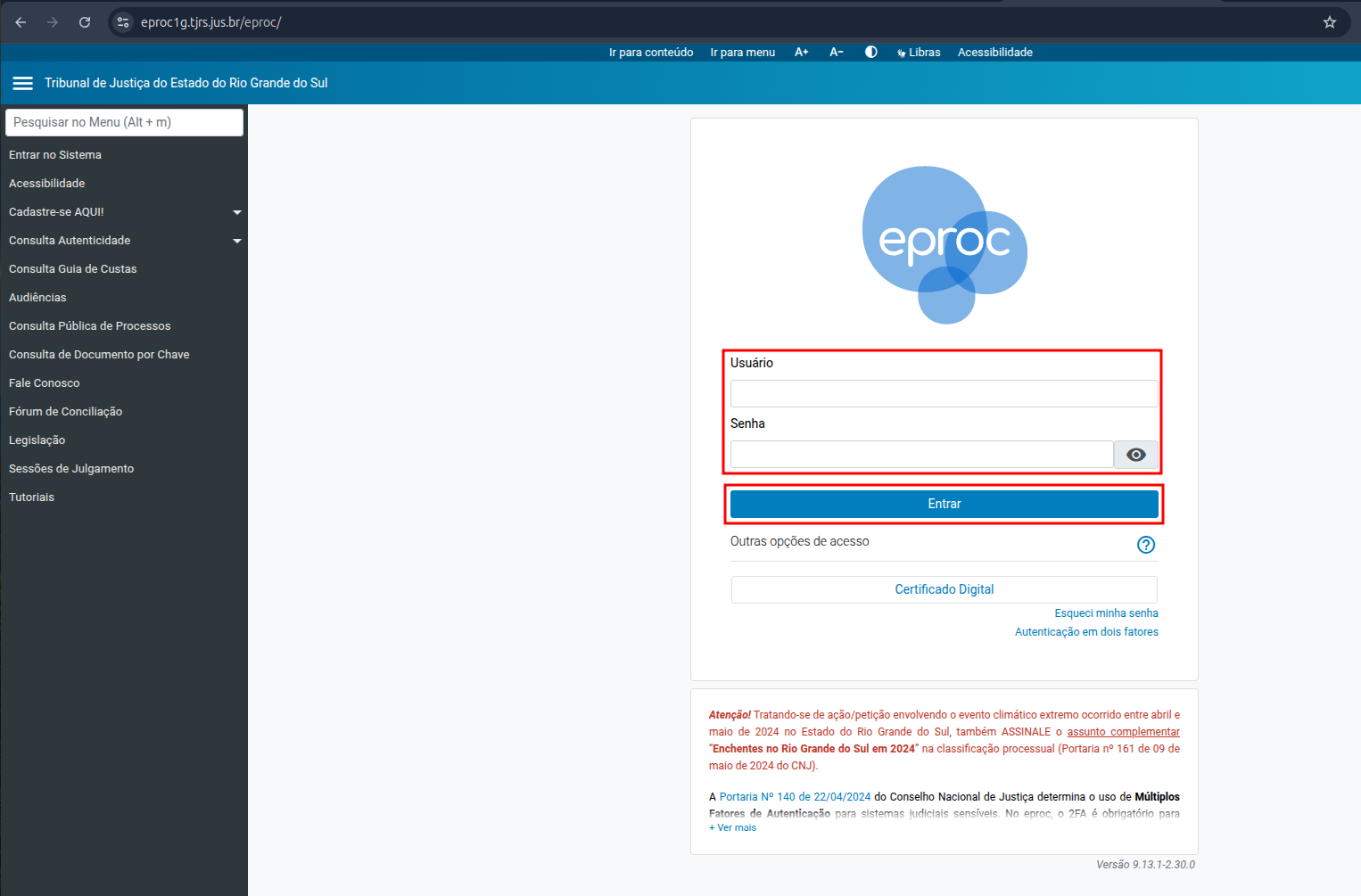
<table border="1" id="bkmrk-inserir-os-campos-us" style="border-collapse: collapse; width: 100%;"><colgroup><col style="width: 99.8765%;"></col></colgroup><tbody><tr><td>[![image.png](https://wiki.oystr.com.br/uploads/images/gallery/2025-05/scaled-1680-/Qk0image.png)](https://wiki.oystr.com.br/uploads/images/gallery/2025-05/Qk0image.png)

Inserir os campos **Usuário** e **Senha**, depois clicar em **Entrar**

</td></tr></tbody></table>

##### <span class="align-center">**2.1.1 Certificado**</span>

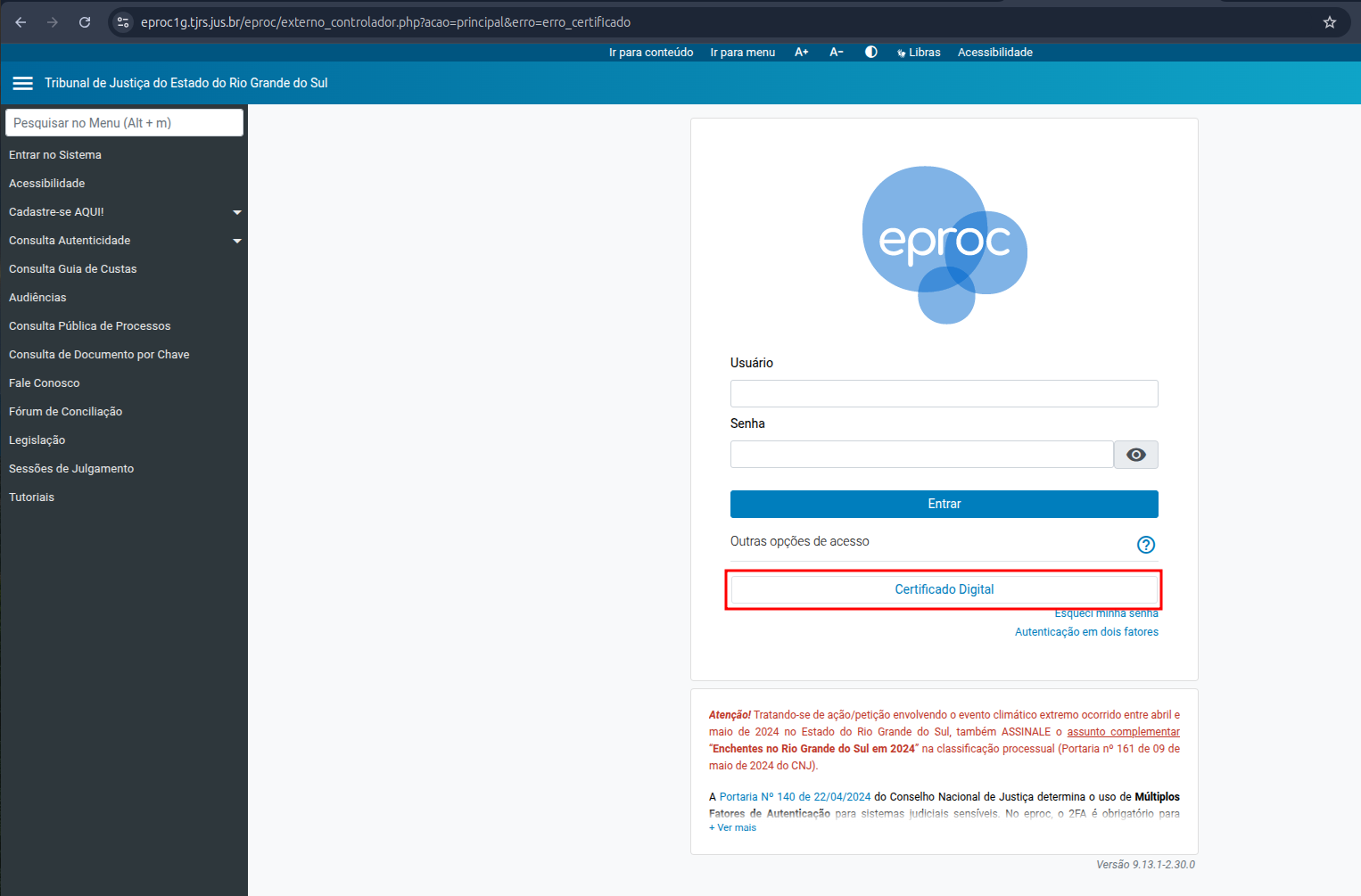
<table border="1" id="bkmrk-1---valide-os-campos" style="border-collapse: collapse; width: 100%; height: 637.85px;"><colgroup><col style="width: 99.8765%;"></col></colgroup><tbody><tr style="height: 585.85px;"><td style="height: 585.85px;">[![image.png](https://wiki.oystr.com.br/uploads/images/gallery/2025-05/scaled-1680-/aNFimage.png)](https://wiki.oystr.com.br/uploads/images/gallery/2025-05/aNFimage.png)

Selecionar **Certificado Digital**

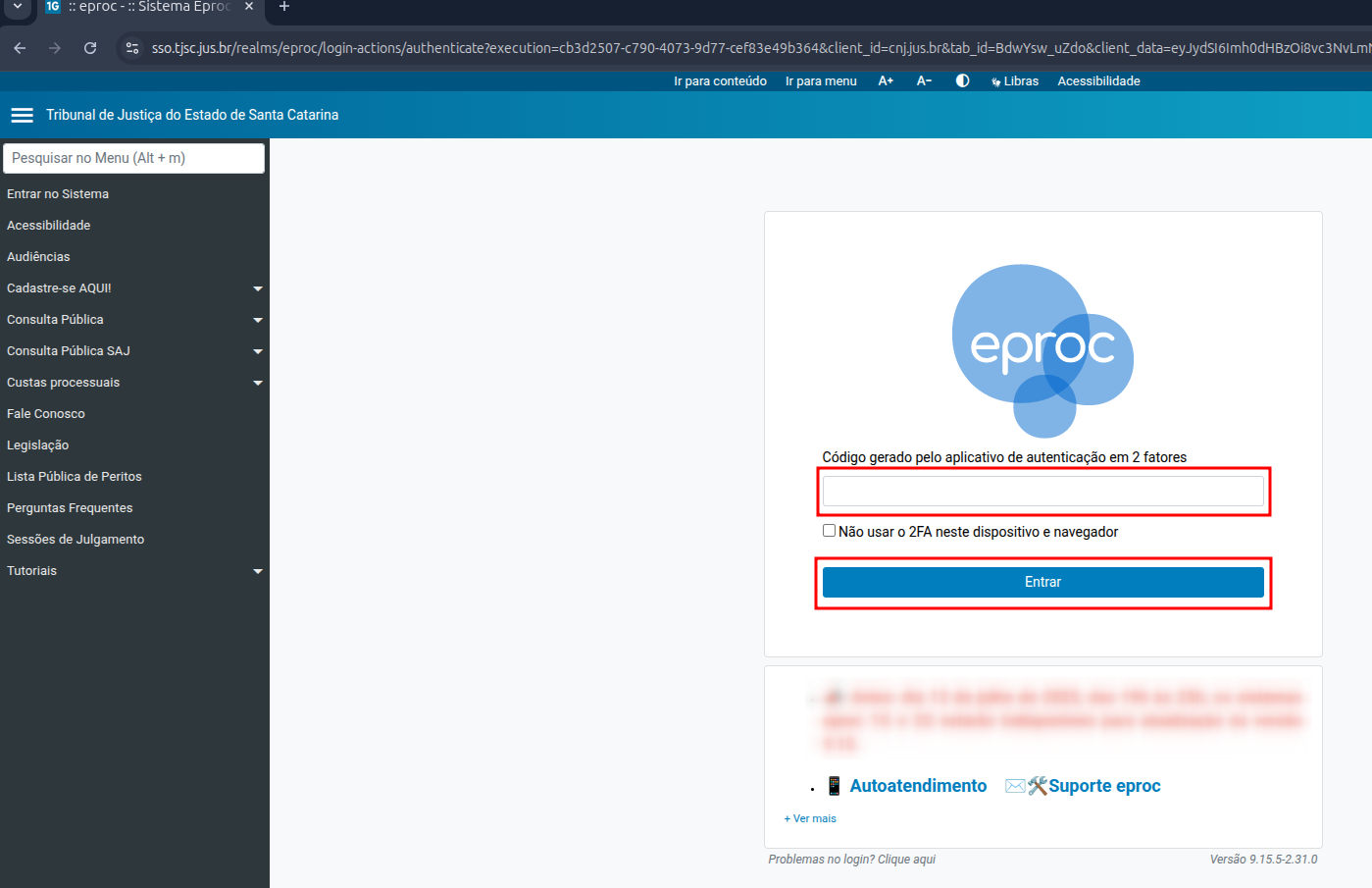
</td></tr><tr style="height: 52px;"><td style="height: 52px;">[![image.png](https://wiki.oystr.com.br/uploads/images/gallery/2025-07/scaled-1680-/1csimage.png)](https://wiki.oystr.com.br/uploads/images/gallery/2025-07/1csimage.png)

Preencher código A2F e clicar em **Entrar**

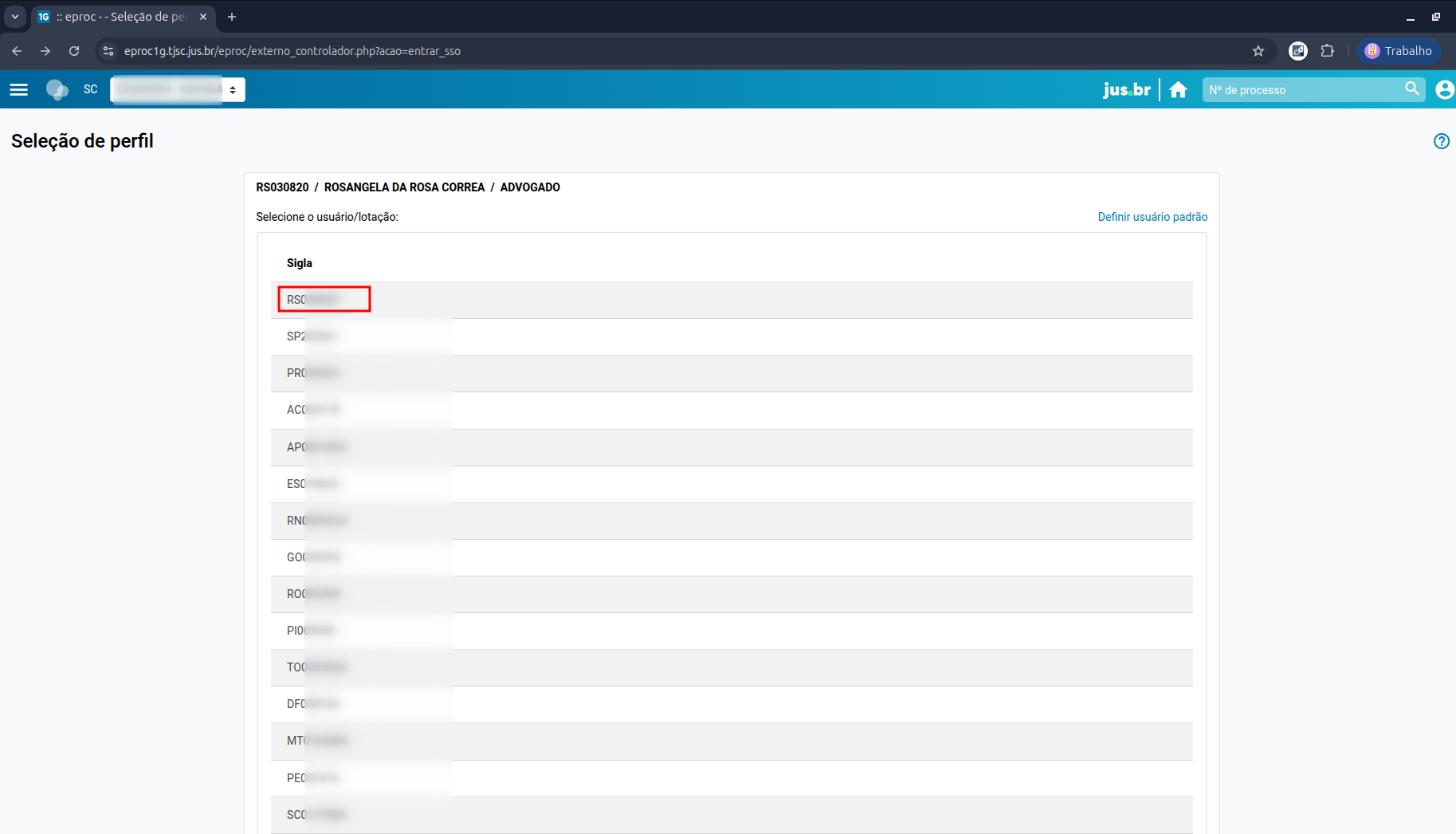
</td></tr><tr><td>[![image.png](https://wiki.oystr.com.br/uploads/images/gallery/2025-07/scaled-1680-/LWYimage.png)](https://wiki.oystr.com.br/uploads/images/gallery/2025-07/LWYimage.png)

Selecione o primeiro código da lista.

</td></tr></tbody></table>

#### <span class="align-center">**2.2 Proto Queue**</span>

<table border="1" id="bkmrk-console-scheduler-cu" style="border-collapse: collapse; width: 100%; height: 406.4px;"><colgroup><col style="width: 24.9629%;"></col><col style="width: 24.9629%;"></col><col style="width: 24.9629%;"></col><col style="width: 24.9629%;"></col></colgroup><tbody><tr style="height: 29.6px;"><td class="align-center" colspan="4" style="height: 29.6px;">**Opções de entrada**</td></tr><tr style="height: 29.6px;"><td style="height: 29.6px;">Console</td><td style="height: 29.6px;">Scheduler-custom</td><td style="height: 29.6px;">Valores possíveis</td><td style="height: 29.6px;">Descrição</td></tr><tr style="height: 63.2px;"><td style="height: 63.2px;">Qual estado?</td><td style="height: 63.2px;">tribunal</td><td style="height: 63.2px;">Tabela abaixo\*</td><td style="height: 63.2px;">define em quais tribunais devem ser buscados os itens para execução.</td></tr><tr style="height: 29.6px;"><td style="height: 29.6px;">Tipo</td><td style="height: 29.6px;">typeSearch</td><td style="height: 29.6px;">Tabela abaixo\*\*</td><td style="height: 29.6px;">  
</td></tr><tr style="height: 57.6px;"><td style="height: 57.6px;">Intimação</td><td style="height: 57.6px;">withText</td><td style="height: 57.6px;">1-Completa

0-Resumida

</td><td style="height: 57.6px;">  
</td></tr><tr style="height: 29.6px;"><td style="height: 29.6px;">Remover Digitalizações</td><td style="height: 29.6px;">removeDigitalCopy</td><td style="height: 29.6px;">1-Sim

2-Não

</td><td style="height: 29.6px;">  
</td></tr><tr style="height: 46.4px;"><td style="height: 46.4px;">Perfil</td><td style="height: 46.4px;">perfil</td><td style="height: 46.4px;">(Texto livre)</td><td style="height: 46.4px;">Código do perfil do usuário no sistema.</td></tr><tr style="height: 57.6px;"><td style="height: 57.6px;">Trazer arquivos somente da movimentação principal?</td><td style="height: 57.6px;">bringFilesOnlyMainEvent</td><td style="height: 57.6px;">true-Sim

false-Não

</td><td style="height: 57.6px;">  
</td></tr><tr style="height: 63.2px;"><td style="height: 63.2px;">Data Intimação</td><td style="height: 63.2px;">formatoDataIntimacao</td><td style="height: 63.2px;">  
</td><td style="height: 63.2px;">define se a data será formatada para 'dd/MM/yyyy HH:mm:ss'.</td></tr></tbody></table>

<table border="1" id="bkmrk-tribunal%3A-valores-po" style="border-collapse: collapse; width: 100%; height: 780.8px; border-width: 1px;"><caption>tribunal: valores possíveis\*</caption><colgroup><col style="width: 11.1605%;"></col><col style="width: 88.9383%;"></col></colgroup><tbody><tr style="height: 29.6px;"><td style="height: 29.6px;">**Valor**</td><td style="height: 29.6px;">**Descrição**</td></tr><tr style="height: 29.6px;"><td style="height: 29.6px;">TODOS</td><td style="height: 29.6px;">TODOS</td></tr><tr style="height: 35.2px;"><td style="height: 35.2px;">RS-1

</td><td style="height: 35.2px;">TRIBUNAL DE JUSTIÇA DO RIO GRANDE DO SUL - TJ RS - 1º GRAU</td></tr><tr style="height: 29.6px;"><td style="height: 29.6px;">RS-2</td><td style="height: 29.6px;">TRIBUNAL DE JUSTIÇA DO RIO GRANDE DO SUL - TJ RS - 2º GRAU</td></tr><tr style="height: 35.2px;"><td style="height: 35.2px;">SC-1

</td><td style="height: 35.2px;">TRIBUNAL DE JUSTIÇA DE SANTA CATARINA - TJ SC - 1º GRAU</td></tr><tr style="height: 29.6px;"><td style="height: 29.6px;">SC-2</td><td style="height: 29.6px;">TRIBUNAL DE JUSTIÇA DE SANTA CATARINA - TJ SC - 2º GRAU</td></tr><tr style="height: 29.6px;"><td style="height: 29.6px;">SP-1</td><td style="height: 29.6px;">TRIBUNAL DE JUSTIÇA DE SÃO PAULO - TJ SP - 1º GRAU</td></tr><tr style="height: 29.6px;"><td style="height: 29.6px;">SP-2</td><td style="height: 29.6px;">TRIBUNAL DE JUSTIÇA DE SÃO PAULO - TJ SP - 2º GRAU</td></tr><tr style="height: 29.6px;"><td style="height: 29.6px;">TO-1</td><td style="height: 29.6px;">TRIBUNAL DE JUSTIÇA DO TOCANTINS - TJ TO - 1º GRAU</td></tr><tr style="height: 29.6px;"><td style="height: 29.6px;">TO-2</td><td style="height: 29.6px;">TRIBUNAL DE JUSTIÇA DO TOCANTINS - TJ TO - 2º GRAU</td></tr><tr style="height: 29.6px;"><td style="height: 29.6px;">JFES</td><td style="height: 29.6px;">JUSTIÇA FEDERAL DO ESPÍRITO SANTO - JFES</td></tr><tr style="height: 29.6px;"><td style="height: 29.6px;">JFRJ</td><td style="height: 29.6px;">JUSTIÇA FEDERAL DO RIO DE JANEIRO - JFRJ</td></tr><tr style="height: 29.6px;"><td style="height: 29.6px;">TRF02</td><td style="height: 29.6px;">TRIBUNAL REGIONAL FEDERAL 2º REGIÃO - TRF02</td></tr><tr style="height: 29.6px;"><td style="height: 29.6px;">JFPR</td><td style="height: 29.6px;">JUSTIÇA FEDERAL DO PARANÁ - JFPR</td></tr><tr style="height: 29.6px;"><td style="height: 29.6px;">JFRS</td><td style="height: 29.6px;">JUSTIÇA FEDERAL DO RIO GRANDE DO SUL - JFRS</td></tr><tr style="height: 29.6px;"><td style="height: 29.6px;">JFSC</td><td style="height: 29.6px;">JUSTIÇA FEDERAL DE SANTA CATARINA - JFSC</td></tr><tr style="height: 29.6px;"><td style="height: 29.6px;">TRF04</td><td style="height: 29.6px;">TRIBUNAL REGIONAL FEDERAL 4º REGIÃO - TRF04</td></tr><tr style="height: 29.6px;"><td style="height: 29.6px;">TNU</td><td style="height: 29.6px;">TRIBUNAL NACIONAL DE UNIFORMIZAÇÃO - TNU</td></tr><tr style="height: 29.6px;"><td style="height: 29.6px;">TRF06-1</td><td style="height: 29.6px;">TRIBUNAL REGIONAL FEDERAL DA 6ª REGIÃO - 1º Grau</td></tr><tr style="height: 29.6px;"><td style="height: 29.6px;">TRF06-2</td><td style="height: 29.6px;">TRIBUNAL REGIONAL FEDERAL DA 6ª REGIÃO - 2º Grau</td></tr><tr style="height: 29.6px;"><td style="height: 29.6px;">TJRJ-1</td><td style="height: 29.6px;">TRIBUNAL DE JUSTIÇA DO ESTADO DO RIO DE JANEIRO - 1º Grau</td></tr><tr style="height: 29.6px;"><td style="height: 29.6px;">TJRJ-2</td><td style="height: 29.6px;">TRIBUNAL DE JUSTIÇA DO ESTADO DO RIO DE JANEIRO - 2º Grau</td></tr><tr style="height: 29.6px;"><td style="height: 29.6px;">TJMG-1</td><td style="height: 29.6px;">TRIBUNAL DE JUSTIÇA DO ESTADO DE MINAS GERAIS - 1º Grau</td></tr><tr style="height: 29.6px;"><td style="height: 29.6px;">TJMG-2</td><td style="height: 29.6px;">TRIBUNAL DE JUSTIÇA DO ESTADO DE MINAS GERAIS - 2º Grau</td></tr></tbody></table>

<table border="1" id="bkmrk-typesearrch%3A-valores" style="border-collapse: collapse; width: 100%; height: 331.2px; border-width: 1px;"><caption>typeSearrch: Valores possíveis\*\*</caption><colgroup><col style="width: 8.89768%;"></col><col style="width: 91.0776%;"></col></colgroup><tbody><tr style="height: 29.6px;"><td style="height: 29.6px;">**Valor**</td><td style="height: 29.6px;">**Descrição**</td></tr><tr style="height: 29.6px;"><td style="height: 29.6px;">01-1</td><td style="height: 29.6px;">Processos pendentes de citação/intimação - NÃO ABRIR</td></tr><tr style="height: 35.2px;"><td style="height: 35.2px;">02

</td><td style="height: 35.2px;">Processos com prazo em aberto</td></tr><tr style="height: 29.6px;"><td style="height: 29.6px;">03</td><td style="height: 29.6px;">Processos pendentes de citação/intimação - Urgentes - ABRIR</td></tr><tr style="height: 29.6px;"><td style="height: 29.6px;">03-1</td><td style="height: 29.6px;">Processos pendentes de citação/intimação - Urgentes - NÃO ABRIR</td></tr><tr style="height: 29.6px;"><td style="height: 29.6px;">04</td><td style="height: 29.6px;">Processos pendentes de intimação de homologação de acordo</td></tr><tr style="height: 29.6px;"><td style="height: 29.6px;">05</td><td style="height: 29.6px;">Processos pendentes de citação - art 334 CPC - ABRIR</td></tr><tr style="height: 29.6px;"><td style="height: 29.6px;">05-1</td><td style="height: 29.6px;">Processos pendentes de citação - art 334 CPC - NÃO ABRIR</td></tr><tr style="height: 29.6px;"><td style="height: 29.6px;">06</td><td style="height: 29.6px;">Processos com intimação de pauta - ABRIR</td></tr><tr style="height: 29.6px;"><td style="height: 29.6px;">06-1</td><td style="height: 29.6px;">Processos com intimação de pauta - NÃO ABRIR</td></tr><tr style="height: 29.6px;"><td style="height: 29.6px;">07</td><td style="height: 29.6px;">Decursos de prazo nos últimos 30 dias</td></tr></tbody></table>

<table border="1" id="bkmrk-" style="border-collapse: collapse; width: 100%;"><colgroup><col style="width: 99.8765%;"></col></colgroup><tbody><tr><td>[![image.png](https://wiki.oystr.com.br/uploads/images/gallery/2025-07/scaled-1680-/Xbrimage.png)](https://wiki.oystr.com.br/uploads/images/gallery/2025-07/Xbrimage.png)

</td></tr><tr><td>  
</td></tr></tbody></table>

#### <span class="align-center">**2.3 Bot** </span>

### **3 Dados de entrada**

<p class="callout info"><span class="align-center"> **Tabela XLS/XML**</span></p>

<p class="callout warning">Campo **FORMATAÇÃO** deve ser preenchido apenas se a formatação do campo for restritiva, ex: regex @Pattern no QueueLoader</p>

<table border="1" id="bkmrk-se%C3%87%C3%83o-propriedade-co" style="width: 108.642%; height: 464.313px;"><tbody><tr style="height: 46.5938px;"><td style="width: 8.28183%; height: 46.5938px;">SEÇÃO</td><td style="width: 13.8443%; height: 46.5938px;">PROPRIEDADE</td><td style="width: 12.979%; height: 46.5938px;">XLS</td><td style="width: 12.8577%; height: 46.5938px;">XML</td><td style="width: 15.4489%; height: 46.5938px;">CAMPO OBRIGATÓRIO</td><td style="width: 16.6873%; height: 46.5938px;">FORMATAÇÃO</td><td style="width: 19.9011%; height: 46.5938px;">DESCRIÇÃO</td><td style="width: 0%; height: 46.5938px;">  
</td><td style="width: 0%; height: 46.5938px;">  
</td><td style="width: 0.123609%; height: 46.5938px;">  
</td></tr><tr style="height: 147.375px;"><td style="width: 8.28183%; height: 147.375px;">  
</td><td style="width: 13.8443%; height: 147.375px;">integracao</td><td style="width: 12.979%; height: 147.375px;">INTEGRACAO</td><td style="width: 12.8577%; height: 147.375px;">integracao</td><td style="width: 15.4489%; height: 147.375px;">Sim</td><td style="width: 16.6873%; height: 147.375px;">  
</td><td style="width: 19.9011%; height: 147.375px;">Referência para o código da pasta no sistema jurídico, utilizado para identificar e localizar documentos e processos de forma eficiente.</td><td style="width: 0%; height: 147.375px;">  
</td><td style="width: 0%; height: 147.375px;">  
</td><td style="width: 0.123609%; height: 147.375px;">  
</td></tr><tr style="height: 80.1875px;"><td style="width: 8.28183%; height: 80.1875px;">2.2.1 </td><td style="width: 13.8443%; height: 80.1875px;">número do processo</td><td style="width: 12.979%; height: 80.1875px;">PROCESSO</td><td style="width: 12.8577%; height: 80.1875px;">processo</td><td style="width: 15.4489%; height: 80.1875px;">Sim</td><td style="width: 16.6873%; height: 80.1875px;">0001515-15.2025.8.15.1515</td><td style="width: 19.9011%; height: 80.1875px;">Número do processo/pasta que será utilizado para realizar a busca.</td><td style="width: 0%; height: 80.1875px;">  
</td><td style="width: 0%; height: 80.1875px;">  
</td><td style="width: 0.123609%; height: 80.1875px;">  
</td></tr><tr style="height: 63.375px;"><td style="width: 8.28183%; height: 63.375px;">2.2.2</td><td style="width: 13.8443%; height: 63.375px;">andamento</td><td style="width: 12.979%; height: 63.375px;">TIPO\_ANDAMENTO</td><td style="width: 12.8577%; height: 63.375px;">tipo\_andamento</td><td style="width: 15.4489%; height: 63.375px;">Sim</td><td style="width: 16.6873%; height: 63.375px;">  
</td><td style="width: 19.9011%; height: 63.375px;">Tipo do andamento do processo.</td><td style="width: 0%; height: 63.375px;">  
</td><td style="width: 0%; height: 63.375px;">  
</td><td style="width: 0.123609%; height: 63.375px;">  
</td></tr><tr style="height: 46.5938px;"><td style="width: 8.28183%; height: 46.5938px;">2.x.x</td><td style="width: 13.8443%; height: 46.5938px;">Data do andamento</td><td style="width: 12.979%; height: 46.5938px;">DATA\_ANDAMENTO</td><td style="width: 12.8577%; height: 46.5938px;">data\_evento</td><td style="width: 15.4489%; height: 46.5938px;">  
</td><td style="width: 16.6873%; height: 46.5938px;">01/01/2000</td><td style="width: 19.9011%; height: 46.5938px;">  
</td><td style="width: 0%; height: 46.5938px;">  
</td><td style="width: 0.123609%; height: 46.5938px;">  
</td></tr><tr style="height: 80.1875px;"><td style="width: 8.28183%; height: 80.1875px;">2.2.2</td><td style="width: 13.8443%; height: 80.1875px;">natureza</td><td style="width: 12.979%; height: 80.1875px;">NATUREZA</td><td style="width: 12.8577%; height: 80.1875px;">natureza</td><td style="width: 15.4489%; height: 80.1875px;">  
</td><td style="width: 16.6873%; height: 80.1875px;">  
</td><td style="width: 19.9011%; height: 80.1875px;">Natureza do andamento. (Processual, Voluntário, etc).</td><td style="width: 0%; height: 80.1875px;">  
</td><td style="width: 0%; height: 80.1875px;">  
</td><td style="width: 0.123609%; height: 80.1875px;">  
</td></tr></tbody></table>

<p class="callout info">**Tabela Scheduler**</p>

<table border="1" id="bkmrk-nome-valor" style="border-collapse: collapse; width: 100%; height: 59.5938px;"><colgroup><col style="width: 24.9691%;"></col><col style="width: 24.9691%;"></col><col style="width: 50.0618%;"></col></colgroup><tbody><tr style="height: 29.7969px;"><td style="height: 29.7969px;">Nome</td><td>Valor</td><td style="height: 29.7969px;">  
</td></tr><tr style="height: 29.7969px;"><td style="height: 29.7969px;">  
</td><td>  
</td><td style="height: 29.7969px;">  
</td></tr></tbody></table>

#### **4 Restrições e Premissas**


&lt;!-- Descreva quaisquer limitações ou condições assumidas durante a definição dos requisitos. --&gt;

> **Exemplo:**
> 
> - Campo DATA\_ não pode conter uma data anterior ao campo DATA\_PROCESSO
> - Processo deve estar ativo, não pode estar encerrado
> - Arquivos devem estar em tal formato aceito pelo portal (".pdf, .txt")

# esaj-intimacoes

### **<span class="align-center" style="color: rgb(0, 0, 0);">1 Descrição do processo</span>**

#### <span class="align-center" style="color: rgb(0, 0, 0);">**1.2 Programas e Aplicações**  
</span>

<table border="1" id="bkmrk-nome-do-sistema-url-" style="width: 100%; border-collapse: collapse; height: 64.125px;"><colgroup><col style="width: 50.0508%;" width="60"></col><col style="width: 49.9492%;" width="81"></col></colgroup><tbody><tr style="height: 37.375px; background-color: rgb(41, 127, 213);"><td style="height: 37.375px;"><span style="color: rgb(255, 255, 255);">**Nome do Sistema**</span>

</td><td style="height: 37.375px;"><span style="color: rgb(255, 255, 255);">**URL**</span>

</td></tr><tr style="height: 26.75px;"><td style="height: 26.75px;"><span style="color: rgb(0, 0, 0);">**esaj**</span>

</td><td style="height: 26.75px;"><span style="color: rgb(0, 0, 0);">https://esaj.tjsp.jus.br/esaj/portal.do?servico=740000</span></td></tr></tbody></table>

### <span style="color: rgb(0, 0, 0);">**2 Detalhamento do Processo**</span>

#### <span style="color: rgb(0, 0, 0);">**2.1 Robô**</span>

<table border="1" id="bkmrk-" style="border-collapse: collapse; width: 100%;"><colgroup><col style="width: 99.8765%;"></col></colgroup><tbody><tr><td>**<span style="color: rgb(0, 0, 0);">2.1 - Sistema</span>**  
</td></tr><tr><td>[![image.png](https://wiki.oystr.com.br/uploads/images/gallery/2024-03/scaled-1680-/eD3image.png)](https://wiki.oystr.com.br/uploads/images/gallery/2024-03/eD3image.png)

**<span style="color: rgb(0, 0, 0);">  
</span>**

<span style="color: rgb(0, 0, 0);">****Ação: Par iniciar o processo, será necessário acessar o site do [ESAJ SP](https://esaj.tjsp.jus.br/esaj/portal.do?servico=740000).****</span>

</td></tr><tr><td>**<span style="color: rgb(0, 0, 0);">2.2 - Login</span>**</td></tr><tr><td>[![image.png](https://wiki.oystr.com.br/uploads/images/gallery/2024-03/scaled-1680-/b8Gimage.png)](https://wiki.oystr.com.br/uploads/images/gallery/2024-03/b8Gimage.png)

**<span style="color: rgb(0, 0, 0);">  
</span>**

<span style="color: rgb(0, 0, 0);">****Ação: Na tela, iremos procurar pela opção “Identifique-se”.****</span>

</td></tr><tr><td>[![image.png](https://wiki.oystr.com.br/uploads/images/gallery/2024-03/scaled-1680-/2aTimage.png)](https://wiki.oystr.com.br/uploads/images/gallery/2024-03/2aTimage.png)

**<span style="color: rgb(0, 0, 0);">**Ação: Na página, iremos até o campo “Certificado Digital” .**</span>**

</td></tr><tr><td>[![image.png](https://wiki.oystr.com.br/uploads/images/gallery/2024-03/scaled-1680-/x12image.png)](https://wiki.oystr.com.br/uploads/images/gallery/2024-03/x12image.png)

<span style="color: rgb(0, 0, 0);">****Ação: No campo de “Selecione o certificado que deseja utilizar:”, iremos selecionar o certificado para login. Feito isso, iremos clicar em “Entrar”.****</span>

</td></tr><tr><td>**<span style="color: rgb(0, 0, 0);">2.3 - Acesso</span>**</td></tr><tr><td>[![image.png](https://wiki.oystr.com.br/uploads/images/gallery/2024-03/scaled-1680-/EHOimage.png)](https://wiki.oystr.com.br/uploads/images/gallery/2024-03/EHOimage.png)

**<span style="color: rgb(0, 0, 0);">  
</span>**

<span style="color: rgb(0, 0, 0);">****Ação: Na tela seguinte, iremos apenas clicar em “Ok”.****</span>

</td></tr><tr><td>[![image.png](https://wiki.oystr.com.br/uploads/images/gallery/2024-03/scaled-1680-/Llkimage.png)](https://wiki.oystr.com.br/uploads/images/gallery/2024-03/Llkimage.png)

**<span style="color: rgb(0, 0, 0);">**Ação: Na tela, iremos acessar a opção de “Painel do advogado”.**</span>**

</td></tr><tr><td>[![image.png](https://wiki.oystr.com.br/uploads/images/gallery/2024-03/scaled-1680-/kwrimage.png)](https://wiki.oystr.com.br/uploads/images/gallery/2024-03/kwrimage.png)

**<span style="color: rgb(0, 0, 0);">**Ação: Feito isso, estaremos na tela.**</span>**

</td></tr><tr><td>[![image.png](https://wiki.oystr.com.br/uploads/images/gallery/2024-03/scaled-1680-/aPjimage.png)](https://wiki.oystr.com.br/uploads/images/gallery/2024-03/aPjimage.png)

**<span style="color: rgb(0, 0, 0);">**Ação: Na tela, iremos até a opção de “Manifestações / ciência.**</span>**

</td></tr><tr><td>[![image.png](https://wiki.oystr.com.br/uploads/images/gallery/2024-03/scaled-1680-/Yweimage.png)](https://wiki.oystr.com.br/uploads/images/gallery/2024-03/Yweimage.png)

**<span style="color: rgb(0, 0, 0);">**Ação: Iremos buscar pela opção “Visualizar Autos”.**</span>**

</td></tr><tr><td>**<span style="color: rgb(0, 0, 0);">Ação: **Para continuar o passo a passo, será necessário entrar em contato com o cliente e solicitar quais Autos podemos acessar.**</span>**

</td></tr></tbody></table>

#### <span style="color: rgb(0, 0, 0);">**2.1 Alterações**</span>

### <span style="color: rgb(0, 0, 0);">**3 **Regras de Negócio****</span>

#### <span style="color: rgb(0, 0, 0);">****3.1 **Arquivo de entrada do robô******</span>

##### <span style="color: rgb(0, 0, 0);">**3.1.1 XLS**</span>

<table border="1" id="bkmrk-descri%C3%87%C3%83o-propriedad" style="width: 100%; border-collapse: collapse; height: 64.125px;"><colgroup><col style="width: 50.0508%;" width="60"></col><col style="width: 49.9492%;" width="81"></col></colgroup><tbody><tr style="height: 37.375px; background-color: rgb(41, 127, 213);"><td style="height: 37.375px;"><span style="color: rgb(255, 255, 255);">**DESCRIÇÃO**</span>

</td><td style="height: 37.375px;"><span style="color: rgb(255, 255, 255);">**PROPRIEDADE**</span>

</td></tr><tr style="height: 26.75px;"><td style="height: 26.75px;"></td><td style="height: 26.75px;">  
</td></tr></tbody></table>

##### <span style="color: rgb(0, 0, 0);">**3.1.2 XML**</span>

<table border="1" id="bkmrk-descri%C3%87%C3%83o-propriedad-1" style="width: 100%; border-collapse: collapse; height: 64.125px;"><colgroup><col style="width: 50.0508%;" width="60"></col><col style="width: 49.9492%;" width="81"></col></colgroup><tbody><tr style="height: 37.375px; background-color: rgb(41, 127, 213);"><td style="height: 37.375px;"><span style="color: rgb(255, 255, 255);">**DESCRIÇÃO**</span>

</td><td style="height: 37.375px;"><span style="color: rgb(255, 255, 255);">**PROPRIEDADE**</span>

</td></tr><tr style="height: 26.75px;"><td style="height: 26.75px;"></td><td style="height: 26.75px;">  
</td></tr></tbody></table>

##### <span style="color: rgb(0, 0, 0);">**3.1.3 FILTROS**</span>

<table border="1" id="bkmrk-descri%C3%87%C3%83o-propriedad-2" style="width: 100%; border-collapse: collapse; height: 64.125px;"><colgroup><col style="width: 50.0508%;" width="60"></col><col style="width: 49.9492%;" width="81"></col></colgroup><tbody><tr style="height: 37.375px; background-color: rgb(41, 127, 213);"><td style="height: 37.375px;"><span style="color: rgb(255, 255, 255);">**DESCRIÇÃO**</span>

</td><td style="height: 37.375px;"><span style="color: rgb(255, 255, 255);">**PROPRIEDADE**</span>

</td></tr><tr style="height: 26.75px;"><td style="height: 26.75px;"></td><td style="height: 26.75px;">  
</td></tr></tbody></table>

#### <span style="color: rgb(0, 0, 0);">**3.1 **Arquivo de saída****</span>

# pdpj-domicilio-eletronico

### **<span class="align-center" style="color: rgb(0, 0, 0);">1 Descrição do processo</span>**

#### <span class="align-center" style="color: rgb(0, 0, 0);">**1.2 Programas e Aplicações**  
</span>

<table border="1" id="bkmrk-nome-do-sistema-url-" style="width: 100%; border-collapse: collapse; height: 64.125px;"><colgroup><col style="width: 50.0508%;" width="60"></col><col style="width: 49.9492%;" width="81"></col></colgroup><tbody><tr style="height: 37.375px; background-color: rgb(41, 127, 213);"><td style="height: 37.375px;"><span style="color: rgb(255, 255, 255);">**Nome do Sistema**</span>

</td><td style="height: 37.375px;"><span style="color: rgb(255, 255, 255);">**URL**</span>

</td></tr><tr style="height: 26.75px;"><td style="height: 26.75px;">**PDPJ**

</td><td style="height: 26.75px;"> https://domicilio-eletronico.pdpj.jus.br./</td></tr></tbody></table>

### <span style="color: rgb(0, 0, 0);">**2 Detalhamento do Processo**</span>

#### <span style="color: rgb(0, 0, 0);">**2.1 Robô**</span>

<table border="1" id="bkmrk-" style="border-collapse: collapse; width: 100%;"><colgroup><col style="width: 99.8765%;"></col></colgroup><tbody><tr><td>**Sistema**  
</td></tr><tr><td>[![image.png](https://wiki.oystr.com.br/uploads/images/gallery/2024-04/scaled-1680-/kN9image.png)](https://wiki.oystr.com.br/uploads/images/gallery/2024-04/kN9image.png)

</td></tr></tbody></table>

<table border="1" id="bkmrk-login-a%C3%A7%C3%A3o%3A-para-rea" style="border-collapse: collapse; width: 100%;"><colgroup><col style="width: 99.8765%;"></col></colgroup><tbody><tr><td>**Login**  
</td></tr><tr><td>[![image.png](https://wiki.oystr.com.br/uploads/images/gallery/2024-04/scaled-1680-/Rc0image.png)](https://wiki.oystr.com.br/uploads/images/gallery/2024-04/Rc0image.png)

</td></tr><tr><td>**Ação:** Para realizar o login, clique em "**Seu certificado digital**".

</td></tr><tr><td>[![image.png](https://wiki.oystr.com.br/uploads/images/gallery/2024-04/scaled-1680-/Bg5image.png)](https://wiki.oystr.com.br/uploads/images/gallery/2024-04/Bg5image.png)

</td></tr><tr><td>**Ação:** Um pop-up irá aparecer. Insira o PIN e clique em "**OK**".

</td></tr></tbody></table>

<table border="1" id="bkmrk-passo-a-passo-%C2%A0-%C2%A0-a%C3%A7" style="border-collapse: collapse; width: 100%; height: 3908.98px;"><colgroup><col style="width: 100%;"></col></colgroup><tbody><tr style="height: 29.7969px;"><td style="height: 29.7969px;">**Passo a passo**</td></tr><tr style="height: 423.641px;"><td style="height: 423.641px;">[![image.png](https://wiki.oystr.com.br/uploads/images/gallery/2024-04/scaled-1680-/0sbimage.png)](https://wiki.oystr.com.br/uploads/images/gallery/2024-04/0sbimage.png)

</td></tr><tr style="height: 35.3906px;"><td style="height: 35.3906px;">**Ação:** Ao acessar o portal, clique em "**Selecione Perfil**".

</td></tr><tr style="height: 401.25px;"><td style="height: 401.25px;">[![image.png](https://wiki.oystr.com.br/uploads/images/gallery/2024-04/scaled-1680-/DKPimage.png)](https://wiki.oystr.com.br/uploads/images/gallery/2024-04/DKPimage.png)

</td></tr><tr style="height: 35.3906px;"><td style="height: 35.3906px;">**Ação:** Selecione "**Meus Representados**" e depois em "**Entrar**".

</td></tr><tr style="height: 373.062px;"><td style="height: 373.062px;">[![image.png](https://wiki.oystr.com.br/uploads/images/gallery/2024-04/scaled-1680-/4OMimage.png)](https://wiki.oystr.com.br/uploads/images/gallery/2024-04/4OMimage.png)

</td></tr><tr style="height: 35.3906px;"><td style="height: 35.3906px;">**Ação:** Clique em "**Comunicação Processual**".

</td></tr><tr style="height: 378.859px;"><td style="height: 378.859px;">[![image.png](https://wiki.oystr.com.br/uploads/images/gallery/2024-04/scaled-1680-/Lxiimage.png)](https://wiki.oystr.com.br/uploads/images/gallery/2024-04/Lxiimage.png)

</td></tr><tr style="height: 57.7812px;"><td style="height: 57.7812px;">**Ação:** Para realizar a busca, insira o "**Número do processo**", a data, ou "**Selecione o representado**" e então clique em "**Buscar**".

</td></tr><tr style="height: 400.672px;"><td style="height: 400.672px;">[![image.png](https://wiki.oystr.com.br/uploads/images/gallery/2024-04/scaled-1680-/fsjimage.png)](https://wiki.oystr.com.br/uploads/images/gallery/2024-04/fsjimage.png)

</td></tr><tr style="height: 35.3906px;"><td style="height: 35.3906px;">**Ação:** Clique em "**Abrir Documento**".

</td></tr><tr style="height: 378.859px;"><td style="height: 378.859px;">[![image.png](https://wiki.oystr.com.br/uploads/images/gallery/2024-04/scaled-1680-/8s8image.png)](https://wiki.oystr.com.br/uploads/images/gallery/2024-04/8s8image.png)

</td></tr><tr style="height: 35.3906px;"><td style="height: 35.3906px;">**Ação:** Clique em "**Abrir Documento Principal**".

</td></tr><tr style="height: 378.859px;"><td style="height: 378.859px;">[![image.png](https://wiki.oystr.com.br/uploads/images/gallery/2024-04/scaled-1680-/tqvimage.png)](https://wiki.oystr.com.br/uploads/images/gallery/2024-04/tqvimage.png)

</td></tr><tr style="height: 35.3906px;"><td style="height: 35.3906px;">**Ação:** Ao abrir o documento, clique no ícone para realizar o download.

</td></tr><tr style="height: 401.25px;"><td style="height: 401.25px;">[![image.png](https://wiki.oystr.com.br/uploads/images/gallery/2024-04/scaled-1680-/BC7image.png)](https://wiki.oystr.com.br/uploads/images/gallery/2024-04/BC7image.png)

</td></tr><tr style="height: 35.3906px;"><td style="height: 35.3906px;">**Ação:** Ao retornar ao portal, clique em "**Ler inteiro teor**".

</td></tr><tr style="height: 401.828px;"><td style="height: 401.828px;">[![image.png](https://wiki.oystr.com.br/uploads/images/gallery/2024-04/scaled-1680-/e6Aimage.png)](https://wiki.oystr.com.br/uploads/images/gallery/2024-04/e6Aimage.png)

</td></tr><tr style="height: 35.3906px;"><td style="height: 35.3906px;">**Ação:** Uma caixa de confirmação será aberta. Clique em "**Ler inteiro teor**" novamente.

</td></tr><tr><td>[![image.png](https://wiki.oystr.com.br/uploads/images/gallery/2024-04/scaled-1680-/Tt1image.png)](https://wiki.oystr.com.br/uploads/images/gallery/2024-04/Tt1image.png)

</td></tr><tr><td>**Ação:** A aba de documentos será aberta novamente, clique em "**Abrir documento principal**".

</td></tr><tr><td style="height: 378.859px;">[![image.png](https://wiki.oystr.com.br/uploads/images/gallery/2024-04/scaled-1680-/VZ6image.png)](https://wiki.oystr.com.br/uploads/images/gallery/2024-04/VZ6image.png)

</td></tr><tr><td style="height: 35.3906px;">**Ação:** Ao abrir o documento, clique no ícone para realizar o download.

</td></tr></tbody></table>

#### <span style="color: rgb(0, 0, 0);">**2.1 Alterações**</span>

### <span style="color: rgb(0, 0, 0);">**3 **Regras de Negócio****</span>

#### <span style="color: rgb(0, 0, 0);">****3.1 **Arquivo de entrada do robô******</span>

##### <span style="color: rgb(0, 0, 0);">**3.1.1 XLS**</span>

<table border="1" id="bkmrk-descri%C3%87%C3%83o-propriedad" style="width: 100%; border-collapse: collapse; height: 64.125px;"><colgroup><col style="width: 50.0508%;" width="60"></col><col style="width: 49.9492%;" width="81"></col></colgroup><tbody><tr style="height: 37.375px; background-color: rgb(41, 127, 213);"><td style="height: 37.375px;"><span style="color: rgb(255, 255, 255);">**DESCRIÇÃO**</span>

</td><td style="height: 37.375px;"><span style="color: rgb(255, 255, 255);">**PROPRIEDADE**</span>

</td></tr><tr style="height: 26.75px;"><td style="height: 26.75px;"></td><td style="height: 26.75px;">  
</td></tr></tbody></table>

##### <span style="color: rgb(0, 0, 0);">**3.1.2 XML**</span>

<table border="1" id="bkmrk-descri%C3%87%C3%83o-propriedad-1" style="width: 100%; border-collapse: collapse; height: 64.125px;"><colgroup><col style="width: 50.0508%;" width="60"></col><col style="width: 49.9492%;" width="81"></col></colgroup><tbody><tr style="height: 37.375px; background-color: rgb(41, 127, 213);"><td style="height: 37.375px;"><span style="color: rgb(255, 255, 255);">**DESCRIÇÃO**</span>

</td><td style="height: 37.375px;"><span style="color: rgb(255, 255, 255);">**PROPRIEDADE**</span>

</td></tr><tr style="height: 26.75px;"><td style="height: 26.75px;"></td><td style="height: 26.75px;">  
</td></tr></tbody></table>

##### <span style="color: rgb(0, 0, 0);">**3.1.3 FILTROS**</span>

<table border="1" id="bkmrk-descri%C3%87%C3%83o-propriedad-2" style="width: 100%; border-collapse: collapse; height: 64.125px;"><colgroup><col style="width: 50.0508%;" width="60"></col><col style="width: 49.9492%;" width="81"></col></colgroup><tbody><tr style="height: 37.375px; background-color: rgb(41, 127, 213);"><td style="height: 37.375px;"><span style="color: rgb(255, 255, 255);">**DESCRIÇÃO**</span>

</td><td style="height: 37.375px;"><span style="color: rgb(255, 255, 255);">**PROPRIEDADE**</span>

</td></tr><tr style="height: 26.75px;"><td style="height: 26.75px;"></td><td style="height: 26.75px;">  
</td></tr></tbody></table>

#### <span style="color: rgb(0, 0, 0);">**3.1 **Arquivo de saída****</span>

# pje-tj-intimation

### **<span class="align-center">1 Introdução</span>**

#### <span class="align-center">**1.1 **Escopo****</span>

> Esta documentação abrange todas as funcionalidades e configurações do **<span data-sheets-root="1">pje-tj-intimation</span>**, incluindo:
> 
> - Login via usuário/senha e certificado;
> - Listagem de intimações;
> - Acesso às intimações;
> - Leitura de intimações;
> - Coleta de dados das intimações;
> - Comprovante de abertura de intimação.

#### <span class="align-center">**1.2 Url de acesso**</span>

> Robô tem acesso aos portais dos tribunais: **AP, RO, RN, PI, PB, PA, PE, MG, MG-JPe (2º Grau), MT, MA, ES, DF, BA, CE, RJ, TRF3, TSE E TRE'S.**  
>   
> [https://pje.tjma.jus.br/pje/login.seam](https://pje.tjma.jus.br/pje/login.seam)
> 
> <table border="1" style="border-collapse: collapse; width: 100%; height: 2203.14px;"><colgroup><col style="width: 24.967%;"></col><col style="width: 31.0356%;"></col><col style="width: 43.9974%;"></col></colgroup><tbody><tr style="height: 29.7969px;"><td style="height: 29.7969px;">TRIBUNAL</td><td style="height: 29.7969px;">1º Grau</td><td style="height: 29.7969px;">2º Grau</td></tr><tr style="height: 35.3906px;"><td style="height: 35.3906px;">**AP**</td><td style="height: 35.3906px;">[https://pje.tjap.jus.br/1g](https://pje.tjma.jus.br/pje/login.seam)</td><td style="height: 35.3906px;">[https://pje.tjap.jus.br/2g](https://pje.tjma.jus.br/pje/login.seam)</td></tr><tr style="height: 35.3906px;"><td style="height: 35.3906px;">**RO**</td><td style="height: 35.3906px;">[https://pjepg.tjro.jus.br](https://pje.tjma.jus.br/pje/login.seam)</td><td style="height: 35.3906px;">  
> </td></tr><tr style="height: 29.7969px;"><td style="height: 29.7969px;">**RN**</td><td style="height: 29.7969px;">https://pje1g.tjrn.jus.br/pje</td><td style="height: 29.7969px;">https://pje2g.tjrn.jus.br/pje</td></tr><tr style="height: 35.3906px;"><td style="height: 35.3906px;">**PI**</td><td style="height: 35.3906px;">[https://pje.tjpi.jus.br/1g](https://pje.tjma.jus.br/pje/login.seam)</td><td style="height: 35.3906px;">[https://pje.tjpi.jus.br/2g](https://pje.tjma.jus.br/pje/login.seam)</td></tr><tr style="height: 35.3906px;"><td style="height: 35.3906px;">**PB**</td><td style="height: 35.3906px;">[https://](https://pje.tjma.jus.br/pje/login.seam)pje.tjpb.jus.br/pje</td><td style="height: 35.3906px;">[https://](https://pje.tjma.jus.br/pje/login.seam)pje.tjpb.jus.br/pje2g</td></tr><tr style="height: 35.3906px;"><td style="height: 35.3906px;">**PA**</td><td style="height: 35.3906px;">[https://pje.tjpa.jus.br/pje](https://pje.tjma.jus.br/pje/login.seam)</td><td style="height: 35.3906px;">[https://pje.tjpa.jus.br/pje-2g](https://pje.tjma.jus.br/pje/login.seam)</td></tr><tr style="height: 29.7969px;"><td style="height: 29.7969px;">**PE**</td><td style="height: 29.7969px;">https://pje.cloud.tjpe.jus.br/1g</td><td style="height: 29.7969px;">https://pje.cloud.tjpe.jus.br/2g</td></tr><tr style="height: 29.7969px;"><td style="height: 29.7969px;">**MG**</td><td style="height: 29.7969px;">https://pje.tjmg.jus.br/pje</td><td style="height: 29.7969px;">https://pje2.tjma.jus.br/pje2g</td></tr><tr style="height: 29.7969px;"><td style="height: 29.7969px;">**MG-JPe** </td><td style="height: 29.7969px;">  
> </td><td style="height: 29.7969px;">https://pjerecursal.tjmg.jus.br/pje</td></tr><tr style="height: 29.7969px;"><td style="height: 29.7969px;">**MT**</td><td style="height: 29.7969px;">https://pje.tjmt.jus.br/pje</td><td style="height: 29.7969px;">https://pje2.tjmt.jus.br/pje2</td></tr><tr style="height: 29.7969px;"><td style="height: 29.7969px;">**MA**</td><td style="height: 29.7969px;">https://pje.tjma.jus.br/pje</td><td style="height: 29.7969px;">https://pje2.tjma.jus.br/pje2g</td></tr><tr style="height: 29.7969px;"><td style="height: 29.7969px;">**ES**</td><td style="height: 29.7969px;">https://pje.tjes.jus.br/pje</td><td style="height: 29.7969px;">https://pje.tjes.jus.br/pje2g</td></tr><tr style="height: 29.7969px;"><td style="height: 29.7969px;">**DF**</td><td style="height: 29.7969px;">https://pje1g-df.tse.jus.br/pje</td><td style="height: 29.7969px;">https://pje.tre-df.jus.br/pje</td></tr><tr style="height: 29.7969px;"><td style="height: 29.7969px;">**BA**</td><td style="height: 29.7969px;">https://pje.tjba.jus.br/pje</td><td style="height: 29.7969px;">https://pje2g.tjba.jus.br/pje</td></tr><tr style="height: 29.7969px;"><td style="height: 29.7969px;">**CE**</td><td style="height: 29.7969px;">https://pje.tjce.jus.br/pje1grau</td><td style="height: 29.7969px;">https://pje.tjce.jus.br/pje2grau</td></tr><tr style="height: 29.7969px;"><td style="height: 29.7969px;">**RJ**</td><td style="height: 29.7969px;">https://tjrj.pje.jus.br/1g</td><td style="height: 29.7969px;">https://tjrj.pje.jus.br/2g</td></tr><tr style="height: 29.7969px;"><td style="height: 29.7969px;">**TRF3**</td><td style="height: 29.7969px;">https://pje1g.trf3.jus.br/pje</td><td style="height: 29.7969px;">https://pje2g.trf3.jus.br/pje</td></tr><tr style="height: 29.7969px;"><td style="height: 29.7969px;">**TRF5**</td><td style="height: 29.7969px;">https://pje1g.trf5.jus.br/pje</td><td style="height: 29.7969px;">https://pje2g.trf5.jus.br/pje</td></tr><tr style="height: 29.7969px;"><td style="height: 29.7969px;">**TRE - AC**</td><td style="height: 29.7969px;">https://pje.tre-ac.jus.br/pje</td><td style="height: 29.7969px;">  
> </td></tr><tr style="height: 29.7969px;"><td style="height: 29.7969px;">**TRE - AL**</td><td style="height: 29.7969px;">https://pje.tre-al.jus.br/pje</td><td style="height: 29.7969px;">  
> </td></tr><tr style="height: 29.7969px;"><td style="height: 29.7969px;">**TRE - AM**</td><td style="height: 29.7969px;">https://pje.tre-am.jus.br/pje</td><td style="height: 29.7969px;">  
> </td></tr><tr style="height: 29.7969px;"><td style="height: 29.7969px;">**TRE - AP**</td><td style="height: 29.7969px;">https://pje.tre-ap.jus.br/pje</td><td style="height: 29.7969px;">  
> </td></tr><tr style="height: 29.7969px;"><td style="height: 29.7969px;">**TRE - BA**</td><td style="height: 29.7969px;">https://pje.tre-ba.jus.br/pje</td><td style="height: 29.7969px;">  
> </td></tr><tr style="height: 29.7969px;"><td style="height: 29.7969px;">**TRE - CE**</td><td style="height: 29.7969px;">https://pje.tre-ce.jus.br/pje</td><td style="height: 29.7969px;">  
> </td></tr><tr style="height: 29.7969px;"><td style="height: 29.7969px;">**TRE - DF**</td><td style="height: 29.7969px;">https://pje.tre-df.jus.br/pje</td><td style="height: 29.7969px;">  
> </td></tr><tr style="height: 29.7969px;"><td style="height: 29.7969px;">**TRE - ES**</td><td style="height: 29.7969px;">https://pje.tre-es.jus.br/pje</td><td style="height: 29.7969px;">  
> </td></tr><tr style="height: 29.7969px;"><td style="height: 29.7969px;">**TRE - GO**</td><td style="height: 29.7969px;">https://pje.tre-go.jus.br/pje</td><td style="height: 29.7969px;">  
> </td></tr><tr style="height: 29.7969px;"><td style="height: 29.7969px;">**TRE - MA**</td><td style="height: 29.7969px;">https://pje.tre-ma.jus.br/pje</td><td style="height: 29.7969px;">  
> </td></tr><tr style="height: 29.7969px;"><td style="height: 29.7969px;">**TRE - MG**</td><td style="height: 29.7969px;">https://pje.tre-mg.jus.br/pje</td><td style="height: 29.7969px;">  
> </td></tr><tr style="height: 29.7969px;"><td style="height: 29.7969px;">**TRE - MS** </td><td style="height: 29.7969px;">https://pje.tre-ms.jus.br/pje</td><td style="height: 29.7969px;">  
> </td></tr><tr style="height: 29.7969px;"><td style="height: 29.7969px;">**TRE - MT**</td><td style="height: 29.7969px;">https://pje.tre-mt.jus.br/pje</td><td style="height: 29.7969px;">  
> </td></tr><tr style="height: 29.7969px;"><td style="height: 29.7969px;">**TRE - PA**</td><td style="height: 29.7969px;">https://pje.tre-pa.jus.br/pje</td><td style="height: 29.7969px;">  
> </td></tr><tr style="height: 29.7969px;"><td style="height: 29.7969px;">**TRE - PB**</td><td style="height: 29.7969px;">https://pje.tre-pb.jus.br/pje</td><td style="height: 29.7969px;">  
> </td></tr><tr style="height: 29.7969px;"><td style="height: 29.7969px;">**TRE - PE**</td><td style="height: 29.7969px;">https://pje.tre-pe.jus.br/pje</td><td style="height: 29.7969px;">  
> </td></tr><tr style="height: 29.7969px;"><td style="height: 29.7969px;">**TRE - PI**</td><td style="height: 29.7969px;">https://pje.tre-pi.jus.br/pje</td><td style="height: 29.7969px;">  
> </td></tr><tr style="height: 29.7969px;"><td style="height: 29.7969px;">**TRE - PR**</td><td style="height: 29.7969px;">https://pje.tre-pr.jus.br/pje</td><td style="height: 29.7969px;">  
> </td></tr><tr style="height: 29.7969px;"><td style="height: 29.7969px;">**TRE - RJ**</td><td style="height: 29.7969px;">https://pje.tre-rj.jus.br/pje</td><td style="height: 29.7969px;">  
> </td></tr><tr style="height: 29.7969px;"><td style="height: 29.7969px;">**TRE - RN**</td><td style="height: 29.7969px;">https://pje.tre-rn.jus.br/pje</td><td style="height: 29.7969px;">  
> </td></tr><tr style="height: 29.7969px;"><td style="height: 29.7969px;">**TRE - RO**</td><td style="height: 29.7969px;">https://pje.tre-ro.jus.br/pje</td><td style="height: 29.7969px;">  
> </td></tr><tr style="height: 29.7969px;"><td style="height: 29.7969px;">**TRE - RR**</td><td style="height: 29.7969px;">https://pje.tre-rr.jus.br/pje</td><td style="height: 29.7969px;">  
> </td></tr><tr style="height: 29.7969px;"><td style="height: 29.7969px;">**TRE - RS**</td><td style="height: 29.7969px;">https://pje.tre-rs.jus.br/pje</td><td style="height: 29.7969px;">  
> </td></tr><tr style="height: 29.7969px;"><td style="height: 29.7969px;">**TRE - SC**</td><td style="height: 29.7969px;">https://pje.tre-sc.jus.br/pje</td><td style="height: 29.7969px;">  
> </td></tr><tr style="height: 29.7969px;"><td style="height: 29.7969px;">**TRE - SE**</td><td style="height: 29.7969px;">https://pje.tre-se.jus.br/pje</td><td style="height: 29.7969px;">  
> </td></tr><tr style="height: 29.7969px;"><td style="height: 29.7969px;">**TRE - SP**</td><td style="height: 29.7969px;">https://pje.tre-sp.jus.br/pje</td><td style="height: 29.7969px;">  
> </td></tr><tr style="height: 29.7969px;"><td style="height: 29.7969px;">**TRE - TO**</td><td style="height: 29.7969px;">https://pje.tre-to.jus.br/pje</td><td style="height: 29.7969px;">  
> </td></tr><tr style="height: 29.7969px;"><td style="height: 29.7969px;">**TSE - AC**  
> </td><td style="height: 29.7969px;">https://pje1g-ac.tse.jus.br/pje</td><td style="height: 29.7969px;">  
> </td></tr><tr style="height: 29.7969px;"><td style="height: 29.7969px;">**TSE - AL**</td><td style="height: 29.7969px;">https://pje1g-al.tse.jus.br/pje</td><td style="height: 29.7969px;">  
> </td></tr><tr style="height: 29.7969px;"><td style="height: 29.7969px;">**TSE - AM**</td><td style="height: 29.7969px;">https://pje1g-am.tse.jus.br/pje</td><td style="height: 29.7969px;">  
> </td></tr><tr style="height: 29.7969px;"><td style="height: 29.7969px;">**TSE - AP**</td><td style="height: 29.7969px;">https://pje1g-ap.tse.jus.br/pje</td><td style="height: 29.7969px;">  
> </td></tr><tr style="height: 29.7969px;"><td style="height: 29.7969px;">**TSE - BA**</td><td style="height: 29.7969px;">https://pje1g-ba.tse.jus.br/pje</td><td style="height: 29.7969px;">  
> </td></tr><tr style="height: 29.7969px;"><td style="height: 29.7969px;">**TSE - CE**</td><td style="height: 29.7969px;">https://pje1g-ce.tse.jus.br/pje</td><td style="height: 29.7969px;">  
> </td></tr><tr style="height: 29.7969px;"><td style="height: 29.7969px;">**TSE - DF**</td><td style="height: 29.7969px;">https://pje1g-df.tse.jus.br/pje</td><td style="height: 29.7969px;">  
> </td></tr><tr style="height: 29.7969px;"><td style="height: 29.7969px;">**TSE - ES**</td><td style="height: 29.7969px;">https://pje1g-es.tse.jus.br/pje</td><td style="height: 29.7969px;">  
> </td></tr><tr style="height: 29.7969px;"><td style="height: 29.7969px;">**TSE - GO**</td><td style="height: 29.7969px;">https://pje1g-go.tse.jus.br/pje</td><td style="height: 29.7969px;">  
> </td></tr><tr style="height: 29.7969px;"><td style="height: 29.7969px;">**TSE - MA** </td><td style="height: 29.7969px;">https://pje1g-ma.tse.jus.br/pje</td><td style="height: 29.7969px;">  
> </td></tr><tr style="height: 29.7969px;"><td style="height: 29.7969px;">**TSE - MG**</td><td style="height: 29.7969px;">https://pje1g-mg.tse.jus.br/pje</td><td style="height: 29.7969px;">  
> </td></tr><tr style="height: 29.7969px;"><td style="height: 29.7969px;">**TSE - MS** </td><td style="height: 29.7969px;">https://pje1g-ms.tse.jus.br/pje</td><td style="height: 29.7969px;">  
> </td></tr><tr style="height: 29.7969px;"><td style="height: 29.7969px;">**TSE - MT**</td><td style="height: 29.7969px;">https://pje1g-mt.tse.jus.br/pje</td><td style="height: 29.7969px;">  
> </td></tr><tr style="height: 29.7969px;"><td style="height: 29.7969px;">**TSE - PA**</td><td style="height: 29.7969px;">https://pje1g-pa.tse.jus.br/pje</td><td style="height: 29.7969px;">  
> </td></tr><tr style="height: 29.7969px;"><td style="height: 29.7969px;">**TSE - PB**</td><td style="height: 29.7969px;">https://pje1g-pb.tse.jus.br/pje</td><td style="height: 29.7969px;">  
> </td></tr><tr style="height: 29.7969px;"><td style="height: 29.7969px;">**TSE - PE**</td><td style="height: 29.7969px;">https://pje1g-pe.tse.jus.br/pje</td><td style="height: 29.7969px;">  
> </td></tr><tr style="height: 29.7969px;"><td style="height: 29.7969px;">**TSE - PI**</td><td style="height: 29.7969px;">https://pje1g-pi.tse.jus.br/pje</td><td style="height: 29.7969px;">  
> </td></tr><tr style="height: 29.7969px;"><td style="height: 29.7969px;">**TSE - PR**</td><td style="height: 29.7969px;">https://pje1g-pr.tse.jus.br/pje</td><td style="height: 29.7969px;">  
> </td></tr><tr style="height: 29.7969px;"><td style="height: 29.7969px;">**TSE - RJ**</td><td style="height: 29.7969px;">https://pje1g-rj.tse.jus.br/pje</td><td style="height: 29.7969px;">  
> </td></tr><tr style="height: 29.7969px;"><td style="height: 29.7969px;">**TSE - RN**</td><td style="height: 29.7969px;">https://pje1g-rn.tse.jus.br/pje</td><td style="height: 29.7969px;">  
> </td></tr><tr style="height: 29.7969px;"><td style="height: 29.7969px;">**TSE - RO**</td><td style="height: 29.7969px;">https://pje1g-ro.tse.jus.br/pje</td><td style="height: 29.7969px;">  
> </td></tr><tr style="height: 29.7969px;"><td style="height: 29.7969px;">**TSE - RR**</td><td style="height: 29.7969px;">https://pje1g-rr.tse.jus.br/pje</td><td style="height: 29.7969px;">  
> </td></tr><tr style="height: 29.7969px;"><td style="height: 29.7969px;">**TSE - RS**</td><td style="height: 29.7969px;">https://pje1g-rs.tse.jus.br/pje</td><td style="height: 29.7969px;">  
> </td></tr><tr style="height: 29.7969px;"><td style="height: 29.7969px;">**TSE - SC**</td><td style="height: 29.7969px;">https://pje1g-sc.tse.jus.br/pje</td><td style="height: 29.7969px;">  
> </td></tr><tr style="height: 29.7969px;"><td style="height: 29.7969px;">**TSE - SE**</td><td style="height: 29.7969px;">https://pje1g-se.tse.jus.br/pje</td><td style="height: 29.7969px;">  
> </td></tr><tr style="height: 29.7969px;"><td style="height: 29.7969px;">**TSE - SP**</td><td style="height: 29.7969px;">https://pje1g-sp.tse.jus.br/pje</td><td style="height: 29.7969px;">  
> </td></tr><tr style="height: 29.7969px;"><td style="height: 29.7969px;">**TSE - TO**</td><td style="height: 29.7969px;">https://pje1g-to.tse.jus.br/pje</td><td style="height: 29.7969px;">  
> </td></tr></tbody></table>

### **2 Fluxo de Trabalho**

#### <span class="align-center">**2.1 **Login****</span>

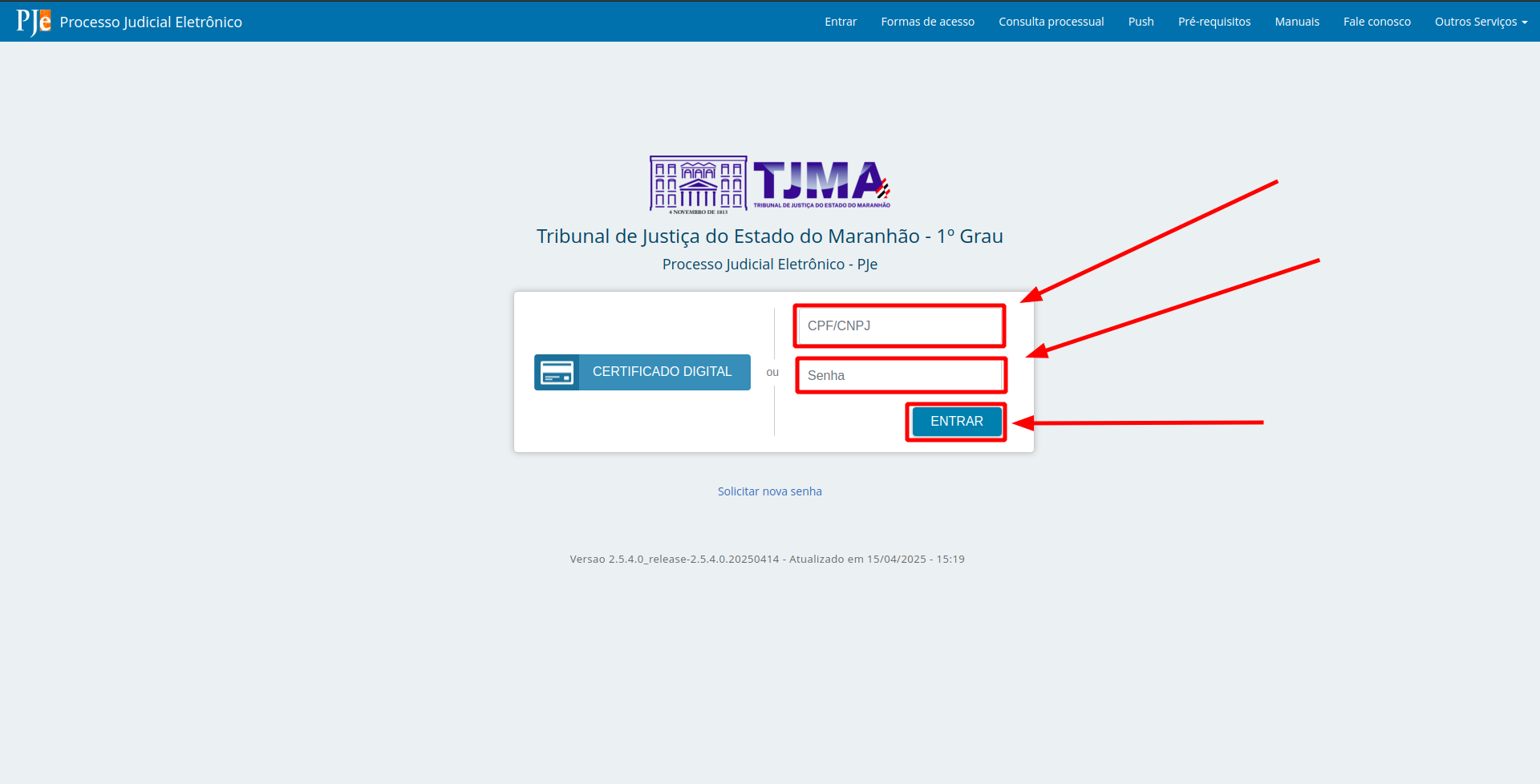
<table border="1" id="bkmrk-1---valide-os-campos" style="font-family: var(--font-body); font-size: 14px; width: 100%;"><colgroup><col style="width: 99.8765%;"></col></colgroup><tbody><tr><td>1 - Login utilizando **usuário** e **senha**:

- Valide os campos;
- Clique em "**Entrar**".

[![image.png](https://wiki.oystr.com.br/uploads/images/gallery/2025-05/scaled-1680-/tA6image.png)](https://wiki.oystr.com.br/uploads/images/gallery/2025-05/tA6image.png)
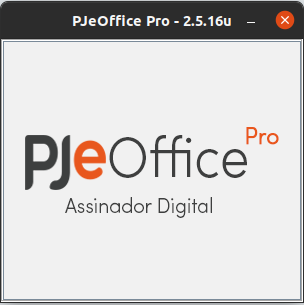
</td></tr><tr><td>2 - Login utilizando **certificado**:

- Inicie e configure o pje-office.

[![image.png](https://wiki.oystr.com.br/uploads/images/gallery/2025-05/scaled-1680-/X33image.png)](https://wiki.oystr.com.br/uploads/images/gallery/2025-05/X33image.png)
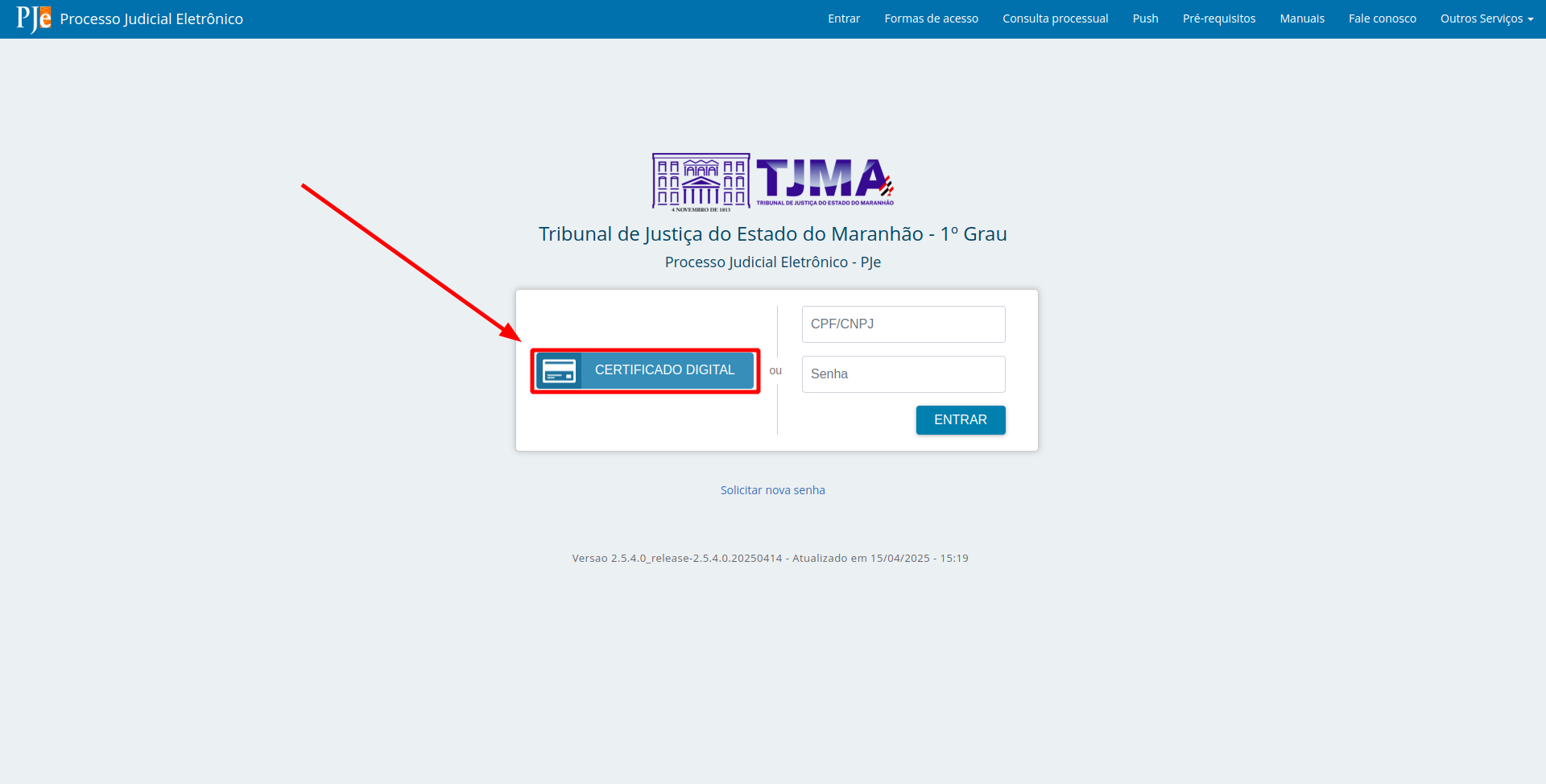
</td></tr><tr><td>3 - Clique em "**Certificado Digital**".

[![image.png](https://wiki.oystr.com.br/uploads/images/gallery/2025-05/scaled-1680-/v9gimage.png)](https://wiki.oystr.com.br/uploads/images/gallery/2025-05/v9gimage.png)
</td></tr><tr><td>4 - Selecione a opção "**Sim desta vez**" no pje-office.

[![image.png](https://wiki.oystr.com.br/uploads/images/gallery/2025-05/scaled-1680-/jU2image.png)](https://wiki.oystr.com.br/uploads/images/gallery/2025-05/jU2image.png)
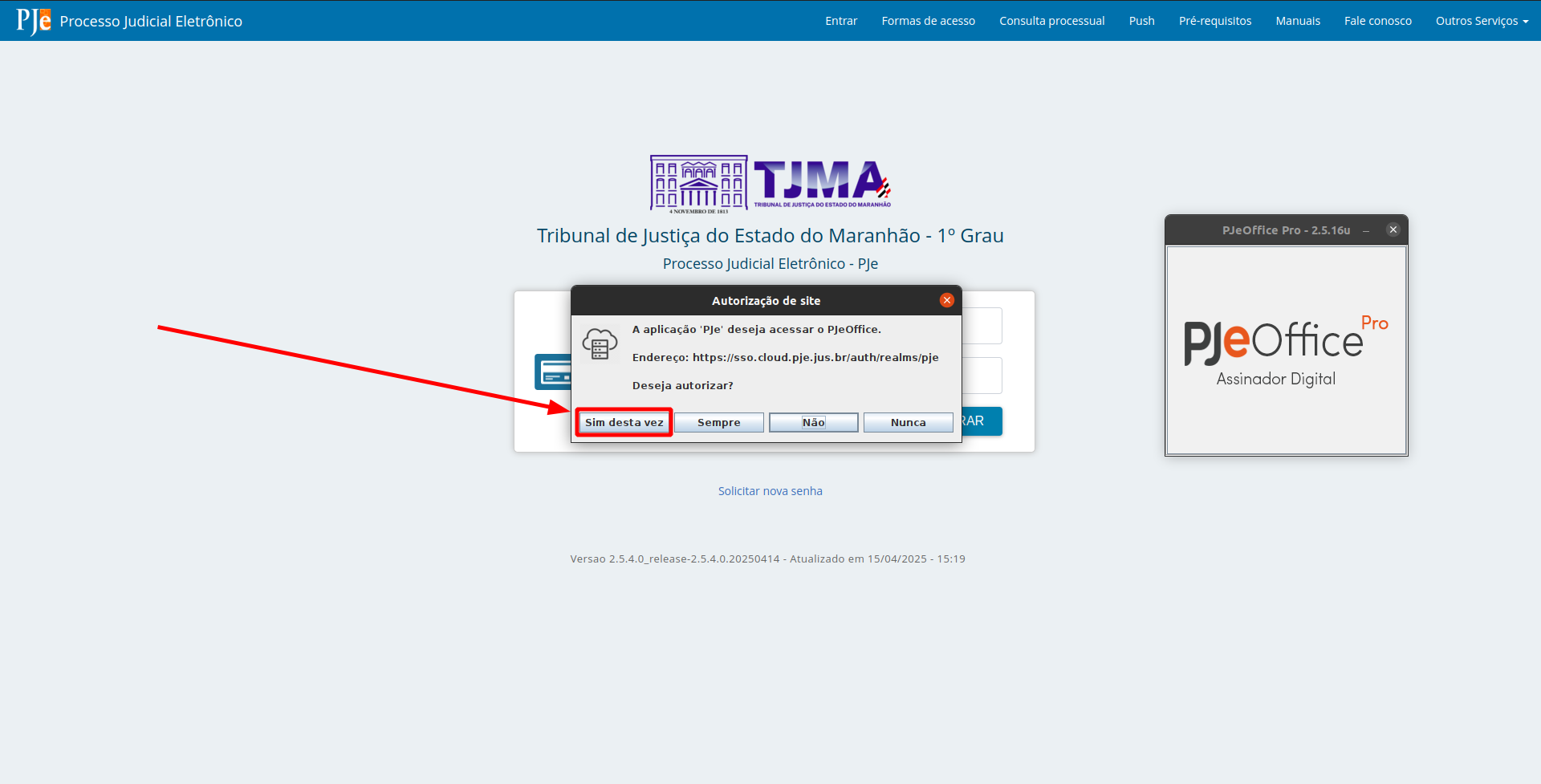
</td></tr><tr><td>5 - Valide a **senha** e clique em "**OK**".

[![image.png](https://wiki.oystr.com.br/uploads/images/gallery/2025-05/scaled-1680-/w2Limage.png)](https://wiki.oystr.com.br/uploads/images/gallery/2025-05/w2Limage.png)
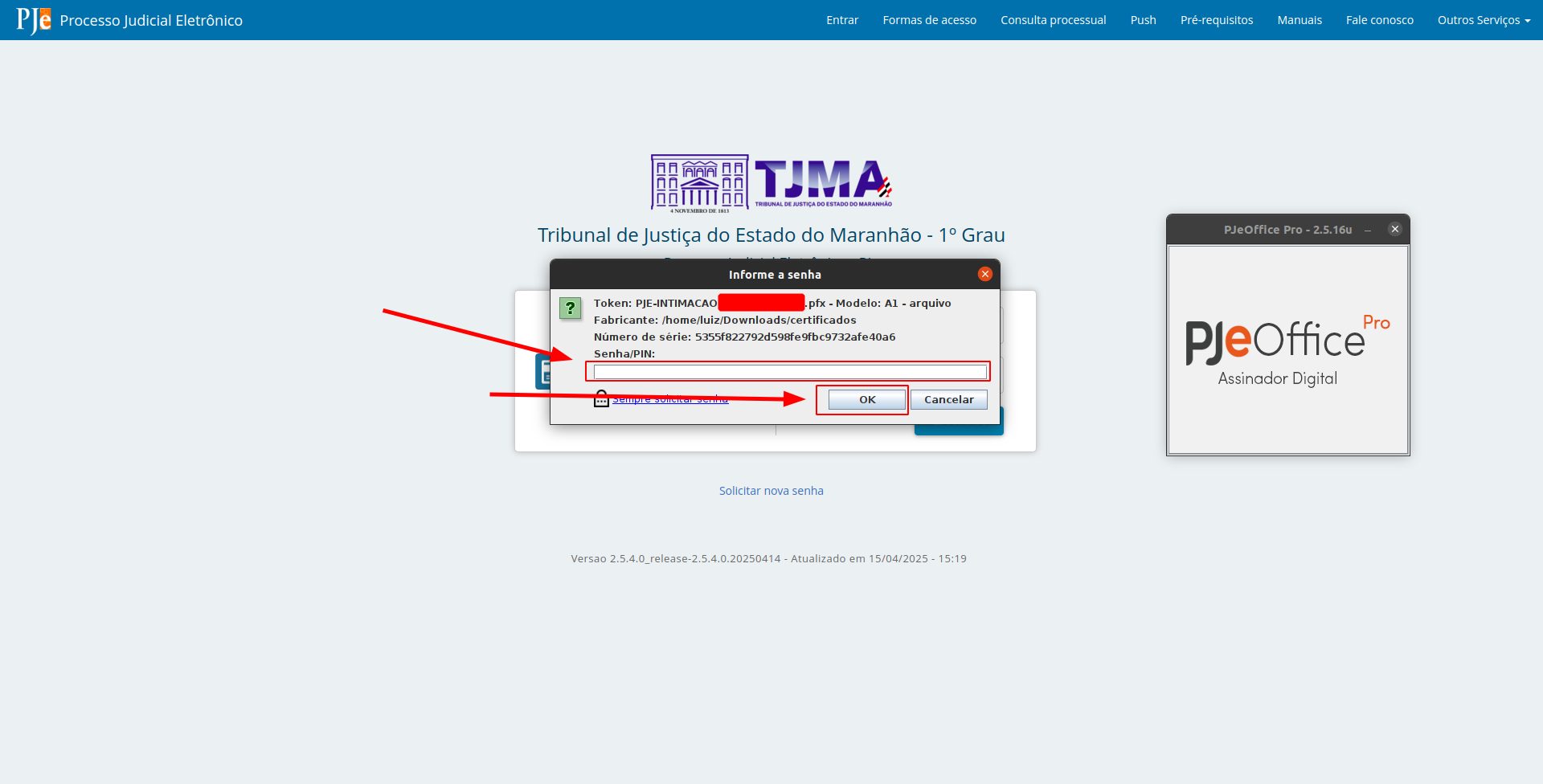
</td></tr></tbody></table>

#### <span class="align-center">**2.2 Proto Queue**</span>

<table border="1" id="bkmrk-1---selecione-os-tip" style="border-collapse: collapse; width: 100%;"><colgroup><col style="width: 99.8765%;"></col></colgroup><tbody><tr><td>1 - Selecione os **tipos de intimações** a **serem listadas**.

[![image.png](https://wiki.oystr.com.br/uploads/images/gallery/2025-05/scaled-1680-/JKoimage.png)](https://wiki.oystr.com.br/uploads/images/gallery/2025-05/JKoimage.png)
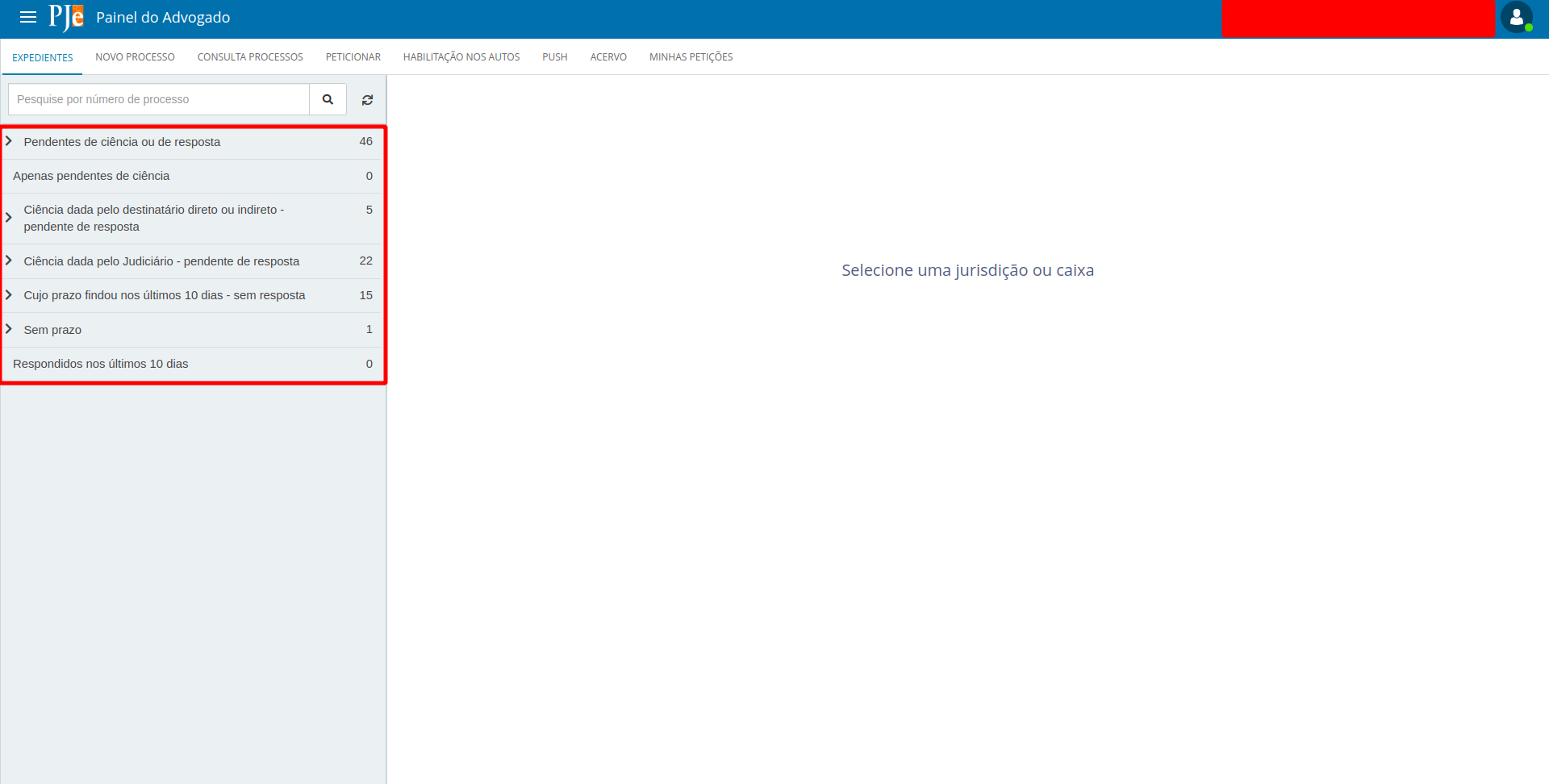
</td></tr><tr><td>2 - **Liste todas** as intimações presentes.

[![image.png](https://wiki.oystr.com.br/uploads/images/gallery/2025-05/scaled-1680-/HXJimage.png)](https://wiki.oystr.com.br/uploads/images/gallery/2025-05/HXJimage.png)
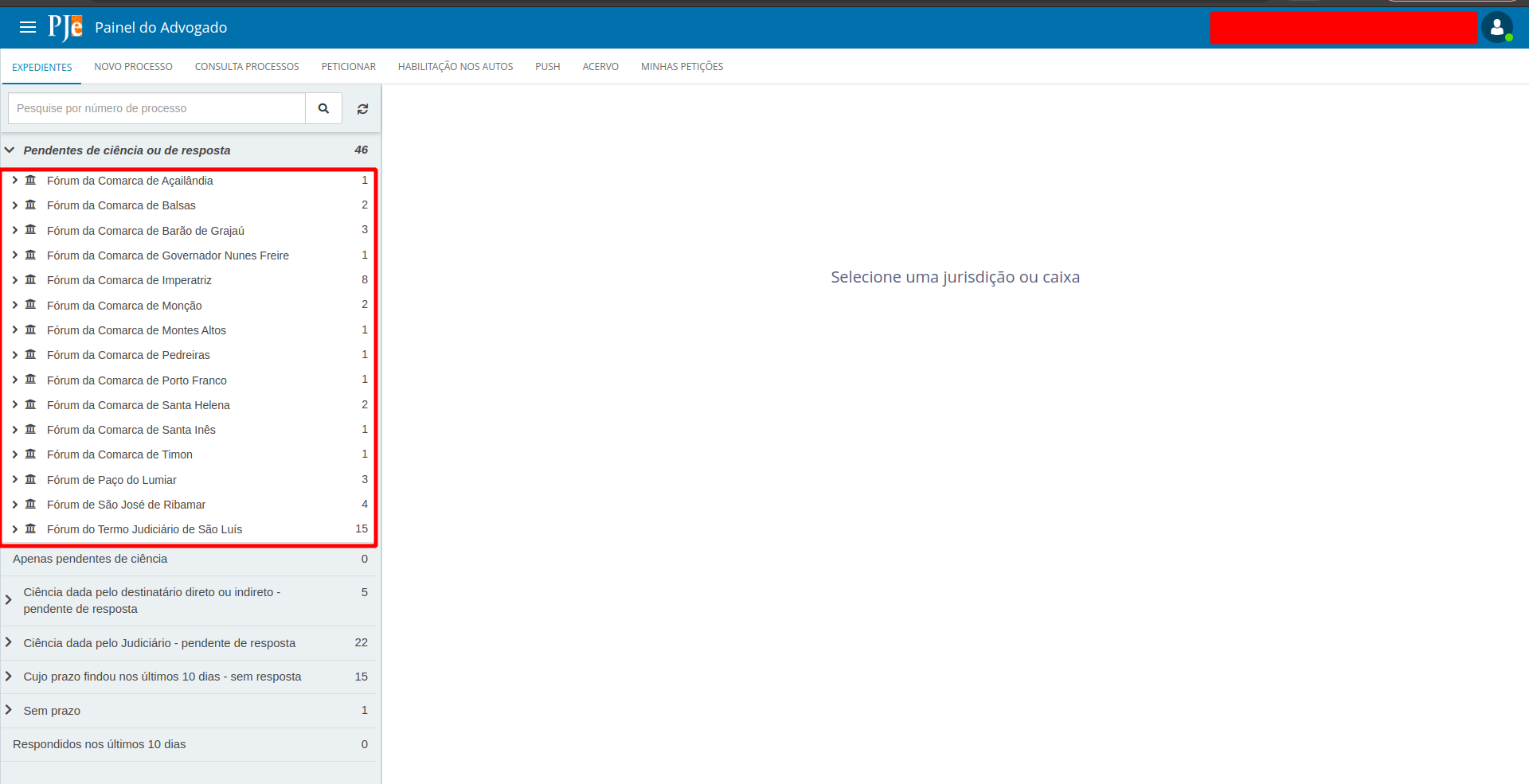
</td></tr></tbody></table>

#### <span class="align-center">**2.3 Bot** </span>

<table border="1" id="bkmrk-1---acesse-a-aba-com" style="border-collapse: collapse; width: 100%;"><colgroup><col style="width: 100%;"></col></colgroup><tbody><tr><td>1 - Acesse a aba com os **Tipos de** **Intimações**.

[![image.png](https://wiki.oystr.com.br/uploads/images/gallery/2025-05/scaled-1680-/JKoimage.png)](https://wiki.oystr.com.br/uploads/images/gallery/2025-05/JKoimage.png)

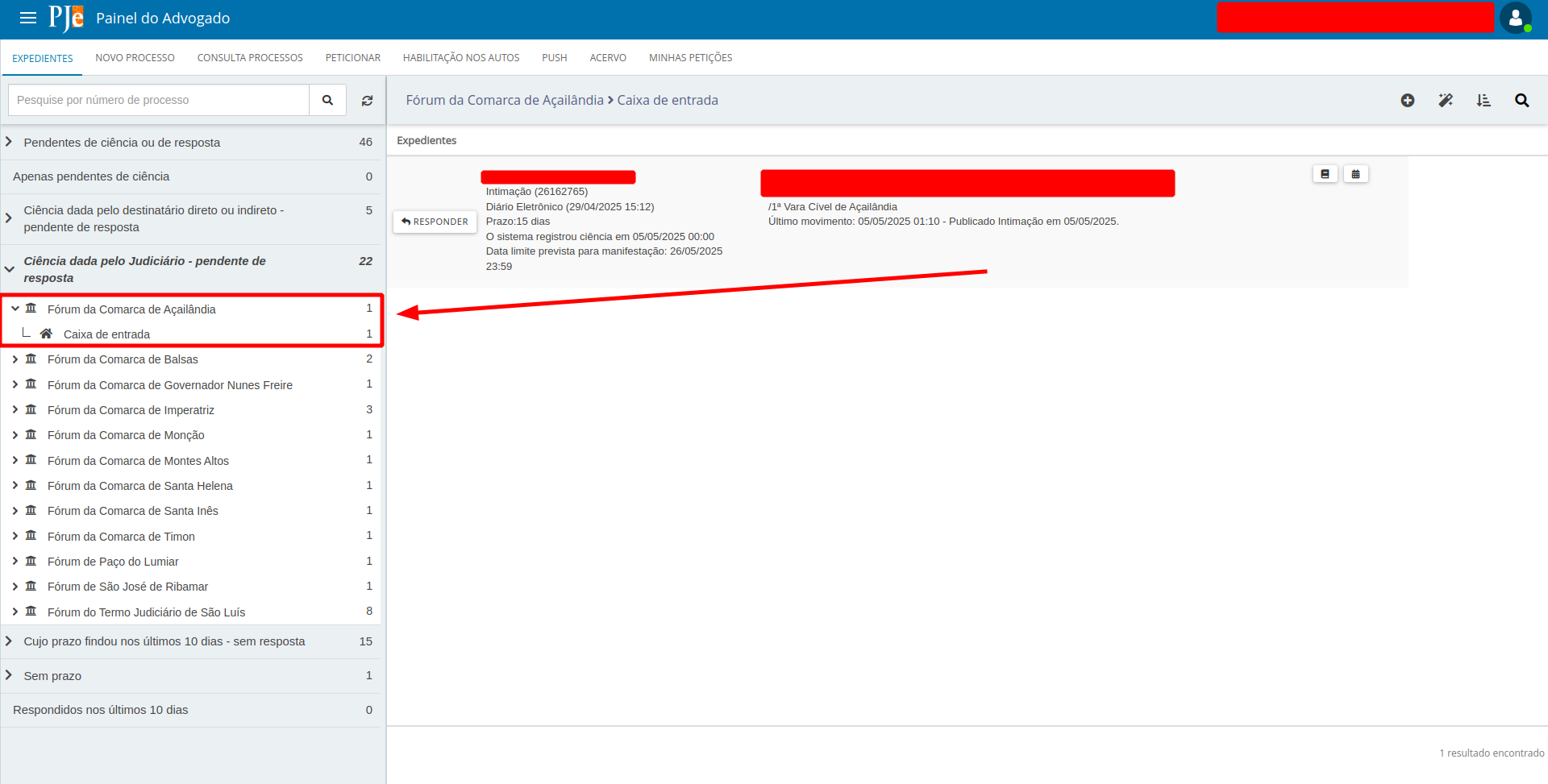
</td></tr><tr><td>2 - **Selecione a jurisdição** previamente determinada.

[![image.png](https://wiki.oystr.com.br/uploads/images/gallery/2025-05/scaled-1680-/iIdimage.png)](https://wiki.oystr.com.br/uploads/images/gallery/2025-05/iIdimage.png)
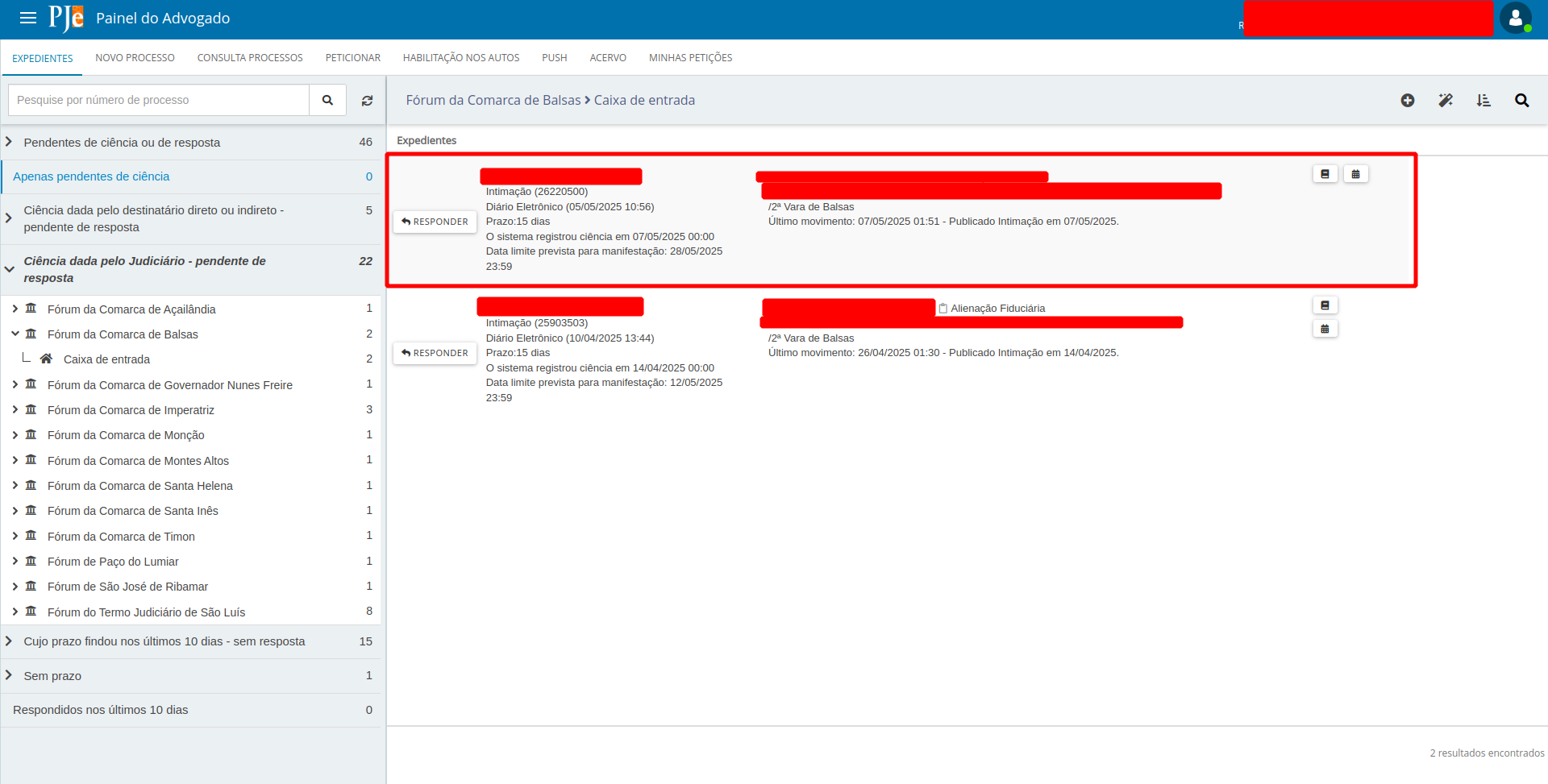
</td></tr><tr><td>3 - No expediente selecionado, **colete suas as informações**.

[![image.png](https://wiki.oystr.com.br/uploads/images/gallery/2025-05/scaled-1680-/kNoimage.png)](https://wiki.oystr.com.br/uploads/images/gallery/2025-05/kNoimage.png)
</td></tr><tr><td>4 - Tipos de cumprimento de Tarefa de Intimação:

- Intimação “**********Apenas pendentes de ciência**********”:

[![image.png](https://wiki.oystr.com.br/uploads/images/gallery/2025-05/scaled-1680-/g0Fimage.png)](https://wiki.oystr.com.br/uploads/images/gallery/2025-05/g0Fimage.png)
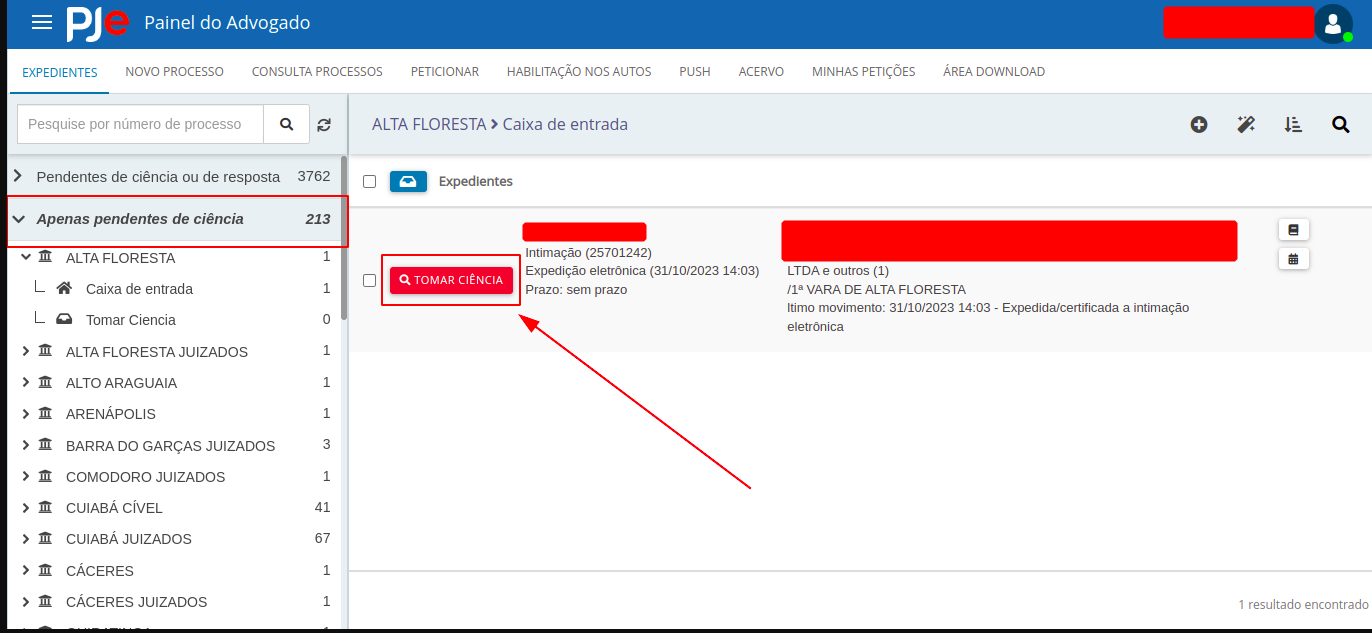
- - Clique em "**Tomar ciência**".

- Outros tipos de intimação:

[![image.png](https://wiki.oystr.com.br/uploads/images/gallery/2025-05/scaled-1680-/kgSimage.png)](https://wiki.oystr.com.br/uploads/images/gallery/2025-05/kgSimage.png)
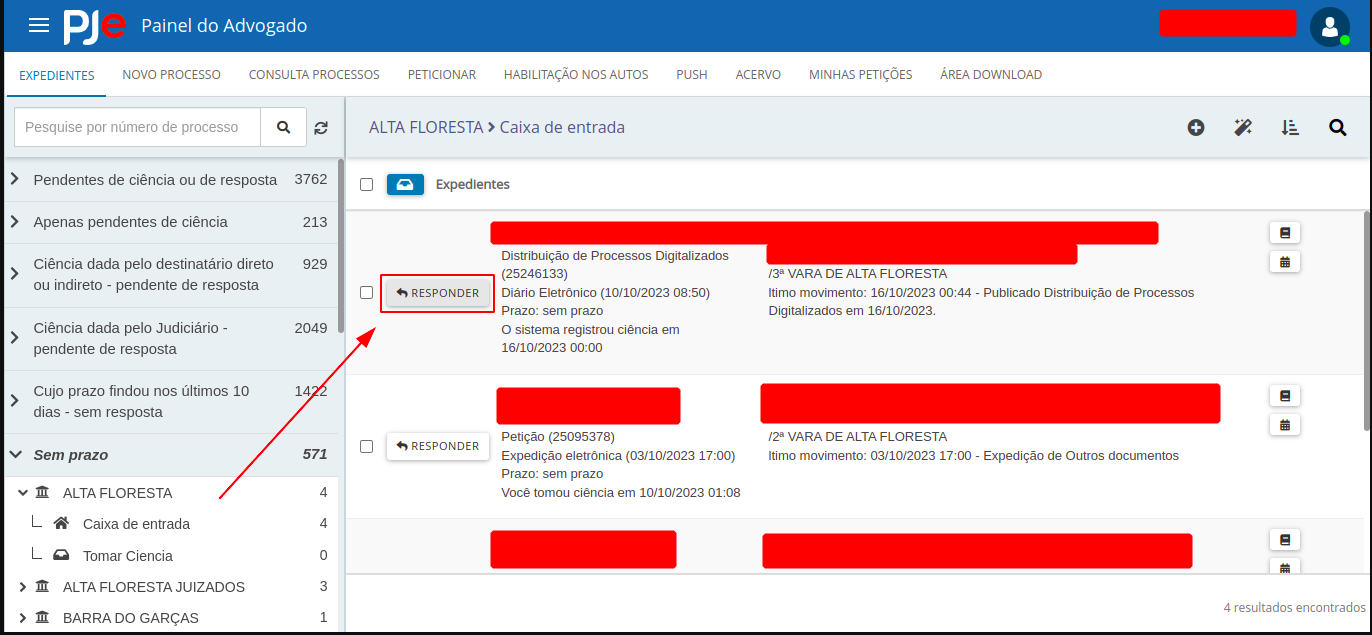
- - Clique em "**Responder**".

[![image.png](https://wiki.oystr.com.br/uploads/images/gallery/2025-05/scaled-1680-/060image.png)](https://wiki.oystr.com.br/uploads/images/gallery/2025-05/060image.png)
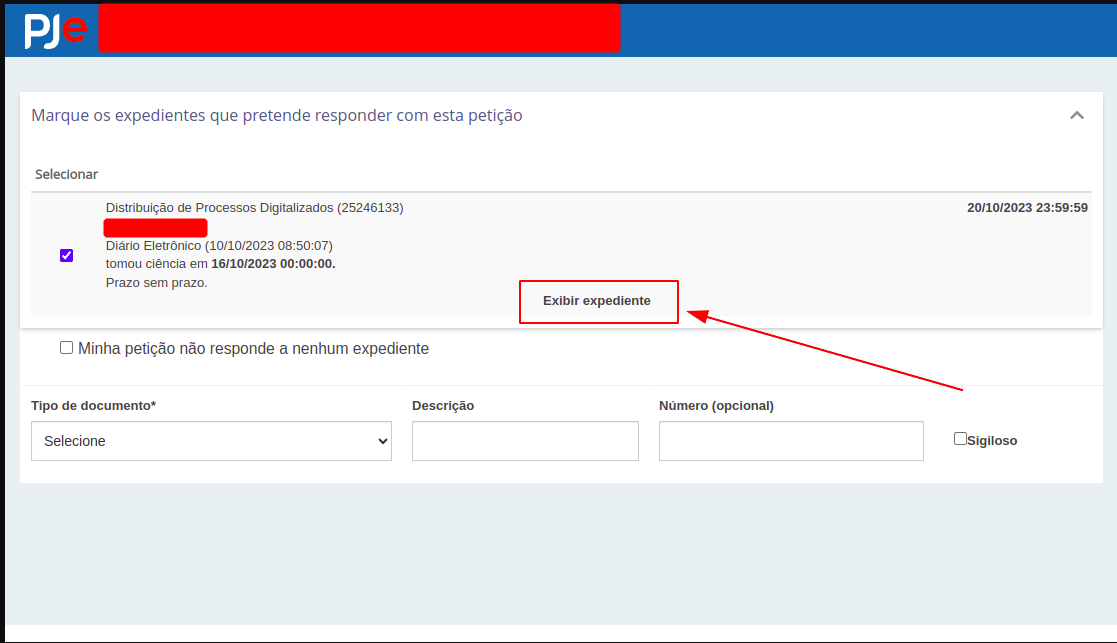
- - Clique em "**Exibir Expediente**" e **colete todas as informações** da intimação.

</td></tr><tr><td>5 - <span style="text-decoration: underline;"><span style="color: rgb(0, 0, 0); text-decoration: underline;">**Retorne o comprovante de realização da tarefa.**</span></span>

</td></tr></tbody></table>


### **3 Dados de entrada**

<p class="callout info">**Tabela Scheduler**</p>

<table border="1" id="bkmrk-nome-valor" style="border-collapse: collapse; width: 100%; height: 59.5938px;"><colgroup><col style="width: 24.9691%;"></col><col style="width: 33.9959%;"></col><col style="width: 15.9423%;"></col><col style="width: 25.0927%;"></col></colgroup><tbody><tr style="height: 29.7969px;"><td style="height: 29.7969px;">PROPRIEDADE</td><td>CAMPO PAINEL</td><td style="height: 29.7969px;">CAMPO OBRIGATÓRIO</td><td>DESCRIÇÃO</td></tr><tr style="height: 29.7969px;"><td style="height: 29.7969px;">tribunal</td><td>Qual estado?

</td><td style="height: 29.7969px;">Sim</td><td>Tribunal onde será feito a abertura de intimações.</td></tr><tr><td>typeSearch</td><td>Tipo

</td><td>Sim</td><td>Tipos de intimações para serem lidas.

Ex.: 01 - Aguardando Cumprimento;

04 - Lidas.

</td></tr><tr><td>Perfil</td><td>Nome do Perfil</td><td>Não</td><td>Perfil que o robô irá realizar a tarefa.</td></tr><tr><td>todosPerfis</td><td>Listar intimações de todos os perfis</td><td>Não</td><td>O robô irá listar as intimações de todos os perfis.</td></tr><tr><td>subPasta</td><td>Subpasta</td><td>Não</td><td>Informe a subpasta desejada.</td></tr><tr><td>listarTodasSubpastas</td><td>Listar todas as subpastas?</td><td>Não</td><td>O robô irá listar todas as subpastas.</td></tr><tr><td>intimacaoParcial</td><td>Trazer Comarcas com Erro</td><td>Não</td><td>O robô irá listar as comarcas com erro.</td></tr><tr><td>todasPartes</td><td>Trazer Partes Ocultas</td><td>Não</td><td>O robô trará as partes ocultas de um processo.</td></tr><tr><td>trazerDiarioOficial</td><td>Trazer Intimações de Diario Oficial</td><td>Não</td><td>O robô trará as intimações presentes no Diário Oficial.</td></tr><tr><td>ignorarCienciaIndisponivel</td><td>Ignorar Intimação quando não for possivel tomar ciência</td><td>Não</td><td>O robô apenas irá listar as intimações que possuem a opção "Tomar Ciência".</td></tr><tr><td>trazerSomenteCienciaIndisponivel</td><td>Trazer somente intimações que não for possivel tomar ciência</td><td>Não</td><td>O robô apenas irá listar as intimações que não são possíveis tomar ciência.</td></tr></tbody></table>


#### **4 Restrições e Premissas**


> - Tribunal deve ser informado corretamente;
> - Credenciais devem estar válidas/ativas;
> - Apenas selecionar as intimações desejadas;
> - Perfil escolhido deve ter acesso às intimações;
> - Processo deve estar ativo;
> - Intimação deve constar no site do tribunal;

# stj-leitura-intimacoes

### **<span class="align-center" style="color: rgb(0, 0, 0);">1 Descrição do processo</span>**

#### <span class="align-center" style="color: rgb(0, 0, 0);">**1.2 Programas e Aplicações**  
</span>

<table border="1" id="bkmrk-nome-do-sistema-url-" style="width: 100%; border-collapse: collapse; height: 64.125px;"><colgroup><col style="width: 50.0508%;" width="60"></col><col style="width: 49.9492%;" width="81"></col></colgroup><tbody><tr style="height: 37.375px; background-color: rgb(41, 127, 213);"><td style="height: 37.375px;"><span style="color: rgb(255, 255, 255);">**Nome do Sistema**</span>

</td><td style="height: 37.375px;"><span style="color: rgb(255, 255, 255);">**URL**</span>

</td></tr><tr style="height: 26.75px;"><td style="height: 26.75px;">**STJ**

</td><td style="height: 26.75px;"> </td></tr></tbody></table>

### <span style="color: rgb(0, 0, 0);">**2 Detalhamento do Processo**</span>

#### <span style="color: rgb(0, 0, 0);">**2.1 Robô**</span>

<table border="1" id="bkmrk-" style="border-collapse: collapse; width: 100%;"><colgroup><col style="width: 99.8765%;"></col></colgroup><tbody><tr><td>**Login**  
</td></tr><tr><td>[![image.png](https://wiki.oystr.com.br/uploads/images/gallery/2024-04/scaled-1680-/7pcimage.png)](https://wiki.oystr.com.br/uploads/images/gallery/2024-04/7pcimage.png)

</td></tr><tr><td>****Ação:**** Ao acessar o site do STJ, seremos direcionados para a página de login, onde primeiramente iremos inserir o nome de usuário e em seguida a senha. Feito isso basta clicar em “****Entrar****”.'</td></tr><tr><td>[![image.png](https://wiki.oystr.com.br/uploads/images/gallery/2024-04/scaled-1680-/NMYimage.png)](https://wiki.oystr.com.br/uploads/images/gallery/2024-04/NMYimage.png)

  
</td></tr><tr><td>******Ação:****** Feito isso estaremos logados no sistema.</td></tr></tbody></table>

<table border="1" id="bkmrk-leitura-de-processos" style="border-collapse: collapse; width: 100%;"><colgroup><col style="width: 99.8765%;"></col></colgroup><tbody><tr><td>**Leitura de processos**  
</td></tr><tr><td>[![image.png](https://wiki.oystr.com.br/uploads/images/gallery/2024-04/scaled-1680-/Rbqimage.png)](https://wiki.oystr.com.br/uploads/images/gallery/2024-04/Rbqimage.png)

</td></tr><tr><td>**Ação**: No sistema, iremos clicar sob a opção “**Processos Tramitando**”.

</td></tr><tr><td>[![image.png](https://wiki.oystr.com.br/uploads/images/gallery/2024-04/scaled-1680-/Cnhimage.png)](https://wiki.oystr.com.br/uploads/images/gallery/2024-04/Cnhimage.png)

</td></tr><tr><td>**Ação**: Na tela, será apresentado os processos.

</td></tr><tr><td>[![image.png](https://wiki.oystr.com.br/uploads/images/gallery/2024-04/scaled-1680-/qH3image.png)](https://wiki.oystr.com.br/uploads/images/gallery/2024-04/qH3image.png)

</td></tr><tr><td>**Ação**: Após a pesquisa, iremos extrair as informações de cada processo disponível, sendo elas:

**Processo**;

**Nome da parte**;

**Última Fase/Andamento**;

**Ministro(a) Relator(a)**;

**Órgão Julgador**;

<span style="color: rgb(224, 62, 45);">**Importante: Não abrir o prazo em nenhuma hipótese.** </span>

<span style="color: rgb(224, 62, 45);">**Apenas executar as leituras dessas informações disponibilizadas.**</span>

</td></tr></tbody></table>

#### <span style="color: rgb(0, 0, 0);">**2.1 Alterações**</span>

### <span style="color: rgb(0, 0, 0);">**3 **Regras de Negócio****</span>

#### <span style="color: rgb(0, 0, 0);">****3.1 **Arquivo de entrada do robô******</span>

##### <span style="color: rgb(0, 0, 0);">**3.1.1 XLS**</span>

<table border="1" id="bkmrk-descri%C3%87%C3%83o-propriedad" style="width: 100%; border-collapse: collapse; height: 64.125px;"><colgroup><col style="width: 50.0508%;" width="60"></col><col style="width: 49.9492%;" width="81"></col></colgroup><tbody><tr style="height: 37.375px; background-color: rgb(41, 127, 213);"><td style="height: 37.375px;"><span style="color: rgb(255, 255, 255);">**DESCRIÇÃO**</span>

</td><td style="height: 37.375px;"><span style="color: rgb(255, 255, 255);">**PROPRIEDADE**</span>

</td></tr><tr style="height: 26.75px;"><td style="height: 26.75px;"></td><td style="height: 26.75px;">  
</td></tr></tbody></table>

##### <span style="color: rgb(0, 0, 0);">**3.1.2 XML**</span>

<table border="1" id="bkmrk-descri%C3%87%C3%83o-propriedad-1" style="width: 100%; border-collapse: collapse; height: 64.125px;"><colgroup><col style="width: 50.0508%;" width="60"></col><col style="width: 49.9492%;" width="81"></col></colgroup><tbody><tr style="height: 37.375px; background-color: rgb(41, 127, 213);"><td style="height: 37.375px;"><span style="color: rgb(255, 255, 255);">**DESCRIÇÃO**</span>

</td><td style="height: 37.375px;"><span style="color: rgb(255, 255, 255);">**PROPRIEDADE**</span>

</td></tr><tr style="height: 26.75px;"><td style="height: 26.75px;"></td><td style="height: 26.75px;">  
</td></tr></tbody></table>

##### <span style="color: rgb(0, 0, 0);">**3.1.3 FILTROS**</span>

<table border="1" id="bkmrk-descri%C3%87%C3%83o-propriedad-2" style="width: 100%; border-collapse: collapse; height: 64.125px;"><colgroup><col style="width: 50.0508%;" width="60"></col><col style="width: 49.9492%;" width="81"></col></colgroup><tbody><tr style="height: 37.375px; background-color: rgb(41, 127, 213);"><td style="height: 37.375px;"><span style="color: rgb(255, 255, 255);">**DESCRIÇÃO**</span>

</td><td style="height: 37.375px;"><span style="color: rgb(255, 255, 255);">**PROPRIEDADE**</span>

</td></tr><tr style="height: 26.75px;"><td style="height: 26.75px;"></td><td style="height: 26.75px;">  
</td></tr></tbody></table>

#### <span style="color: rgb(0, 0, 0);">**3.1 **Arquivo de saída****</span>

# tcu-intimacao

#### **<span class="align-center" style="color: rgb(0, 0, 0);">1 Descrição do processo</span>**

#### <span class="align-center" style="color: rgb(0, 0, 0);">**1.2 Programas e Aplicações**  
</span>

<table border="1" id="bkmrk-nome-do-sistema-url-" style="width: 100%; border-collapse: collapse; height: 64.125px;"><colgroup><col style="width: 50.0508%;" width="60"></col><col style="width: 49.9492%;" width="81"></col></colgroup><tbody><tr style="height: 37.375px; background-color: rgb(41, 127, 213);"><td style="height: 37.375px;"><span style="color: rgb(255, 255, 255);">**Nome do Sistema**</span>

</td><td style="height: 37.375px;"><span style="color: rgb(255, 255, 255);">**URL**</span>

</td></tr><tr style="height: 26.75px;"><td style="height: 26.75px;">**TCU**

</td><td style="height: 26.75px;">https://portal.tcu.gov.br/inicio/index.htm</td></tr></tbody></table>

#### <span style="color: rgb(0, 0, 0);">**2 Detalhamento do Processo**</span>

<table border="1" id="bkmrk-" style="border-collapse: collapse; width: 100%; height: 1048.77px;"><colgroup><col style="width: 99.8765%;"></col></colgroup><tbody><tr style="height: 29.7969px;"><td style="height: 29.7969px;">**Sistema**  
</td></tr><tr style="height: 212.797px;"><td style="height: 212.797px;">[![image.png](https://wiki.oystr.com.br/uploads/images/gallery/2024-04/scaled-1680-/vOKimage.png)](https://wiki.oystr.com.br/uploads/images/gallery/2024-04/vOKimage.png)

</td></tr><tr style="height: 35.3906px;"><td style="height: 35.3906px;">****Ação:**** Para dar início ao processo de protocolo, será necessário acessar o sistema ****[TCU](https://portal.tcu.gov.br/inicio/index.htm)****.</td></tr></tbody></table>

<table border="1" id="bkmrk-passo-a-passo-a%C3%A7%C3%A3o%3A%C2%A0" style="border-collapse: collapse; width: 100%;"><colgroup><col style="width: 100%;"></col></colgroup><tbody><tr><td>******Passo a passo******</td></tr><tr><td>[![image.png](https://wiki.oystr.com.br/uploads/images/gallery/2024-04/scaled-1680-/Iokimage.png)](https://wiki.oystr.com.br/uploads/images/gallery/2024-04/Iokimage.png)

</td></tr><tr><td style="height: 29.7969px;">******Ação:****** No sistema, iremos na opção “******Conecta TCU******”.</td></tr><tr><td style="height: 206.797px;">[![image.png](https://wiki.oystr.com.br/uploads/images/gallery/2024-04/scaled-1680-/89Eimage.png)](https://wiki.oystr.com.br/uploads/images/gallery/2024-04/89Eimage.png)

  
</td></tr><tr><td style="height: 29.7969px;">********Ação:******** Em seguida, iremos na opção “********Acessar serviços********”.</td></tr><tr><td style="height: 287.797px;">[![image.png](https://wiki.oystr.com.br/uploads/images/gallery/2024-04/scaled-1680-/V0yimage.png)](https://wiki.oystr.com.br/uploads/images/gallery/2024-04/V0yimage.png)

  
</td></tr><tr><td style="height: 29.7969px;">**********Ação:********** No sistema, iremos na opção de login e senha e em seguida iremos clicar na opção “**********Enviar**********”.</td></tr><tr><td>[![image.png](https://wiki.oystr.com.br/uploads/images/gallery/2024-04/scaled-1680-/YaFimage.png)](https://wiki.oystr.com.br/uploads/images/gallery/2024-04/YaFimage.png)

  
</td></tr><tr><td>************Ação:************ Feito isso, estaremos no sistema.</td></tr><tr><td>[![image.png](https://wiki.oystr.com.br/uploads/images/gallery/2024-04/scaled-1680-/4kkimage.png)](https://wiki.oystr.com.br/uploads/images/gallery/2024-04/4kkimage.png)

  
</td></tr><tr><td>**************Ação:************** No sistema, iremos clicar sob a opção “**************Minhas comunicações**************”.</td></tr><tr><td>[![image.png](https://wiki.oystr.com.br/uploads/images/gallery/2024-04/scaled-1680-/J7Ximage.png)](https://wiki.oystr.com.br/uploads/images/gallery/2024-04/J7Ximage.png)

  
</td></tr><tr><td>****************Ação:**************** Feito isso, iremos clicar sob a opção “****************Pendentes de ciência****************” e iremos clicar sob o símbolo de ação do lado e ir ate a opção “****************Acessar comunicação****************”.</td></tr></tbody></table>

#### <span style="color: rgb(0, 0, 0);">**3 **Regras de Negócio****</span>

#### <span style="color: rgb(0, 0, 0);">****3.1 **Arquivo de entrada do robô******</span>

#### <span style="color: rgb(0, 0, 0);">**3.1.1 XLS**</span>

<table border="1" id="bkmrk-descri%C3%87%C3%83o-propriedad" style="width: 100%; border-collapse: collapse; height: 64.125px;"><colgroup><col style="width: 50.0508%;" width="60"></col><col style="width: 49.9492%;" width="81"></col></colgroup><tbody><tr style="height: 37.375px; background-color: rgb(41, 127, 213);"><td style="height: 37.375px;"><span style="color: rgb(255, 255, 255);">**DESCRIÇÃO**</span>

</td><td style="height: 37.375px;"><span style="color: rgb(255, 255, 255);">**PROPRIEDADE**</span>

</td></tr><tr style="height: 26.75px;"><td style="height: 26.75px;"></td><td style="height: 26.75px;">  
</td></tr></tbody></table>

#### <span style="color: rgb(0, 0, 0);">**3.1.2 XML**</span>

<table border="1" id="bkmrk-descri%C3%87%C3%83o-propriedad-1" style="width: 100%; border-collapse: collapse; height: 64.125px;"><colgroup><col style="width: 50.0508%;" width="60"></col><col style="width: 49.9492%;" width="81"></col></colgroup><tbody><tr style="height: 37.375px; background-color: rgb(41, 127, 213);"><td style="height: 37.375px;"><span style="color: rgb(255, 255, 255);">**DESCRIÇÃO**</span>

</td><td style="height: 37.375px;"><span style="color: rgb(255, 255, 255);">**PROPRIEDADE**</span>

</td></tr><tr style="height: 26.75px;"><td style="height: 26.75px;"></td><td style="height: 26.75px;">  
</td></tr></tbody></table>

#### <span style="color: rgb(0, 0, 0);">**3.1.3 FILTROS**</span>

<table border="1" id="bkmrk-descri%C3%87%C3%83o-propriedad-2" style="width: 100%; border-collapse: collapse; height: 64.125px;"><colgroup><col style="width: 50.0508%;" width="60"></col><col style="width: 49.9492%;" width="81"></col></colgroup><tbody><tr style="height: 37.375px; background-color: rgb(41, 127, 213);"><td style="height: 37.375px;"><span style="color: rgb(255, 255, 255);">**DESCRIÇÃO**</span>

</td><td style="height: 37.375px;"><span style="color: rgb(255, 255, 255);">**PROPRIEDADE**</span>

</td></tr><tr style="height: 26.75px;"><td style="height: 26.75px;"></td><td style="height: 26.75px;">  
</td></tr></tbody></table>

#### <span style="color: rgb(0, 0, 0);">**3.1 **Arquivo de saída****</span>