# projuris-brb-andamento-documento

### **<span class="align-center" style="color: rgb(0, 0, 0);">1 Descrição do processo</span>**

#### <span class="align-center" style="color: rgb(0, 0, 0);">**1.2 Programas e Aplicações**  
</span>

<table border="1" id="bkmrk-nome-do-sistema-url-" style="width: 100%; border-collapse: collapse; height: 64.125px;"><colgroup><col style="width: 50.0508%;" width="60"></col><col style="width: 49.9492%;" width="81"></col></colgroup><tbody><tr style="height: 37.375px; background-color: rgb(41, 127, 213);"><td style="height: 37.375px;"><span style="color: rgb(255, 255, 255);">**Nome do Sistema**</span>

</td><td style="height: 37.375px;"><span style="color: rgb(255, 255, 255);">**URL**</span>

</td></tr><tr style="height: 26.75px;"><td style="height: 26.75px;">**<span style="color: rgb(0, 0, 0);">Projuris</span>**

</td><td style="height: 26.75px;"><span style="color: rgb(0, 0, 0);"> https://cju.brb.com.br/projuris</span></td></tr></tbody></table>

### <span style="color: rgb(0, 0, 0);">**2 Detalhamento do Processo**</span>

#### <span style="color: rgb(0, 0, 0);">**2.1 Robô**</span>

<table border="1" id="bkmrk-" style="border-collapse: collapse; width: 100%; height: 6005.83px;"><colgroup><col style="width: 99.8765%;"></col></colgroup><tbody><tr style="height: 29.7969px;"><td style="height: 29.7969px;"><span style="color: rgb(0, 0, 0);">**2.1.1 - Sistema**</span></td></tr><tr style="height: 499.75px;"><td style="height: 499.75px;">[![image.png](https://wiki.oystr.com.br/uploads/images/gallery/2025-10/scaled-1680-/0Siimage.png)](https://wiki.oystr.com.br/uploads/images/gallery/2025-10/0Siimage.png)

  
<span style="color: rgb(0, 0, 0);">  
</span>

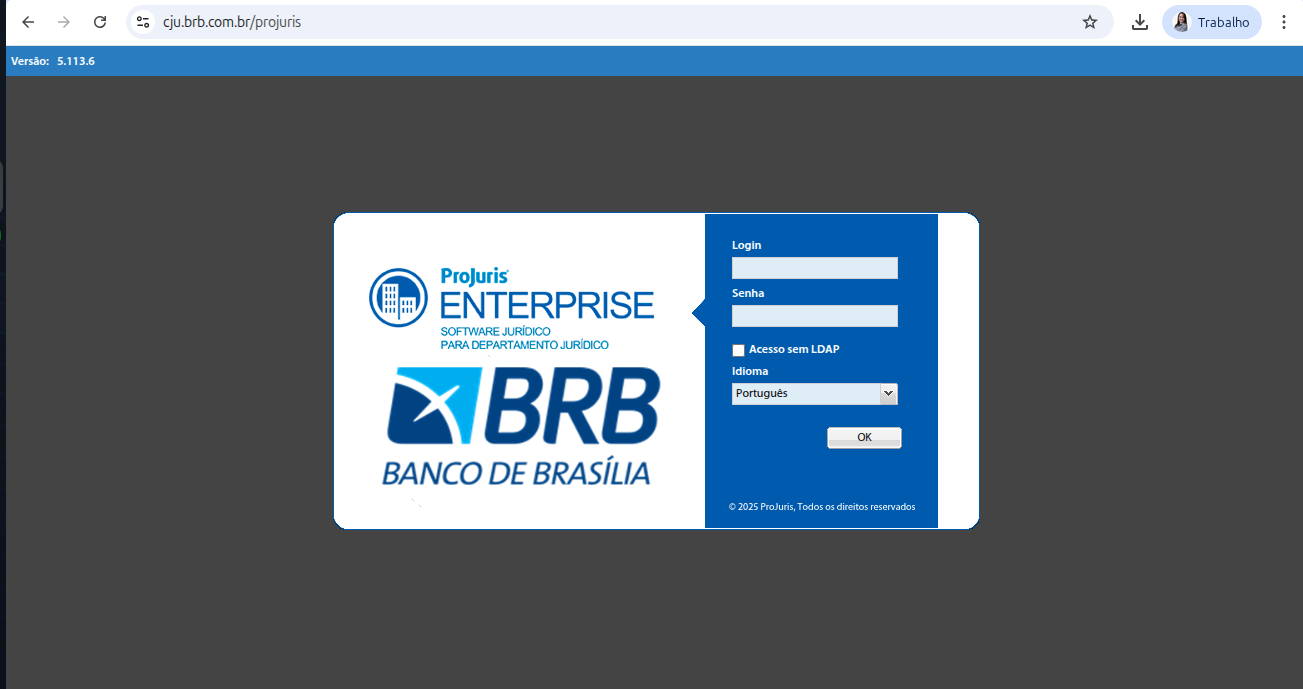
<span style="color: rgb(0, 0, 0);">**Ação:** Acesse o site do [Projuris-brb](https://digio.projuris.com.br/projuris)</span>

</td></tr><tr style="height: 35.3906px;"><td style="height: 35.3906px;">**<span style="color: rgb(0, 0, 0);">2.1.2 - Login</span>**

</td></tr><tr style="height: 460.562px;"><td style="height: 460.562px;">[![image.png](https://wiki.oystr.com.br/uploads/images/gallery/2025-10/scaled-1680-/0Siimage.png)](https://wiki.oystr.com.br/uploads/images/gallery/2025-10/0Siimage.png)  
**<span style="color: rgb(0, 0, 0);">Ação: </span>**<span style="color: rgb(0, 0, 0);">Para logar preencha os campos: "**Login**" e "**Senha**" e marque a opção "**Acesso sem LDAP"**.</span>

</td></tr><tr style="height: 390.359px;"><td style="height: 390.359px;">[![image.png](https://wiki.oystr.com.br/uploads/images/gallery/2025-10/scaled-1680-/TOUimage.png)](https://wiki.oystr.com.br/uploads/images/gallery/2025-10/TOUimage.png)

  
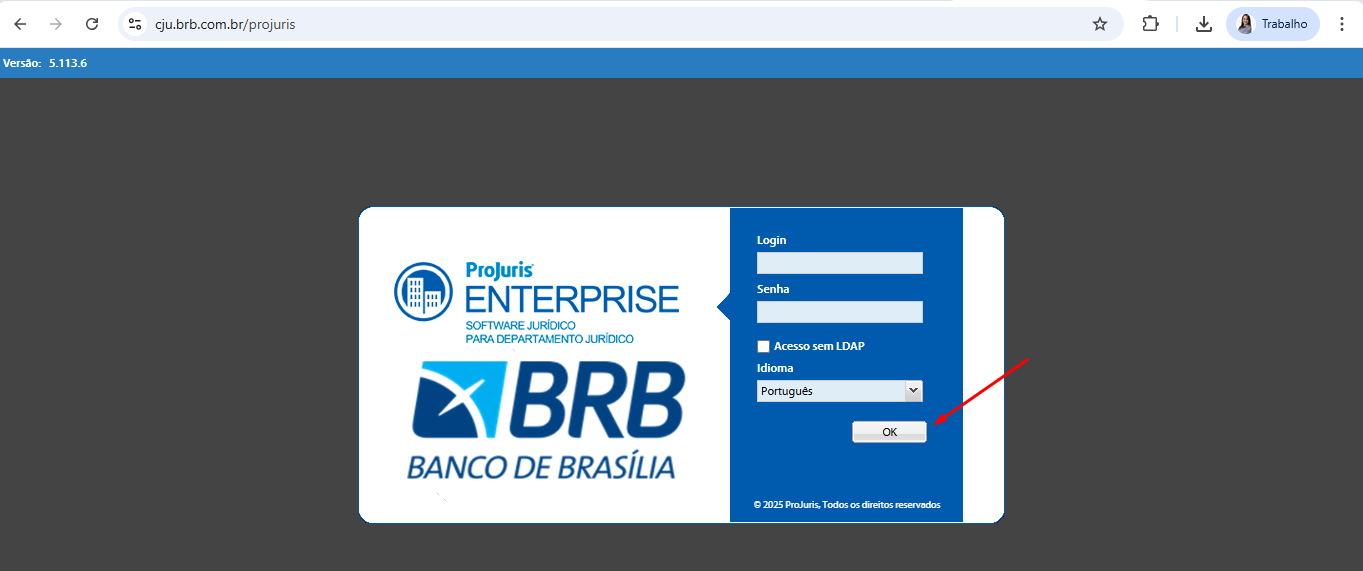
**<span style="color: rgb(0, 0, 0);">Ação: </span>**<span style="color: rgb(0, 0, 0);">Validado os campos, clique em "**OK**".</span>

</td></tr><tr style="height: 35.3906px;"><td style="height: 35.3906px;">**<span style="color: rgb(0, 0, 0);">2.1.3 - Acesso</span>**

</td></tr><tr style="height: 480.359px;"><td style="height: 480.359px;">[![image.png](https://wiki.oystr.com.br/uploads/images/gallery/2025-10/scaled-1680-/sV9image.png)](https://wiki.oystr.com.br/uploads/images/gallery/2025-10/sV9image.png)

  
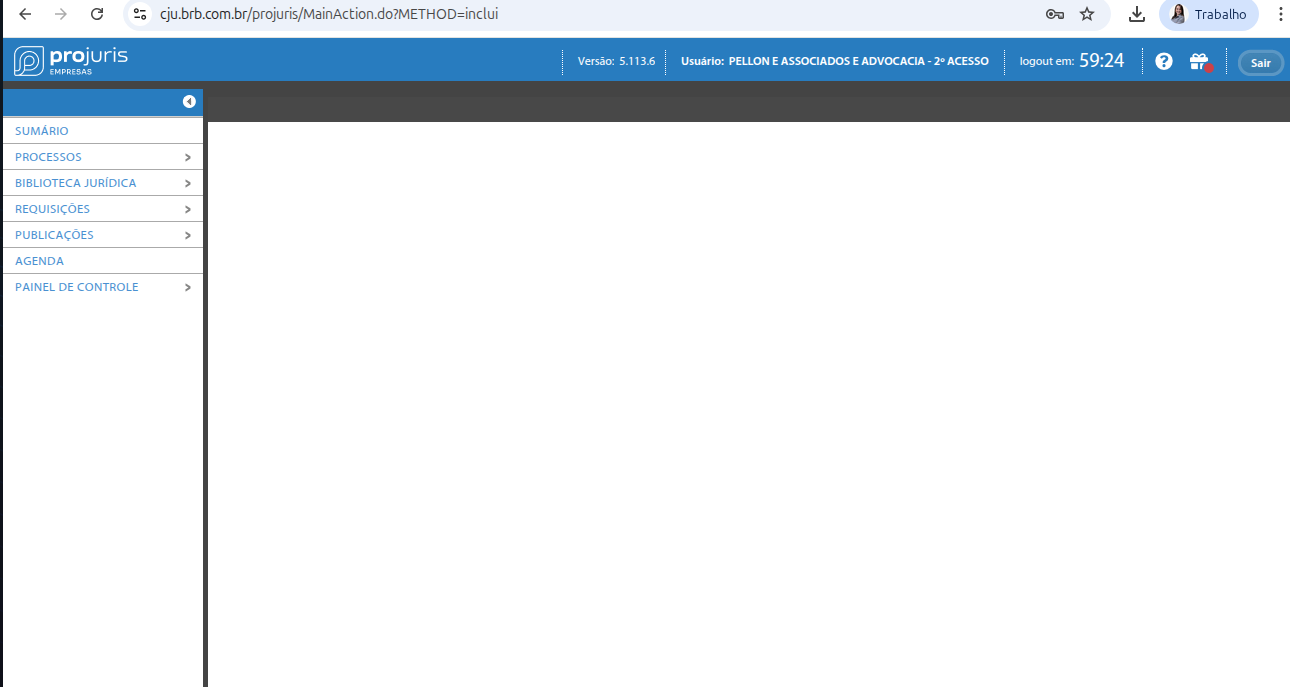
**<span style="color: rgb(0, 0, 0);">Ação: </span>**<span style="color: rgb(0, 0, 0);">Feito isso, estaremos logados no site.</span>

</td></tr><tr><td>**<span style="color: rgb(0, 0, 0);">2.1.4 - Buscar Processo</span>**

</td></tr><tr style="height: 444.781px;"><td style="height: 444.781px;">[![image.png](https://wiki.oystr.com.br/uploads/images/gallery/2024-05/scaled-1680-/s90image.png)](https://wiki.oystr.com.br/uploads/images/gallery/2024-05/s90image.png)

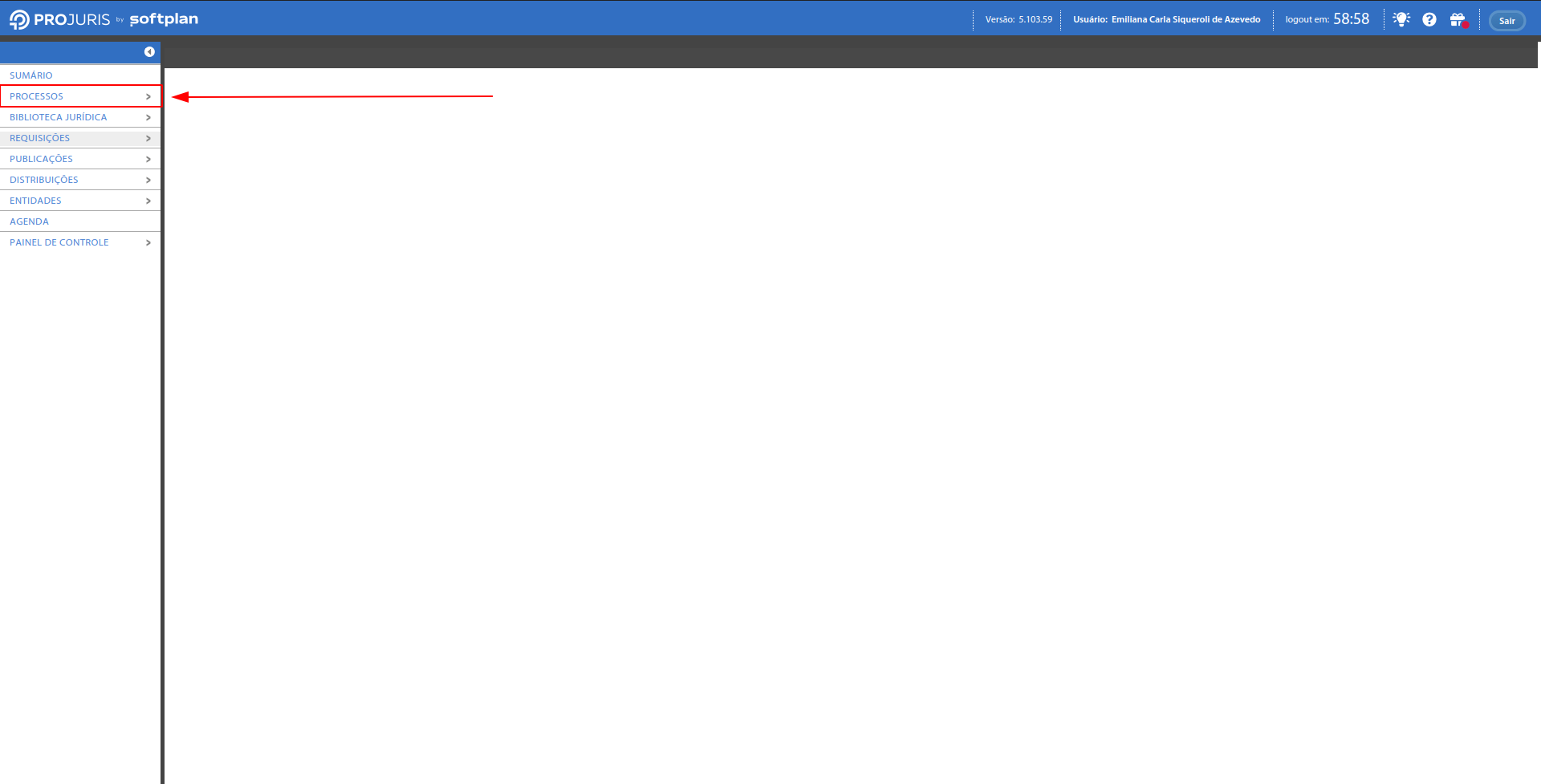
**<span style="color: rgb(0, 0, 0);">Ação:</span>**<span style="color: rgb(0, 0, 0);"> No menu lateral, selecione "**Processos**".</span><span style="color: rgb(0, 0, 0);"> </span>

</td></tr><tr style="height: 489.562px;"><td style="height: 489.562px;">[![image.png](https://wiki.oystr.com.br/uploads/images/gallery/2025-10/scaled-1680-/QDvimage.png)](https://wiki.oystr.com.br/uploads/images/gallery/2025-10/QDvimage.png)

  
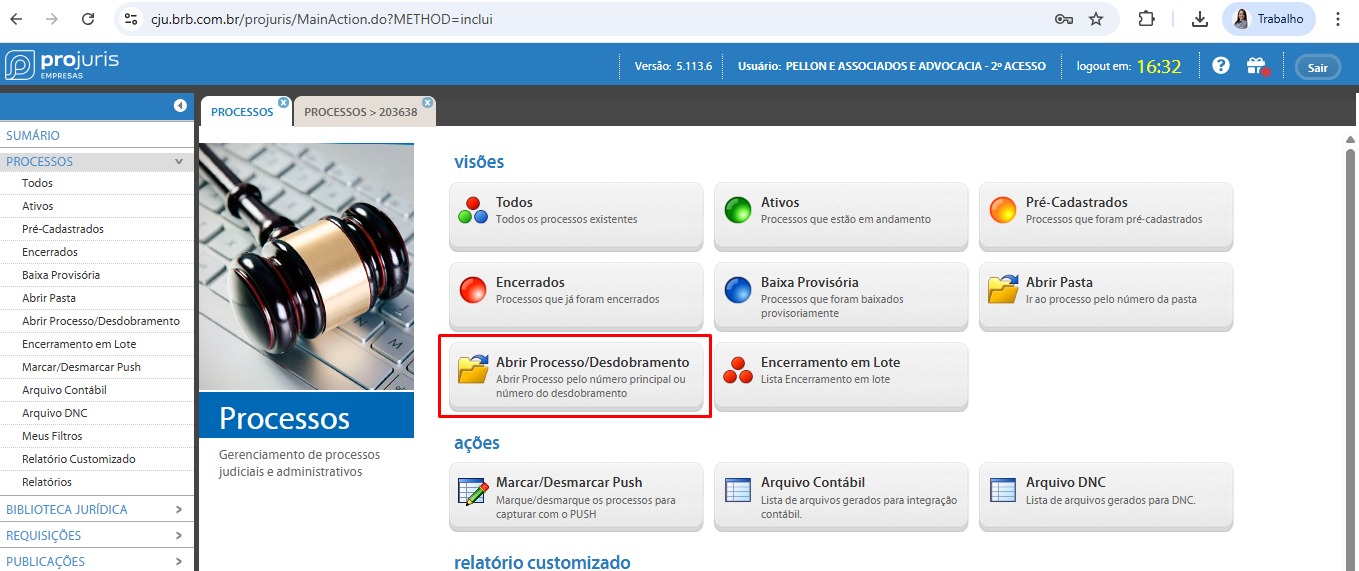
<span style="color: rgb(0, 0, 0);">**Ação:** Para realizar a pesquisa, selecione a opção "**Abrir Processo/Desdobramento**".</span>

</td></tr><tr style="height: 396px;"><td style="height: 396px;">[![image.png](https://wiki.oystr.com.br/uploads/images/gallery/2025-10/scaled-1680-/vlUimage.png)](https://wiki.oystr.com.br/uploads/images/gallery/2025-10/vlUimage.png)


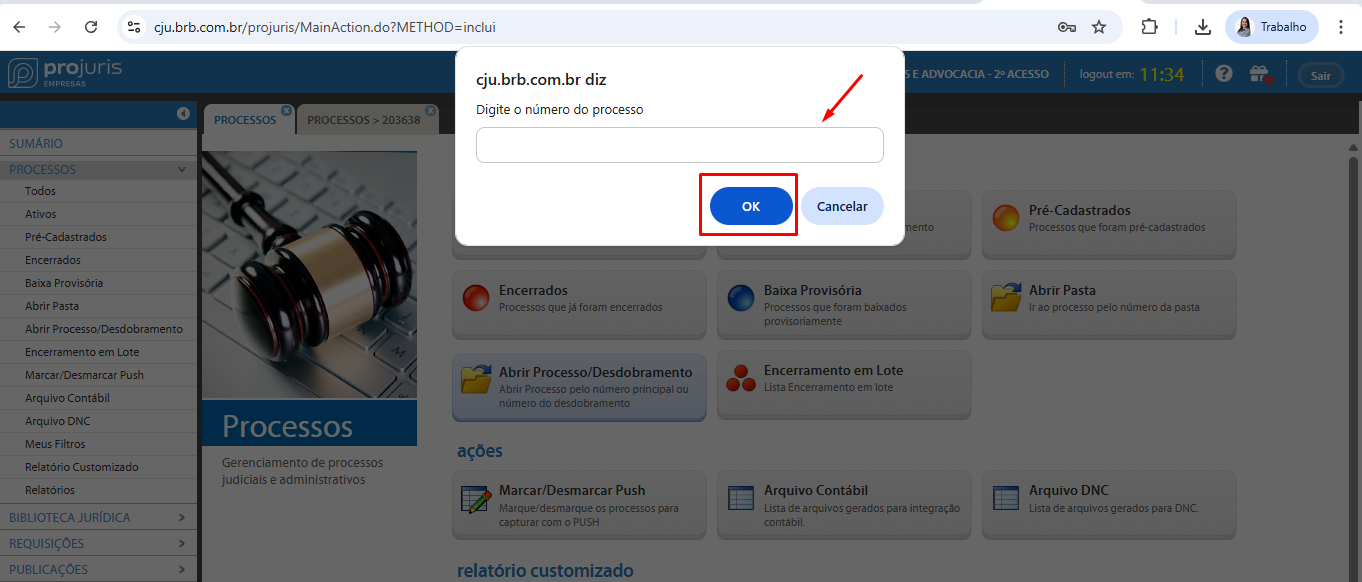
**<span style="color: rgb(0, 0, 0);">Ação: </span>**<span style="color: rgb(0, 0, 0);">Feito isso, aparecerá um pop-up onde devemos preencher com o "**número do processo**" e clicar em "**ok**".</span>

</td></tr><tr><td>**<span style="color: rgb(0, 0, 0);">2.1.5 - Andamento</span>**</td></tr><tr style="height: 458.453px;"><td style="height: 458.453px;">[![image.png](https://wiki.oystr.com.br/uploads/images/gallery/2025-10/scaled-1680-/GDeimage.png)](https://wiki.oystr.com.br/uploads/images/gallery/2025-10/GDeimage.png)


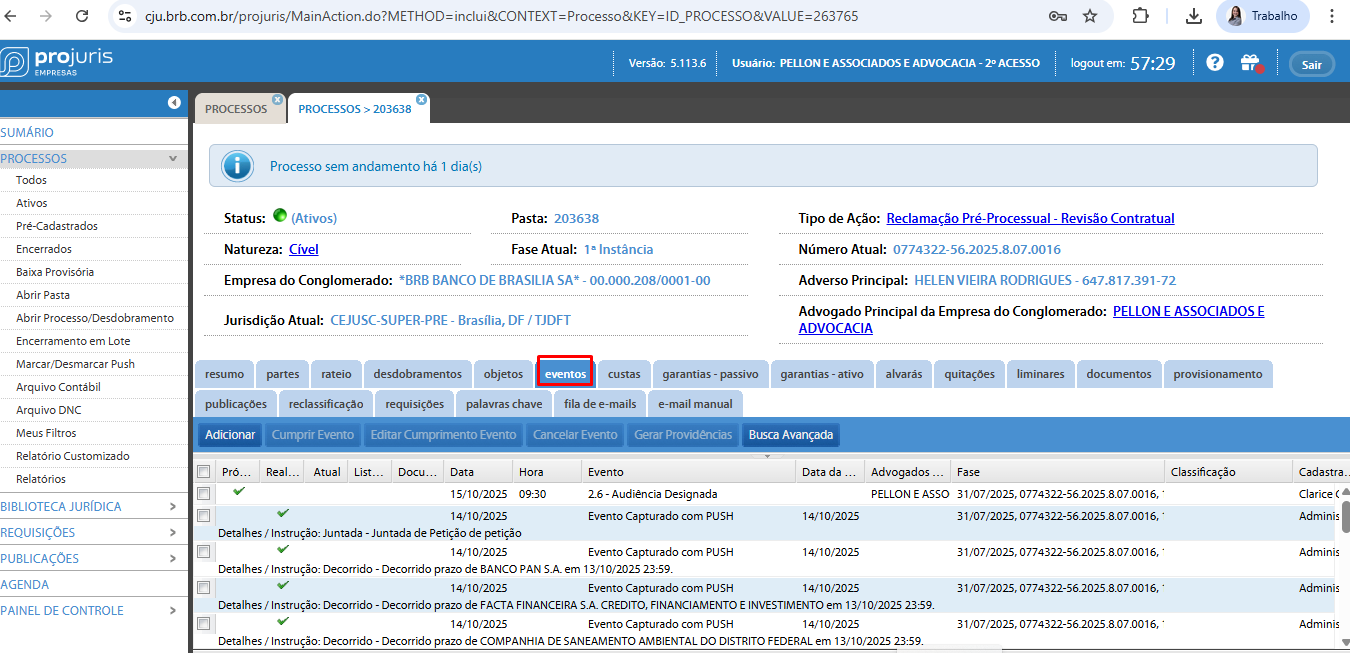
**<span style="color: rgb(0, 0, 0);">Ação: </span>**<span style="color: rgb(0, 0, 0);">Realizada a pesquisa, acesse "**Eventos**".</span>

</td></tr><tr style="height: 445.594px;"><td style="height: 445.594px;">[![image.png](https://wiki.oystr.com.br/uploads/images/gallery/2025-10/scaled-1680-/Ktrimage.png)](https://wiki.oystr.com.br/uploads/images/gallery/2025-10/Ktrimage.png)


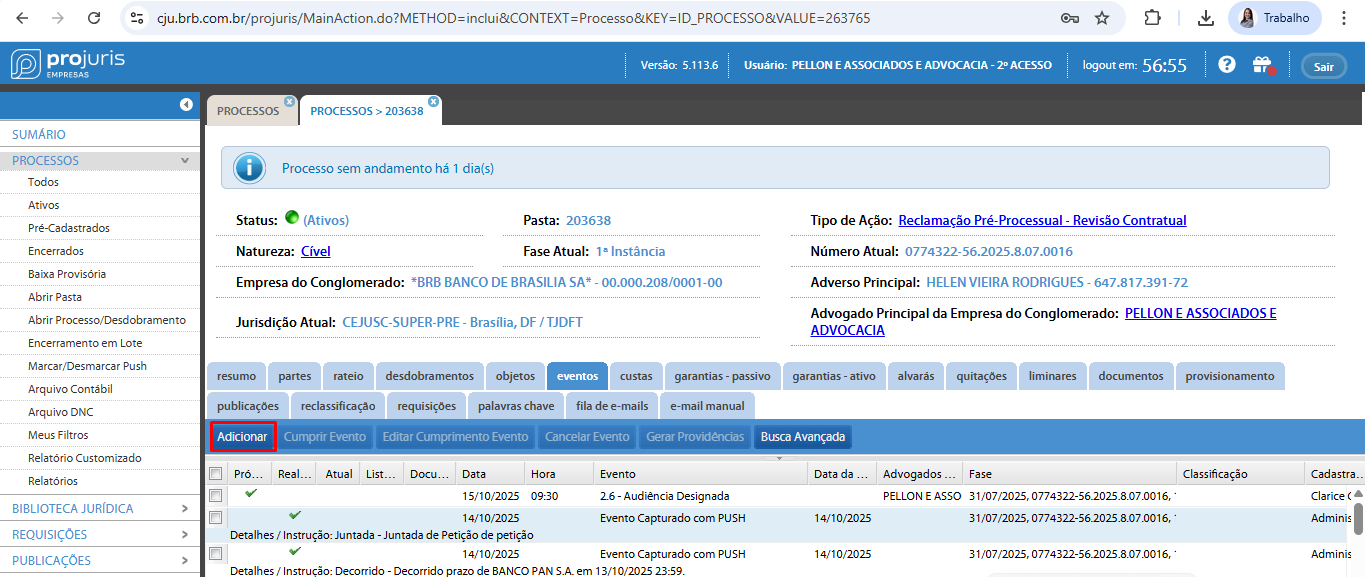
**<span style="color: rgb(0, 0, 0);">Ação: </span>**<span style="color: rgb(0, 0, 0);">Após isso, clique em "**Adicionar**".</span>

</td></tr><tr style="height: 499.719px;"><td style="height: 499.719px;">[![image.png](https://wiki.oystr.com.br/uploads/images/gallery/2025-10/scaled-1680-/72gimage.png)](https://wiki.oystr.com.br/uploads/images/gallery/2025-10/72gimage.png)


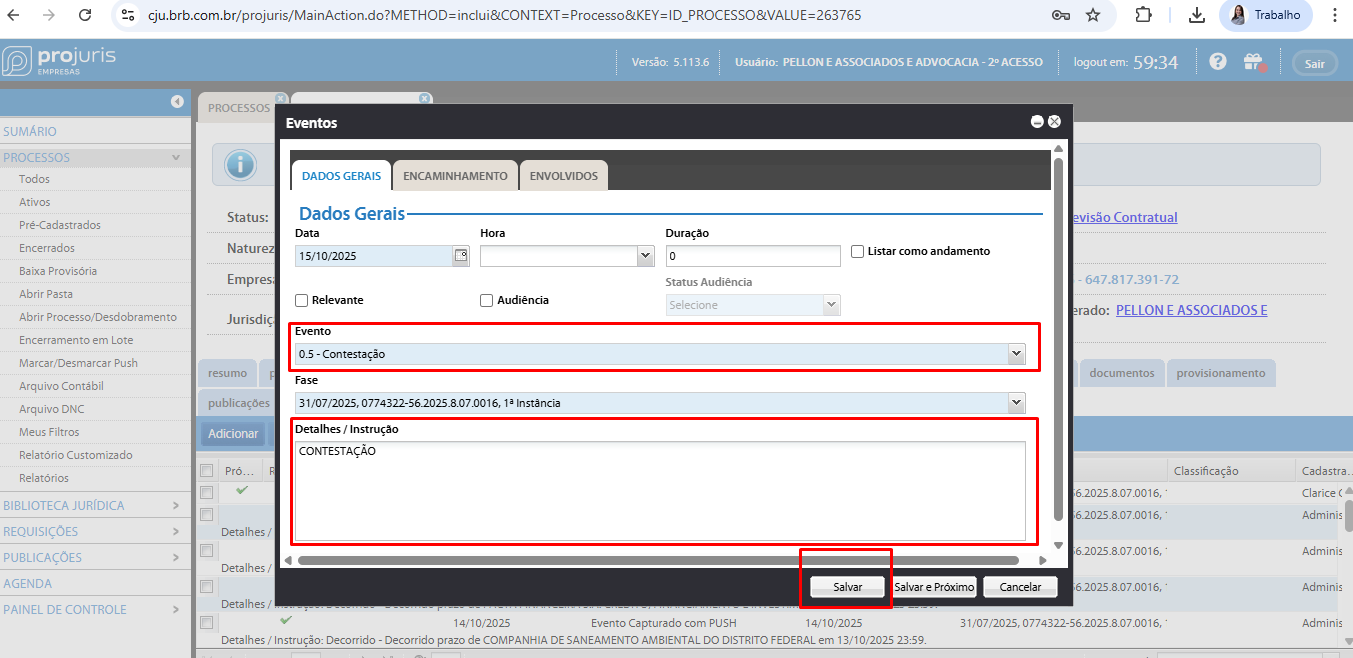
**<span style="color: rgb(0, 0, 0);">Ação: </span>**<span style="color: rgb(0, 0, 0);">Em **"Dados Gerais"**, preencha os campos "**Evento" e "Detalhes/Instrução"** e clique em **"Salvar"**. Os demais campos serão preenchidos automaticamente.</span>

</td></tr><tr><td>**<span style="color: rgb(0, 0, 0);">2.1.6 - Documento</span>**

</td></tr><tr style="height: 445.188px;"><td style="height: 445.188px;">[![image.png](https://wiki.oystr.com.br/uploads/images/gallery/2025-10/scaled-1680-/zjNimage.png)](https://wiki.oystr.com.br/uploads/images/gallery/2025-10/zjNimage.png)


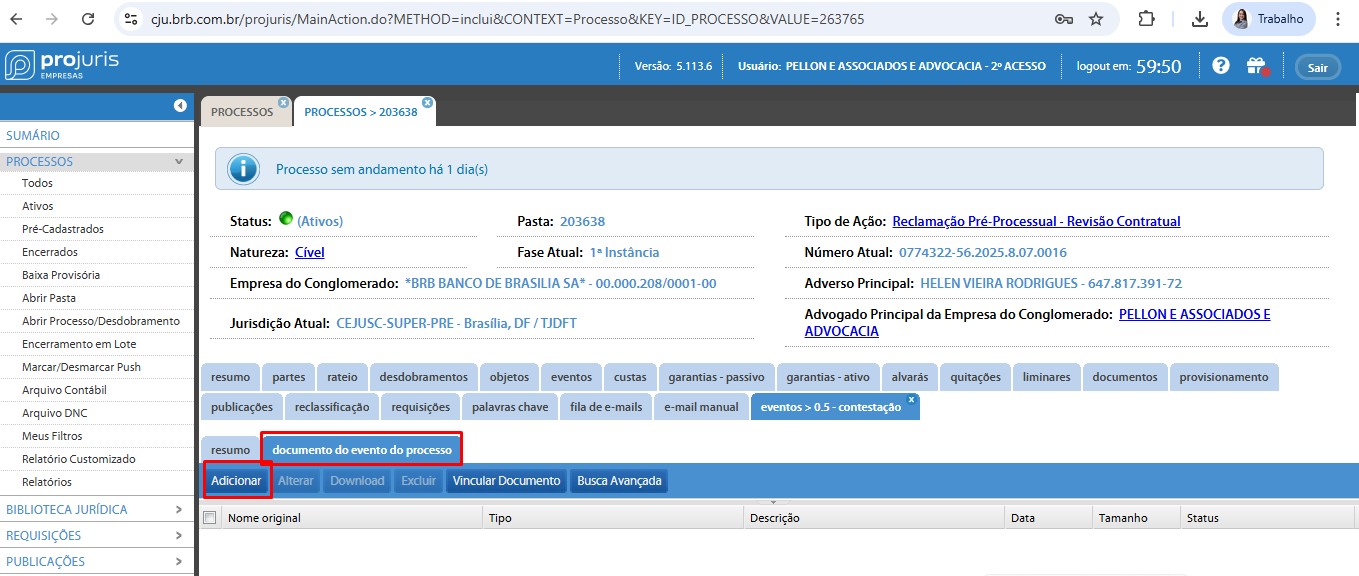
**<span style="color: rgb(0, 0, 0);">Ação: </span>**<span style="color: rgb(0, 0, 0);">Após o salvamento do evento, clique em "**Documento do Evento do Processo"** e depois em **"Adicionar"**.</span>

</td></tr><tr style="height: 448px;"><td style="height: 448px;">[![image.png](https://wiki.oystr.com.br/uploads/images/gallery/2025-10/scaled-1680-/ajIimage.png)](https://wiki.oystr.com.br/uploads/images/gallery/2025-10/ajIimage.png)

  
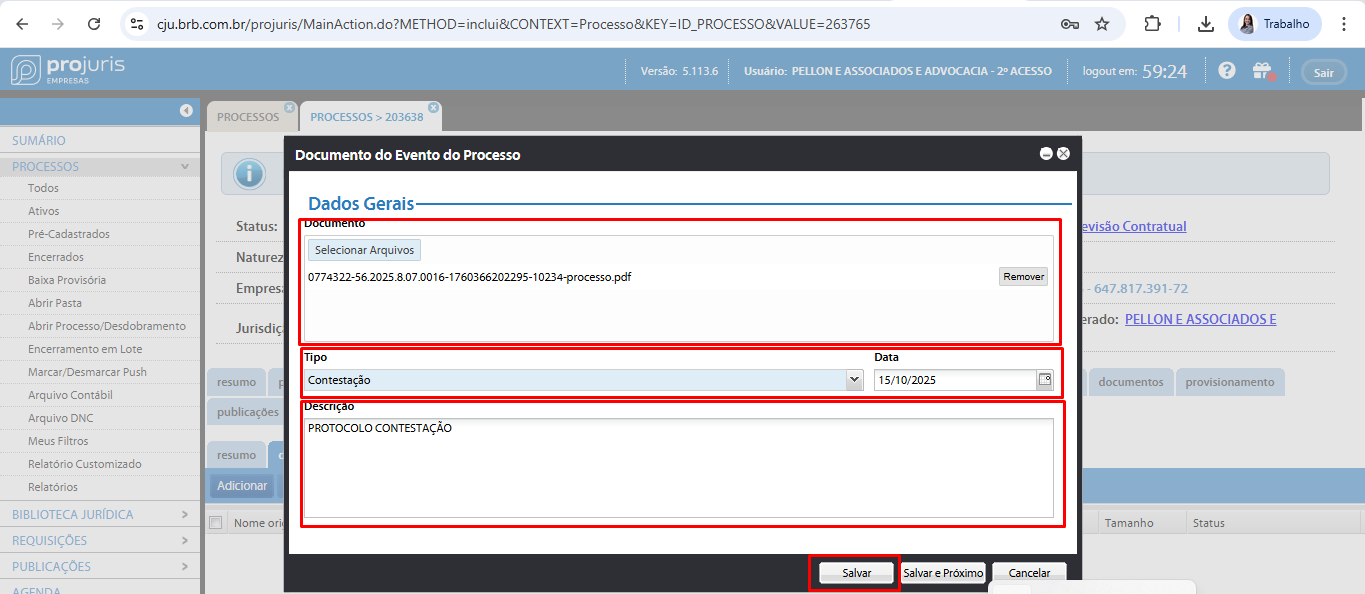
**<span style="color: rgb(0, 0, 0);">Ação: </span>**<span style="color: rgb(0, 0, 0);">Em "**Dados Gerais"**, no campo "**Documento"**, clique em "**Selecionar Arquivos"** e faça o upload do arquivo. No campo "**Tipo"**, selecione o tipo de documento dentre as opções da lista. No campo "**Descrição"**, preencha com o conteúdo desejado. Validando os campos, clique em **"Salvar".**</span>

</td></tr><tr><td>**<span style="color: rgb(0, 0, 0);">2.1.7 - Cumprir Evento</span>**

</td></tr><tr style="height: 68.9844px;"><td style="height: 68.9844px;">[![image.png](https://wiki.oystr.com.br/uploads/images/gallery/2025-10/scaled-1680-/Xloimage.png)](https://wiki.oystr.com.br/uploads/images/gallery/2025-10/Xloimage.png)


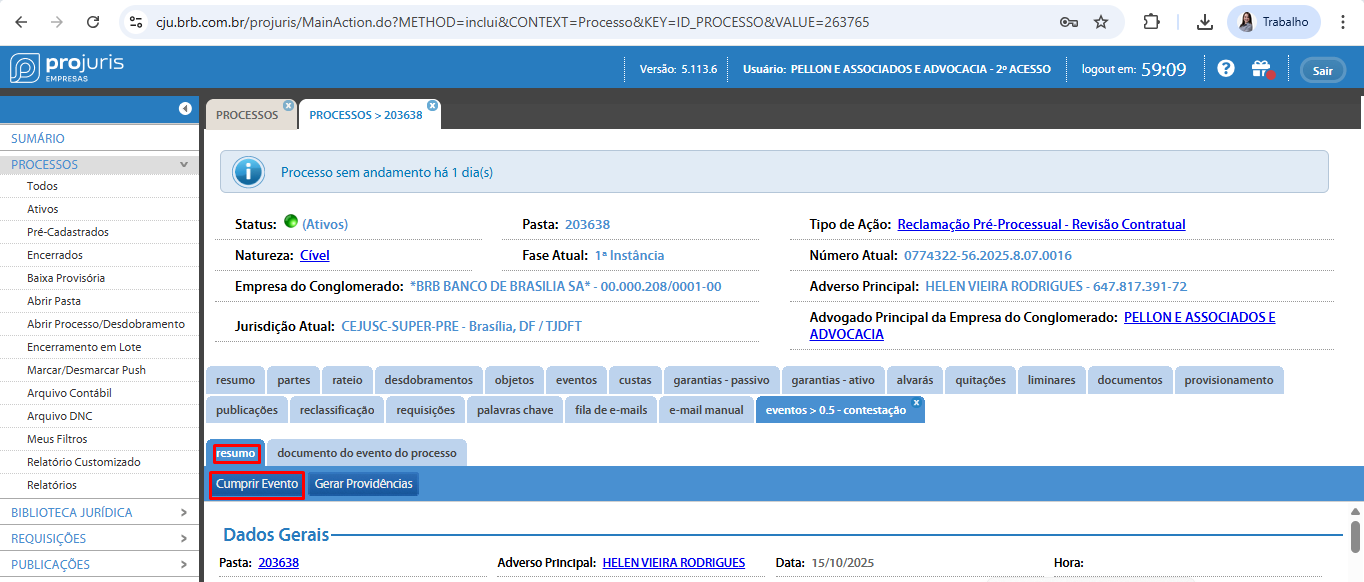
<span style="color: rgb(0, 0, 0);">**Ação:** Após o salvamento, clique em **"Resumo"** e em **"Cumprir Evento"**</span><span style="color: rgb(0, 0, 0);">**.**</span>

</td></tr><tr style="height: 377.938px;"><td style="height: 377.938px;">[![image.png](https://wiki.oystr.com.br/uploads/images/gallery/2025-10/scaled-1680-/sj9image.png)](https://wiki.oystr.com.br/uploads/images/gallery/2025-10/sj9image.png)

  
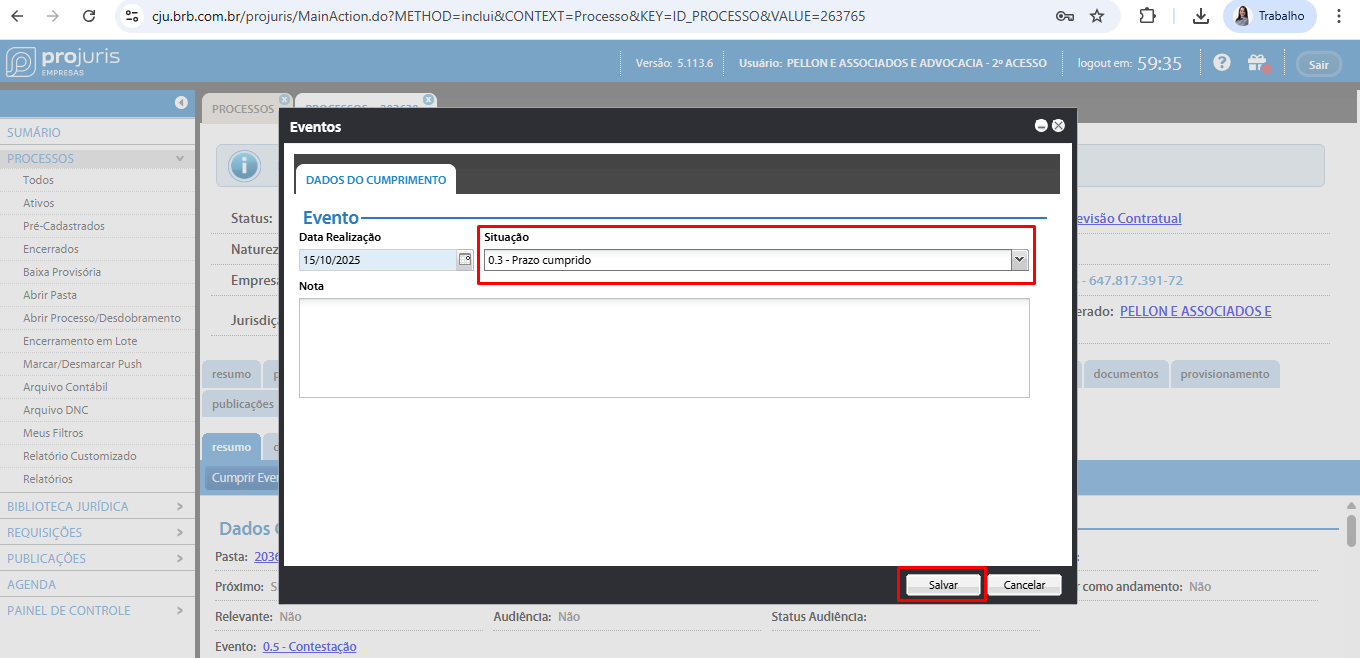
<span style="color: rgb(0, 0, 0);">**Ação:** Após o cumprimento do evento, abrirá uma nova tela "**Eventos"**, com a opção "**Dados do Cumprimento"**, preencha o campo "**Situação"** e clique em "**Salvar"**. </span>

</td></tr></tbody></table>

### <span class="align-center">**3 Referências**</span>

<table border="1" id="bkmrk-se%C3%87%C3%83o-propriedade-co" style="width: 100%; height: 804.094px;"><tbody><tr style="height: 63.5938px;"><td style="width: 13.8443%; padding: 0.75pt; height: 63.5938px;" width="13%">SEÇÃO</td><td style="height: 63.5938px;" width="19%">PROPRIEDADE

</td><td style="height: 63.5938px;" width="26%">COLUNA

</td><td style="height: 63.5938px;" width="22%">PREENCHIMENTO

</td><td style="width: 16.9345%; padding: 0.75pt; height: 63.5938px;" width="16%">DESCRIÇÃO

</td></tr><tr style="height: 182.125px;"><td style="width: 13.8443%; padding: 0.75pt; height: 182.125px;" width="13%">-

</td><td style="height: 182.125px;" width="19%">integracao

</td><td style="height: 182.125px;" width="26%">INTEGRACAO

</td><td style="height: 182.125px;" width="22%">Opcional

</td><td style="width: 16.9345%; padding: 0.75pt; height: 182.125px;" width="16%">Referência para o código da pasta no sistema jurídico, utilizado para identificar e localizar documentos e processos de forma eficiente.

</td></tr><tr style="height: 92.5625px;"><td style="width: 13.8443%; padding: 0.75pt; height: 92.5625px;" width="13%">2.1.4

</td><td style="height: 92.5625px;" width="19%">número do processo

</td><td style="height: 92.5625px;" width="26%">PROCESSO

</td><td style="height: 92.5625px;" width="22%">Obrigatório

</td><td style="width: 16.9345%; padding: 0.75pt; height: 92.5625px;" width="16%">Número do processo que será utilizado para realizar o protocolo.

</td></tr><tr style="height: 92.5625px;"><td style="width: 13.8443%; padding: 0.75pt; height: 92.5625px;" width="13%">2.1.5

</td><td style="height: 92.5625px;" width="19%">Evento

</td><td style="height: 92.5625px;" width="26%">EVENTO

</td><td style="height: 92.5625px;" width="22%">Obrigatório

</td><td style="width: 16.9345%; padding: 0.75pt; height: 92.5625px;" width="16%">Tipo do evento (Exatamente igual ao disponibilizado pelo portal).

</td></tr><tr style="height: 70.1719px;"><td style="width: 13.8443%; padding: 0.75pt; height: 70.1719px;" width="13%">2.1.5

</td><td style="height: 70.1719px;" width="19%">Detalhes / Instrução

</td><td style="height: 70.1719px;" width="26%">DETALHES

</td><td style="height: 70.1719px;" width="22%">Obrigatório

</td><td style="width: 16.9345%; padding: 0.75pt; height: 70.1719px;" width="16%">Detalhes referente ao documento protocolado

</td></tr><tr style="height: 47.7812px;"><td style="width: 13.8443%; padding: 0.75pt; height: 47.7812px;" width="13%">2.1.6

</td><td style="height: 47.7812px;" width="19%">Nome do Arquivo

</td><td style="height: 47.7812px;" width="26%">ARQUIVO

</td><td style="height: 47.7812px;" width="22%">Obrigatório

</td><td style="width: 16.9345%; padding: 0.75pt; height: 47.7812px;" width="16%">Arquivo que será enviado ao sistema.

</td></tr><tr style="height: 92.5625px;"><td style="width: 13.8443%; padding: 0.75pt; height: 92.5625px;" width="13%">2.1.6

</td><td style="height: 92.5625px;" width="19%">Tipo

</td><td style="height: 92.5625px;" width="26%">TIPO

</td><td style="height: 92.5625px;" width="22%">Obrigatório

</td><td style="width: 16.9345%; padding: 0.75pt; height: 92.5625px;" width="16%">Tipo (Exatamente igual ao disponibilizado pelo portal).

</td></tr><tr style="height: 70.1719px;"><td style="width: 13.8443%; padding: 0.75pt; height: 70.1719px;" width="13%">2.1.6

</td><td style="height: 70.1719px;" width="19%">Descrição

</td><td style="height: 70.1719px;" width="26%">DESCRIÇÃO

</td><td style="height: 70.1719px;" width="22%">Obrigatório

</td><td style="width: 16.9345%; padding: 0.75pt; height: 70.1719px;" width="16%">Descrição do documento protocolado

</td></tr><tr style="height: 92.5625px;"><td style="width: 13.8443%; padding: 0.75pt; height: 92.5625px;" width="13%">2.1.7

</td><td style="height: 92.5625px;" width="19%">Situação

</td><td style="height: 92.5625px;" width="26%">SITUAÇÃO

</td><td style="height: 92.5625px;" width="22%">Obrigatório

</td><td style="width: 16.9345%; padding: 0.75pt; height: 92.5625px;" width="16%">Situação (Exatamente igual ao disponibilizado pelo portal).

</td></tr></tbody></table>

### **4 Restrições e Premissas**

#### **4.1 - Restrições**

1. **Processo Válido:**
    - O número de processo informado deve existir;
2. **Validação de Dados:**
    - As informações de cada etapa do robô, sendo elas: Andamento - "**Evento**", "**Tipo**", Cumprir evento - "**Situação**" devem ser exatamente iguais a uma das opções permitidas pelo portal;
    - O nome do arquivo, na coluna ARQUIVO, deve ser exatamente igual ao nome do anexo que será enviado ao sistema.

### **5 Critérios de Aceitação**

1. **Pesquisa do processo:**
    - O robô deve ser capaz de realizar a busca no portal pelo número do processo. Caso não encontre, deve-se retornar uma mensagem de erro.
2. **Validação de Dados:**
    - O robô deve ser capaz de Validar todos os campos de cada etapa corretamente. Caso um dos campos não possua exatamente a mesma informação que o cliente forneceu na planilha deve-se devolver uma mensagem de erro.


### **6 Descrição Funcional**

#### <span class="align-center">**6.1 **Funcionalidades****</span>

O robô desenvolvido possui as seguintes funcionalidades:

1. **Pesquisa do processo:**
    - O robô é capaz de realizar a busca pelo número de processo.
2. **Validação de Dados:**
    - O robô é capaz de validar corretamente os campos necessários;
    - O robô é capaz de realizar o upload do arquivo no sistema.
3. **Confirmação da Tarefa:**
    - O robô é capaz de realizar uma validação para verificar se o andamento e o documento foram inseridos corretamente.

#### <span class="align-center">**6.2 **Requisitos Funcionais****</span>

Para que o robô funcione corretamente, os seguintes requisitos funcionais devem ser atendidos:

1. 1. 1. **Formato e Validação de Dados:**
            - O sistema deve validar se o número de processo informado na busca está correto e retorna resposta, antes de permitir que o robô siga para o próximo passo.
            - O sistema deve validar se as informações dos campos de cada etapa existem, antes de permitir que o robô salve o andamento.